
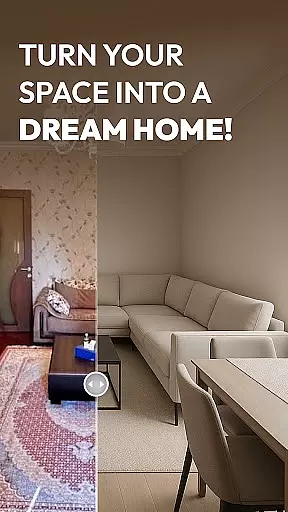
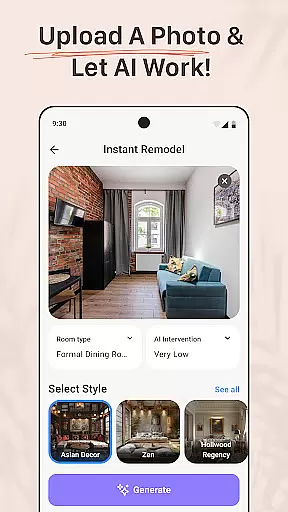
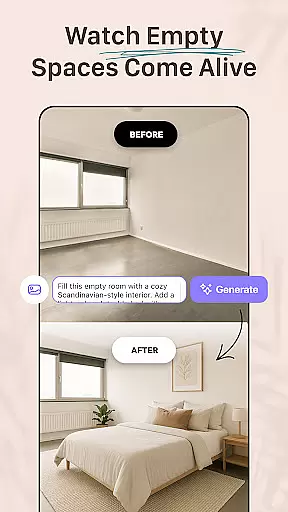
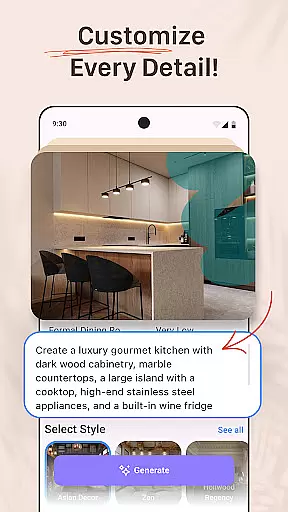


AI Remodel is a cutting-edge AI-powered home design application that enables users to plan, design, and visualize their dream spaces with professional precision. The app provides an intuitive platform for creating accurate floor plans and immersive 3D renderings without requiring prior design experience. Whether remodeling a single room or redesigning an entire home, users can leverage advanced AI tools to guide them through every step of the project.
The app's standout feature is its ability to blend powerful AI-driven suggestions with creative freedom. Users can upload photos or start from scratch, receiving intelligent recommendations on layouts, color schemes, furniture placement, and material combinations. With seamless integration of Planner 5D, AI Remodel ensures precise measurements, real-time scaling, and high-resolution exports, making it ideal for homeowners, renters, and professional designers alike.
AI Remodel transforms how users approach interior design by offering tools like a fully interactive 3D room planner, curated style templates, and customizable decor options. Its innovative features allow users to experiment freely, preview changes, and confidently execute renovation projects. This makes AI Remodel not just a planning tool but a comprehensive creative suite for modern home design.
AI Remodel stands out with its robust set of features tailored for both novice and professional users. One of its core functionalities is the AI-driven interior design assistant, which suggests optimal layouts, color palettes, and furniture arrangements based on uploaded photos or user inputs. This feature empowers users to explore various design styles, from minimalism to rustic themes, while ensuring practicality and aesthetic harmony.
The app also includes a fully interactive 3D room planner, allowing users to drag, drop, and rotate furniture and fixtures in real time. This planner syncs seamlessly with external tools like Planner 5D, enabling users to scale designs accurately and export professional-grade blueprints. Additionally, the app supports real-world measurements, ensuring that every design element aligns with physical space constraints.
Another key highlight is its versatility for different user groups. Homeowners can experiment with DIY layout ideas, renters can virtually redecorate their spaces, and professional designers can present polished concepts to clients. By combining intuitive UX, precision editing, and Planner 5D integration, AI Remodel delivers a comprehensive solution for all types of interior design projects.
Property listing authenticity is a crucial feature for users seeking reliable and accurate information about home design and renovation options. AI Remodel ensures that all design elements and property details generated through its platform are verified and true to life. This means that every virtual representation, from floor plans to 3D renderings, accurately reflects real-world possibilities and constraints.
The app employs advanced algorithms to cross-check design suggestions against actual architectural standards and material specifications. This meticulous verification process guarantees that users receive authentic and actionable insights when planning their home renovations. Whether it's choosing the right furniture or testing different color palettes, you can trust that the app's recommendations are based on genuine data.
For homeowners, renters, and professional designers alike, this commitment to authenticity translates into significant time and cost savings. By previewing realistic design outcomes, users can avoid costly mistakes and make informed decisions before committing to any physical changes. This level of accuracy not only enhances user confidence but also streamlines the entire renovation process.
AI Remodel offers comprehensive home management features that extend beyond basic design functionalities. These tools allow users to maintain an organized record of their renovation projects, track progress, and manage various aspects of their home improvement journey in one place. From initial sketches to final implementations, the app provides a seamless experience for overseeing every step of the process.
One standout feature is the integration with Planner 5D, which enables precise control over measurements and layout adjustments. Users can draw custom floor plans, move walls, add lighting, and experiment with different materials within a fully responsive 3D environment. This flexibility ensures that even complex remodeling tasks become manageable and intuitive.
Additionally, AI Remodel supports collaboration among multiple stakeholders, making it ideal for both DIY enthusiasts and professional designers. By facilitating clear communication and easy sharing of concepts, the app empowers users to present their ideas effectively and implement them efficiently. Ultimately, these robust home management capabilities enhance productivity and ensure successful project completion.
User-friendly interface
Advanced AI tools
Seamless Planner 5D integration
Versatile for all user levels
High-quality 3D rendering
Limited offline functionality
Premium features locked behind paywall
Steep learning curve for beginners
Occasional performance lags
Requires stable internet connection

Unlock AI-based barcode scanning and support the development of Grocy Android
 4.4
4.4
Draw your floor plan smartly. Make house design blueprint with home planner app
3.60
Convert your Phone to HiSense Smart TV Remote Control
4.70
Smart AI plant care schedules, Real plant experts, support & Thriving community!
4.20
Innovative and budget-friendly housing options
4.60
View houses and apartments for rent, updated daily.
4.80
Find your next home, house, apartment, condo, casa, flat, rental, studio, or bed
4.70
Search for Homes, Rentals, Agents & Schools
4.70
Looking for the perfect apartment finder app? Find beautiful rental homes here!
4.60
Connect with reliable pros for maintenance services, plumbing, and home design!
4.80
Home Ideas | Renovation Advice | Local Pros. Go From Dream to Home with Houzz.
4.70
Download today to join the community to help bring lost pets home faster.
4.70
Turn old phones into security cameras, baby monitors, pet cams, and more.
4.70
AI-powered home design, interior design, home decor, and room design solutions
4.50
Resident Center, powered by Buildium, is designed with simplicity in mind.
4.50
The only mappable smart lights for custom decoration.
4.50
AI Home Designer & Room Planner: Decorate your interior space with AI
4.40
The official app for Home Assistant. Control your home anywhere in the world.
4.30
USHUD.com helps you find the best homes for sale in your area
4.00


User Reviews