
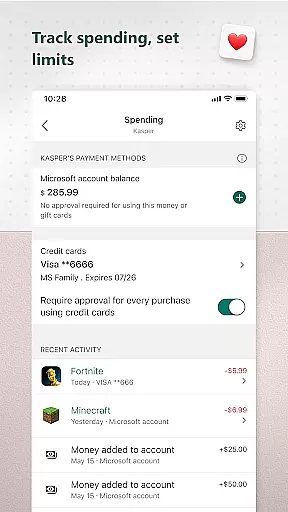
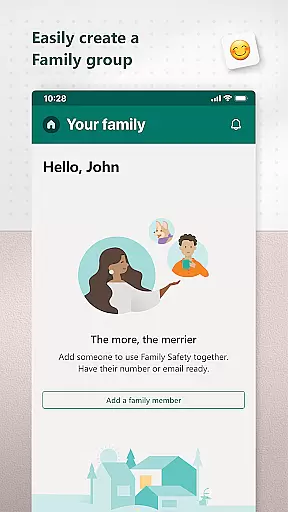
Microsoft Family Safety is a comprehensive parenting app designed to help families develop healthy digital habits while ensuring online safety. The app allows parents to set up parental controls, manage screen time, and filter inappropriate content across multiple devices including Android, Xbox, and Windows.
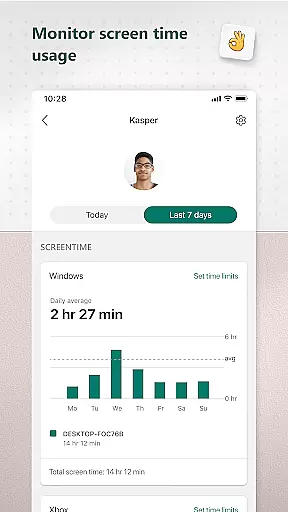
A key feature of the app is its activity reporting system, which provides weekly summaries of children's screen time and app usage. This helps parents have informed conversations with their kids about digital habits. Additionally, the app offers content filters that ensure safe browsing on Microsoft Edge and block access to inappropriate apps and games.
This app serves as a valuable tool for modern families looking to balance digital freedom with necessary safeguards. By giving parents control over their children's digital environments while promoting open communication, Microsoft Family Safety creates a safer online experience for the whole family.
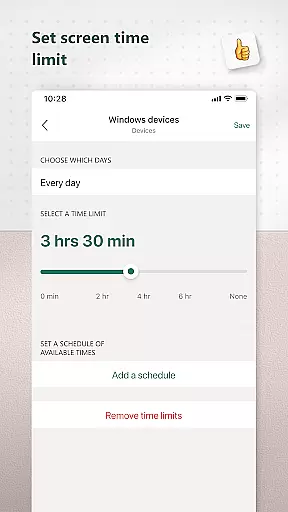
Microsoft Family Safety offers an impressive range of features designed to give parents comprehensive control over their children's digital experiences. The app's screen time management tools allow parents to set specific time limits for individual apps and games across different platforms, including Xbox, Windows, and Android devices.
The activity reporting feature provides detailed insights into children's digital behavior through weekly email summaries and real-time activity logs. Parents can view which apps their children are using, how long they spend on each, and when they request additional time. This information helps facilitate meaningful discussions about healthy technology use.
Content filtering capabilities ensure children only access age-appropriate material. The app enables parents to block inappropriate apps and games while configuring Microsoft Edge to display only kid-friendly websites. These features work together to create a safer digital environment without completely restricting children's online independence.
Microsoft Family Safety provides a reliable and credible parenting solution that is designed to help parents create a safer digital environment for their children. The app's features are developed based on expert recommendations and industry best practices, ensuring that the controls and filters provided are both effective and age-appropriate.
The app includes web filters for kid-friendly browsing on Microsoft Edge, which blocks inappropriate content while allowing access to educational and suitable websites. Additionally, it enables parents to set limits on screen time across devices such as Xbox, Windows, and Android, helping children develop balanced digital habits without being overwhelmed by excessive use.
Activity reports offer insights into children's online activities, empowering parents with knowledge about their kids' digital behavior. This feature supports open conversations between parents and children regarding responsible internet usage, backed by data-driven evidence from weekly summaries of app and game activity.
With clear disclaimers and transparent privacy policies, Microsoft ensures users understand how their data is handled. By obtaining consent before collecting interaction data through various permissions, the app maintains trustworthiness and reinforces its commitment to safeguarding user information according to stringent standards.
Microsoft Family Safety offers precise growth tracking capabilities that allow parents to monitor their children's development in the digital world accurately. Through detailed activity logs, parents can observe patterns in screen time usage, gaining valuable insights into when and how long their kids engage with different apps and games.
Parents receive weekly email summaries highlighting key metrics related to their childu2019s online activities. These reports include specifics like total hours spent on devices, popular applications used, and websites visited, providing an accurate snapshot of each child's digital footprint over time.
By setting specific app and game limits, parents can control exposure to certain types of content, ensuring that their children spend time on productive and educational platforms rather than potentially harmful ones. Notifications alert parents whenever additional time requests are made, keeping them informed about any changes in routine or unexpected behaviors.
This meticulous approach not only aids in maintaining healthy tech habits but also fosters a deeper understanding between parents and children about responsible device usage. With these tools at hand, families can work together towards achieving a balanced lifestyle where technology serves as a beneficial tool rather than a disruptive force.
Comprehensive cross-platform support
Detailed activity reporting
Customizable content filters
Real-time notifications
User-friendly interface
Limited iOS functionality
Requires child consent
Some features need premium subscription
Occasional syncing issues
Complex initial setup

Free symptom & med tracker with expert-reviewed tips.
 4.30
4.30
AI Motion Video Maker & Ideas
4.3
The Baby’s Bounty App is your hub to register for our diaper banks in Nevada
3.70
Track your pregnancy, kick & contraction counter, baby & mom's heartrate monitor
4.60
Keep track of your stored breastmilk
4.40
Track your labor contractions
4.90
Pregnancy+ App has helped 80m moms track their pregnancy with info & support!
4.80
App/Game blocker & GPS tracker
4.50
Parental control: child monitoring app, screen time control, GPS child tracker
4.40
A simple way to track your baby’s breastfeeding, diaper changes, sleep patterns.
4.90
Pinardin - Smart Parental Control, Online Safety & GPS Tracking!
4.80
Parental control App for Location, Remote Camera, Screen Mirroring, Block Apps.
4.60
GPS phone tracker: find kids on map. Location tracking and parental control.
4.50
Block apps, set screen time limits, and customize usage schedules
4.50
Reliable phone tracker by number & locate phone app. Protect your family.
4.50
GeoLog - Real-Time Location Tracker
4.40
Find unique + popular baby names for your little peanut.
4.30
Learn according to the age of your child and consult with other moms.
4.20
Watching baby, helping parents
4.10


User Reviews