
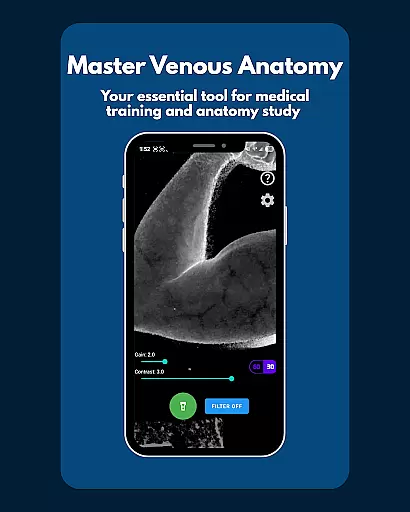
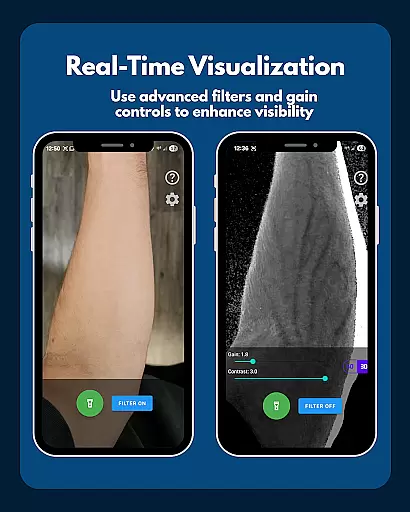
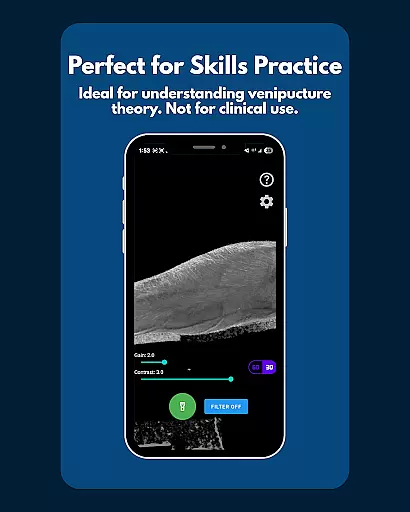
VeinFinder is an innovative educational tool designed to assist students and educators in mastering venous anatomy. This app utilizes advanced GPU-accelerated image processing to enhance vein visibility directly through your device's camera, eliminating the need for additional hardware. With its practical application, VeinFinder bridges the gap between theoretical knowledge and hands-on understanding, making it invaluable for those studying anatomy or training in venipuncture and IV access procedures.
The app offers precise control over image settings such as gain and contrast, ensuring optimal vein visibility across different skin tones and lighting conditions. Whether preparing for exams or seeking a visual teaching aid, VeinFinder provides a private and secure solution with all processing done locally on the device. Its user-friendly interface and instant comparison feature make it an essential companion for both learning and teaching environments.
VeinFinder stands out with its array of specialized features tailored for medical education. The app's core functionality lies in its ability to process images in real-time, enhancing vein visibility without any external equipment. Users can toggle the enhancement filter on and off to compare the processed image with the raw camera feed instantly, providing an interactive learning experience.
Additional features include precision controls for adjusting gain and contrast, which are crucial for adapting to various skin tones and lighting scenarios. An integrated flashlight ensures usability in low-light conditions, while the app maintains privacy by processing all data locally. These capabilities make VeinFinder a versatile tool for students, educators, and professionals looking to refine their understanding of venous anatomy in a secure and controlled manner.
VeinFinder stands out in the realm of educational tools by offering highly accurate and authoritative content for anatomy study. The application leverages advanced GPU-accelerated image processing to enhance the visibility of veins, providing users with a precise representation of venous anatomy directly through their device's camera. This technological approach ensures that students and educators have access to reliable visual information without the need for additional hardware.
The app is meticulously designed to assist users in bridging the gap between theoretical knowledge and practical understanding. By allowing users to instantly toggle the vein-enhancing filter on and off, VeinFinder facilitates direct comparison between enhanced views and raw camera feeds. This feature not only reinforces learning but also instills confidence in identifying anatomical structures, which is crucial for exams or training modules focused on anatomy and physiology.
Furthermore, VeinFinder incorporates precision control settings, enabling users to fine-tune gain and contrast. This adaptability optimizes visibility across diverse skin tones and lighting conditions, ensuring consistent performance. Such attention to detail underscores the app's commitment to delivering authoritative content tailored to various educational scenarios, from classroom instruction to self-study sessions.
One of VeinFinder's key strengths lies in its ability to support personalized learning paths, catering to individual needs within medical education. The app offers customizable features such as adjustable gain and contrast settings, allowing users to tailor their experience based on specific requirements like skin tone or environmental lighting. This flexibility empowers learners to create a study environment that best suits their unique circumstances, enhancing overall comprehension and retention of complex venous anatomy.
For students preparing for anatomy exams or healthcare professionals honing their skills in venipuncture and phlebotomy site mapping, VeinFinder serves as an invaluable resource. Its real-time vein visualization capabilities provide immediate feedback, facilitating hands-on practice that adapts to each user's pace and proficiency level. This interactive approach fosters a deeper understanding of IV access theory and procedural knowledge, essential components of personalized learning.
Moreover, educators can utilize VeinFinder as a dynamic teaching aid, integrating it into lesson plans to address varying student needs. By promoting active engagement with anatomical concepts through visual exploration, the app supports differentiated instruction strategies. This ensures that all learners, regardless of their starting point, can progress effectively along their educational journey, making VeinFinder a versatile tool for personalized learning in medical education.
Enhances learning efficiency
Real-time vein visualization
Private and secure processing
User-friendly interface
Ideal for diverse educational settings
Performance varies by device
Not suitable for clinical use
Dependent on lighting conditions
Limited to educational purposes
Refund window is short

Learn and joke with the Silly Turkey!
 4.5
4.5
Study the questions most likely to be asked during the Oral & Practical Exams.
2.80
Short Lessons for Better Finances, Health, Skills, Jobs & Relationships.
4.80
Astronomy Guide to the Night Sky
4.40
The Fighter Verses Bible memory system helps you memorize God's Word.
4.50
Explore the City of the Sun in Augmented Reality
3.70
THE ESTABLISHED "GO TO" ARMY BOARD PREPARATION APP!
4.30
Hasbro’s classic CANDY LAND game is now a gorgeous interactive storybook app.
2.30
Educational Activities for 2-8
3.70
A realistic sky map to observe stars, planets, satellites and constellations!
4.80
Memorize anything efficiently with AnkiDroid! Many pre-built decks available.
4.80
Childcare Management App: Daily sheets, sign in-out, billing and learning tools
4.70
Learn & Speak New Languages
4.70
The Only Official DVSA Theory Test Kit App
4.50
Astronomy app ? Discover the universe scope, explore solar system model in 3D.
4.20
Master note reading with StaffWars….
4.00
Make your own game and world. Draw and animate characters
3.70
Visit Daniel's house & make believe. Play doctor, make music, & feed fish.
3.20
Test prep for Indiana students
4.1


User Reviews