



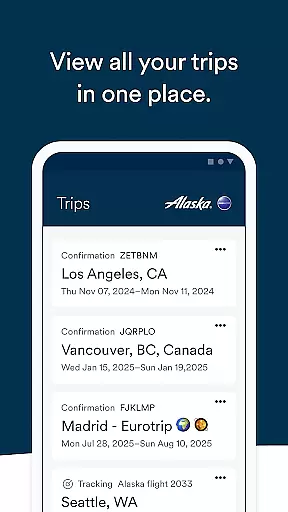
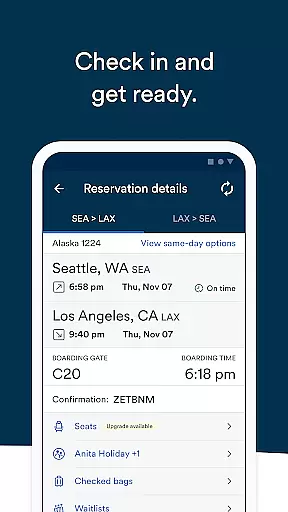

Alaska Airlines offers a comprehensive travel companion app designed to streamline every phase of your journey. With this application, travelers can effortlessly book flights, manage reservations, and access essential flight information in real-time. The app supports both Android and iOS platforms, ensuring broad accessibility for users across different devices.
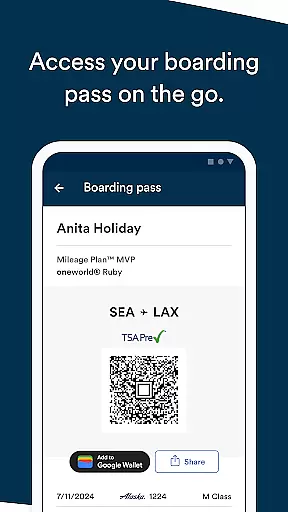
The app's key strength lies in its ability to simplify complex travel processes. Users can utilize discount codes or mileage points when booking, modify existing reservations, and even purchase seat upgrades through secure payment methods like Apple Pay. Additionally, the integration with Apple Wallet allows for convenient storage of boarding passes and loyalty program cards, enhancing the overall travel experience.
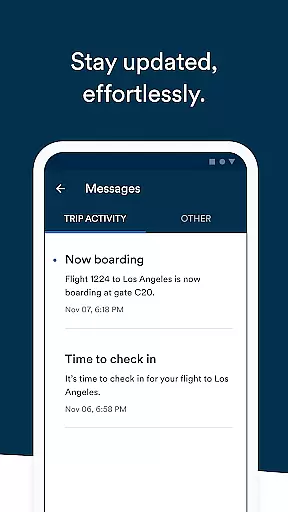
This digital tool proves especially valuable during airport transitions, where time is critical. Travelers can receive timely push notifications about delays or gate changes, check-in up to 24 hours before departure, and monitor standby lists. These features collectively contribute to a more organized and stress-free travel experience, making Alaska Airlines' app an indispensable resource for modern air travelers.
The Alaska Airlines app distinguishes itself through a robust set of features tailored for frequent travelers. One of its primary advantages is the seamless integration of booking capabilities with flexible payment options, including percentage-off codes and mileage redemption. This functionality extends to managing Atmos Rewards accounts, where users can track their points and status progression while accessing upcoming trip details.
Another significant feature is the advanced flight management system. Passengers can modify their travel plans by changing flight times, canceling reservations, or upgrading seats directly through the app. The implementation of Apple Wallet support further enhances convenience by allowing users to store essential documents digitally. Moreover, the app facilitates real-time communication by enabling users to share flight information with contacts and track companions' flights.
What sets this app apart is its attention to detail in user experience. Through the message center, travelers receive crucial updates about their journeys, while customizable options let them tailor notifications and views according to personal preferences. These thoughtful implementations demonstrate how technology can significantly improve the practical aspects of air travel, positioning Alaska Airlines' app as a leader in the travel application space.
Booking authenticity is a crucial aspect of any travel application, ensuring that all reservations made through the platform are legitimate and secure. The Alaska Airlines app provides users with reliable booking features that guarantee the authenticity of each reservation.
Through this app, users can book flights using percentage-off codes or miles, providing flexibility and security in their transactions. Each booking is directly integrated into the user's account, allowing easy access to trip details and ensuring that all information is accurate and up-to-date.
The app also allows users to manage their bookings efficiently. Whether it's adding reward numbers, changing flights, or purchasing seat upgrades, every action is authenticated and recorded. This ensures that users have full control over their travel plans while maintaining transparency throughout the process.
By prioritizing booking authenticity, the Alaska Airlines app not only secures users' reservations but also enhances their overall travel experience by providing peace of mind and reliability at every step of their journey.
Price transparency is essential for travelers who want to understand the costs associated with their bookings clearly. The Alaska Airlines app excels in providing detailed and straightforward pricing information, ensuring users are fully informed before making any purchases.
Users can view all costs related to their flights, including base fares, taxes, and additional fees. The app also supports various payment methods, such as Apple Pay and stored payment options, making it convenient for users to complete their transactions without hidden charges.
In addition to displaying prices, the app offers flexible options for managing expenses. Users can easily cancel or change their flights, with all associated costs clearly outlined. This level of transparency empowers users to make cost-effective decisions and manage their travel budgets effectively.
Overall, the Alaska Airlines app's commitment to price transparency ensures that users can trust the financial aspects of their travel planning, leading to a more satisfying and stress-free experience.
User-friendly interface
Comprehensive flight management
Secure payment integration
Real-time notifications
Rewards tracking system
Limited third-party integrations
Occasional update bugs
Specific to airline
Heavy on permissions
No offline mode

Discover the power of one-way location tracking. Share your location securely.
 4.50
4.50
Meet Allyz®, your ultimate travel companion
4.70
Bus tickets at unbeatable prices with routes across the US. All aboard FlixBus!
4.70
Vacationing on CARNIVAL? Maximize your fun on board with the ultimate cruise app
4.60
One app, 300,000+ travel experiences, tours, and tickets you’ll remember.
4.90
Everything you need for your trip in one place with the Volaris app.
3.60
The best way to book travel
4.60
Link & locate for real-time child & family safety: GPS tracker for families
4.40
Find the perfect vacation rental. Search from over 2 million properties.
4.80
Streamline your U.S. entry
4.90
Guest how you guest when you book one of our 6,800+ hotels and earn rewards.
4.90
Plan where to stand and shave minutes off your trip!
4.80
Book flight, car or packages. Instant access to hotel discounts & travel deals
4.80
Book neighborhood dog boarding, dog walking, pet sitting, and doggy day care.
4.60
Stack Upside with your current credit & debit rewards for even more cash back!
4.50
The Official Freedom Trail Foundation app.
4.30
Offline WiFi Hotspot Finder, eSIM, Caller ID, Dialer, Home Screen Launcher & VPN
4.20
Examine the planet
3.80
Real-time flight tracking with live maps and flight status updates.
3.70


User Reviews