
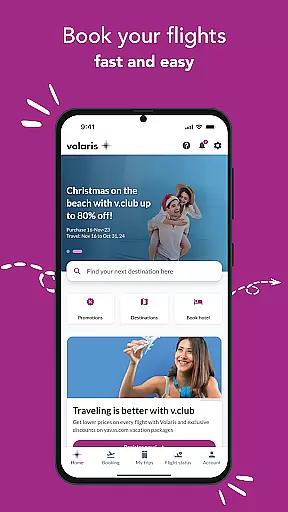
Volaris 2.0 is a comprehensive travel app designed to simplify every aspect of your journey. With over 197 routes available, the app allows users to book flights effortlessly while saving traveler and payment information for faster transactions. It serves as a one-stop solution for managing trips, providing options to add baggage, pets, sports equipment, and seats.
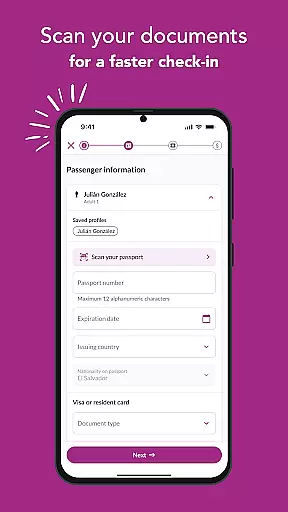
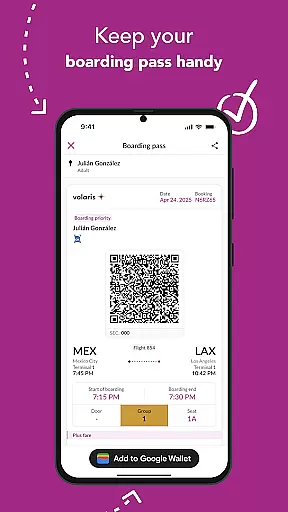
One standout feature is its ability to speed up boarding on international flights by scanning travel documents during check-in. Users can also access their boarding passes directly through the app, ensuring they have all necessary flight information at their fingertips. The app further enhances user experience with live flight status updates and timely notifications regarding special offers and flight changes.
Whether you're planning your next trip or already on the go, Volaris 2.0 ensures convenience and efficiency, making it an indispensable tool for modern travelers.
Volaris 2.0 boasts a variety of features tailored to enhance the travel experience. Firstly, it provides an intuitive booking system where users can choose from more than 197 routes, save traveler details, and store payment information securely. This streamlines future bookings significantly, offering both speed and security.
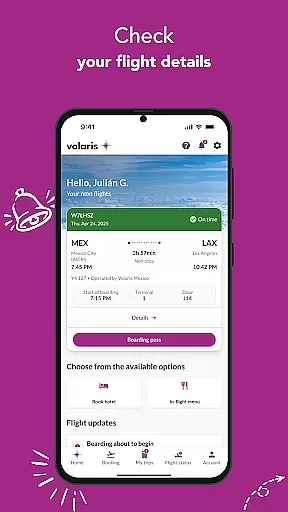
The app's 'My Trips' section allows users to verify bookings, confirm essential details like flight numbers and baggage allowances, and add optional services such as extra baggage, pet transport, sports equipment, and preferred seating. Additionally, the check-in process is optimized for international flights through document scanning, which expedites boarding procedures.
Another key feature is the digital boarding pass functionality, enabling passengers to avoid long lines at the airport by accessing their passes via the app. Users can track vital flight information including boarding times, groups, seat numbers, and itineraries. Furthermore, real-time flight status updates and proactive notifications about offers and changes ensure that travelers remain informed throughout their journeys.
When it comes to booking travel, ensuring the authenticity of your reservations is paramount. The Volaris 2.0 app provides a reliable booking system that covers over 197 routes, allowing travelers to book flights with confidence. Each reservation is promptly confirmed and stored within the app's 'My trips' section.
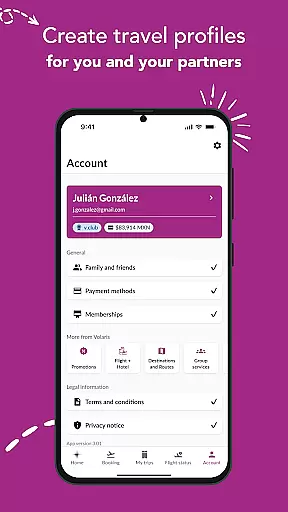
The application saves traveler information for you and your companion, streamlining future bookings and enhancing the overall booking experience. This feature not only makes each booking faster but also adds an extra layer of security by reducing input errors. With saved payment information, users can complete transactions easier, faster, and safer, reinforcing the trustworthiness of every booking made through the app.
Moreover, Volaris 2.0 offers exclusive mobile app deals, providing users with cost-saving opportunities on their trips. These personalized offers are applied at the time of booking, ensuring that customers receive the best possible rates. By integrating these features, Volaris 2.0 ensures that every booking is authentic, traceable, and optimized for customer satisfaction.
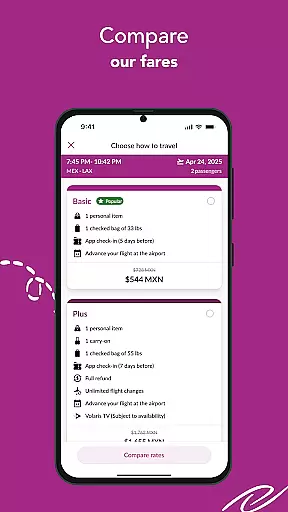
Price transparency is a critical factor for travelers when planning a trip. The Volaris 2.0 app excels in this area by offering clear and upfront pricing for all its flights. Users can easily view and compare prices across 197+ routes, empowering them to make informed decisions without worrying about hidden fees or unexpected charges.
In addition to visible pricing, the app allows travelers to save their payment details securely. This convenience not only speeds up the booking process but also ensures that users are fully aware of the costs involved from the start. The ability to add optional services such as baggage, pets, sports equipment, and seats further enhances price transparency, as customers can see the exact cost implications of each additional service.
Volaris 2.0 also keeps travelers updated with notifications about special offers and discounts, contributing to a transparent pricing model. By delivering live updates on flight statuses and check-in reminders, the app ensures that users are never caught off guard by changes that might affect pricing. This commitment to clarity and openness establishes Volaris 2.0 as a trustworthy tool for managing travel expenses effectively.
User-friendly interface
Secure payment storage
Comprehensive trip management
Efficient boarding process
Real-time flight updates
Limited route flexibility
Occasional bugs reported
Notifications may be delayed
No offline functionality
Ads within the app

Navigate your world faster and easier with voice navigation & street view map
 4.20
4.20
Tide Table Chart provides quick and easy access to high and low tide forecasts.
3.20
View current Idaho road conditions, road cameras, and timelapse videos.
4.1
Maps, Wait Times, Park Hours
4.40
Download now and start earning rewards on hotels, tours, and everything travel.
4.50
Guest how you guest when you book one of our 6,800+ hotels and earn rewards.
4.90
Walt Disney World Resort maps, wait times, tickets, dining & more.
4.50
Travel and Book 8,000+ Hotels Worldwide with the Marriott Bonvoy™ app.
4.90
Examine the planet
3.80
The travel app that makes booking cheap flights, hotels, and car rentals easy.
4.80
Easily rent a car at over 9,500 locations with the Enterprise car rental app.
4.60
The mobile panorama panel. Works offline - worldwide!
4.40
Iowa 511 is the Iowa Department of Transportation's traveler information app.
3.80
View US public land boundary maps on your device.
3.70
Real-time flight tracking with live maps and flight status updates.
3.70
Mix of explore game, travel mapping & tracking to memorize everywhere you go
3.60
Apply for an electronic travel authorisation (ETA) to come to the UK.
3.20
Every Diners, Drive-in & Dives location in one place! Your guide to Flavortown!
3.00
The #1 Parent App in Brevard County
4.1


User Reviews