
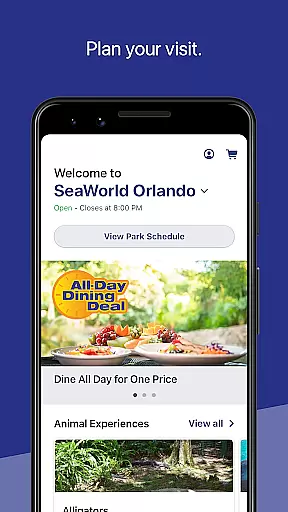
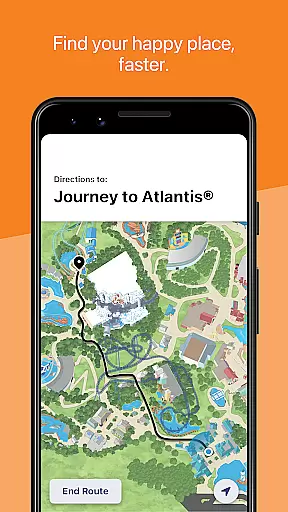
SeaWorld is a comprehensive travel companion app designed to enhance your park experience. The application provides essential tools for planning and navigating your visit, including interactive maps, real-time updates on ride wait times, and show schedules. Whether you're looking to discover animal experiences, enjoy live shows, or find dining options, this app serves as your all-in-one guide.
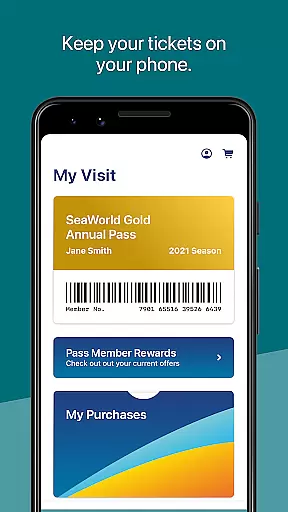
The app also allows users to manage their in-park purchases and memberships digitally, making it convenient to access annual passes and redeem pre-purchased tickets. With its intuitive interface and robust features, SeaWorld ensures that visitors can optimize their time and make the most of their visit without missing out on any attractions.
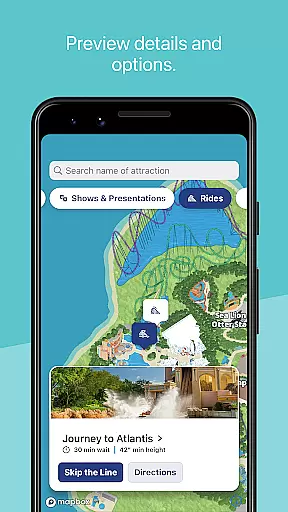
One of the standout features of the SeaWorld app is its interactive map functionality. Users can easily locate nearby attractions, filter points of interest by type, and even get directions to restrooms or specific exhibits. This feature significantly enhances navigation within the park, allowing families and individuals to maximize their visit.
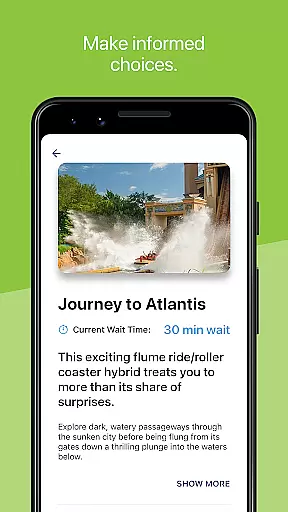
In addition to mapping capabilities, the app offers practical tools such as viewing ride wait times and showtimes, which help guests plan their day efficiently. Users can also upgrade their experience with add-ons like Quick Queue or reserve seating for shows directly through the app. These functionalities ensure that visitors have a seamless and enjoyable experience while minimizing wait times and maximizing convenience.
When planning a visit to SeaWorld, having reliable booking information is crucial for a seamless experience. The SeaWorld app ensures that all bookings made through its platform are authentic and verified. This includes reservations for shows, rides, and special experiences like Quick Queueu00ae and Reserved Seating.
The app provides real-time confirmation of your bookings, ensuring that every reservation you make is accurate and officially recognized by the park. This verification process gives users peace of mind, knowing that their plans are secure and acknowledged by SeaWorld's systems.
Additionally, users can access their purchases and barcodes directly within the app, making it easy to redeem tickets and discounts in the park. This feature not only enhances convenience but also significantly reduces the chances of errors or issues with bookings during your visit.
Understanding the costs associated with your SeaWorld visit is essential for budgeting and planning. The SeaWorld app excels in providing price transparency across its various offerings, from ticket prices to dining deals. Users can easily view detailed pricing information for different packages, including annual passes and in-park upgrades such as the All Day Dining Deal.
The app clearly displays any additional costs or fees associated with premium experiences, ensuring there are no hidden surprises. For instance, upgrading to a Quick Queueu00ae or reserving seats for shows comes with explicit pricing details, allowing visitors to make informed decisions about their spending.
Moreover, the app often highlights discounts and special offers, presenting a comprehensive view of potential savings. This transparency empowers users to optimize their budgets while enjoying a full range of attractions and services at SeaWorld, enhancing overall satisfaction with their visit.
User-friendly interface
Interactive park maps
Real-time updates
Convenient digital ticketing
Comprehensive planning tools
Limited to SeaWorld parks
Occasional connectivity issues
Premium features require payment
Heavy reliance on data
Not ideal for offline use

Book rooms at any of 4.2M properties worldwide. Find flight deals every day!
 4.60
4.60
The Official Freedom Trail Foundation app.
4.30
View US public land boundary maps on your device.
3.70
GPS Live Satellite Earth to find route navigation and current location map
4.00
Real-time flight tracking with live maps and flight status updates.
3.70
Guest how you guest when you book one of our 6,800+ hotels and earn rewards.
4.90
Get real-time traffic, directions, search and find places
4.10
Stay at Motel 6 for less - book fast, save more with MY6 app!
4.70
Find the perfect vacation rental. Search from over 2 million properties.
4.80
All-in-one delivery and taxi app. Ride, food, & grocery delivery app.
4.80
Manage your travel on Delta with access to boarding passes, flight info & more.
4.80
Navigation on hikes is no longer a problem. Download the map, put notes and go!
4.60
Book neighborhood dog boarding, dog walking, pet sitting, and doggy day care.
4.60
Take JetBlue everywhere you go! Book, manage and check in for your trips & more.
4.60
NEW! Vacation with Ease.
4.60
Walt Disney World Resort maps, wait times, tickets, dining & more.
4.50
Travel light with our easy-to-use mobile app, the perfect flying companion.
4.40
A tool for outdoor activities.
4.30
MyTSA gives you 24/7 access to info that passengers frequently request from TSA.
4.10


User Reviews