
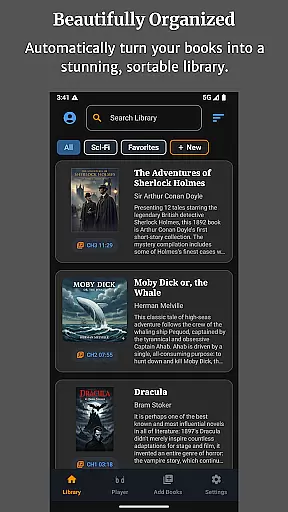
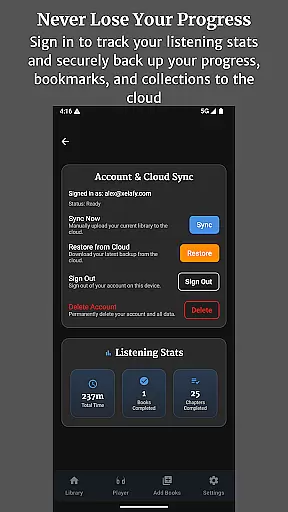
Audiobook Buddy is a comprehensive audiobook management app designed to transform your scattered audio files into an organized, visually appealing library. The app supports syncing from local folders and popular cloud services like Google Drive, OneDrive, and Dropbox, creating a unified library with smart organization features.
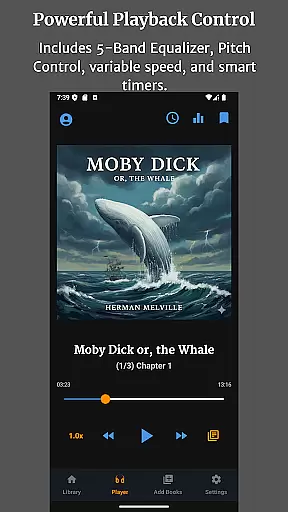
With Audiobook Buddy, users can create custom collections to group related audiobooks by series, genre, or any preferred category. It offers seamless playback options including a 5-band equalizer, pitch control, per-book speed settings, and a sleep timer. The app also provides full lock-screen controls, background playback, and customizable themes, ensuring a personalized and convenient listening experience across devices.
This app is ideal for avid audiobook listeners who want to manage large libraries efficiently while enjoying advanced playback features and cloud-synced progress tracking.
Audiobook Buddy stands out with its robust feature set tailored for audiobook enthusiasts. The app's smart library organization system automatically sorts audiobooks, whether they're synced locally or from cloud storage services like Google Drive, OneDrive, or Dropbox. This ensures all your audiobooks are accessible in one centralized location.
The app includes advanced playback controls such as a 5-band equalizer, pitch adjustment, and variable speed settings for each book. These features provide users with complete control over their listening experience. Additionally, the sleep timer and background playback functionality make it perfect for bedtime listening or multitasking.
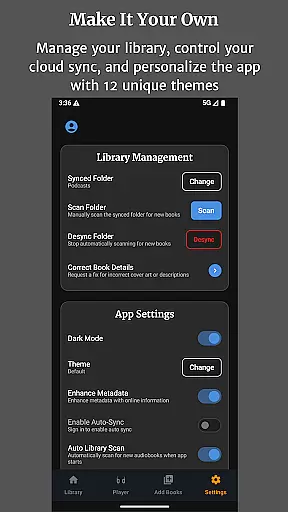
Audiobook Buddy also offers extensive customization options, including 11 unique themes and multi-language support (English, German, French, Japanese). Users can import various audio formats and metadata files, ensuring compatibility with most personal collections while providing a professional-grade listening experience.
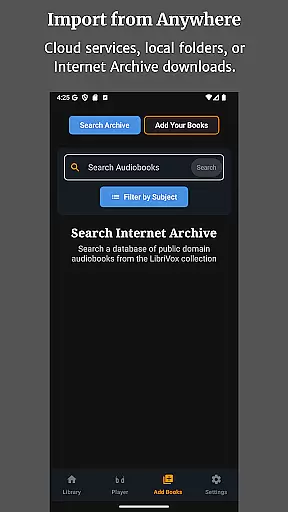
Audiobook Buddy offers an extensive library of public domain audiobooks sourced from LibriVox, providing users with a vast selection of titles to choose from.
In addition to the public domain offerings, the app allows users to import their own files and ZIP archives, enabling the creation of a personalized library that can include copyrighted materials legally owned by the user.
The app supports a wide range of audio formats including MP3, M4A, M4B, AAC, OGG, FLAC, WAV, and WMA, ensuring compatibility with various sources and maintaining the integrity of the original content.
By focusing on non-DRM titles, Audiobook Buddy ensures that users have legitimate access to a diverse collection while also allowing them to integrate their existing collections seamlessly.
Audiobook Buddy excels in format compatibility, supporting a comprehensive array of audio file types such as MP3, M4A, M4B, AAC, OGG, FLAC, WAV, and WMA, which covers most user needs for importing personal audiobooks.
Beyond audio formats, the app reads metadata from CUE, NFO, and TXT files, enhancing the organization and searchability of your library by extracting relevant information about each audiobook.
For cover art, Audiobook Buddy is capable of displaying embedded artwork as well as external image files in JPEG, PNG, and WebP formats, enriching the visual experience and making it easier to identify books at a glance.
This broad format support ensures that whether you're syncing from local folders or cloud services like Google Drive, OneDrive, or Dropbox, your audiobooks will be accurately represented and easily accessible within the app.
User-friendly interface
Advanced playback options
Cloud sync functionality
Multi-platform support
Customizable themes
No DRM support
Limited language options
Occasional sync issues
Large file handling
Premium feature costs

Bilingual dictionary with English translations of Modern Standard Arabic words.
 4.30
4.30
Track your Star Wars book collection across Canon & Legends
4.80
Bible Study App with Audio Book, Verse of the Day, and Devotionals.
4.80
Unlock more features in Lithium and show your support. Expand for details.
4.00
Holy Bible, a KJIV Bible study, audios & daily verses, talk with God now.
4.80
A companion for prayer, with Azan alarm, Quibla direction, and Holy Quran book
4.10
Daily Bible app: King James Version with verses and audio for studying&prayer
4.40
A KJV Bible with Apocrypha and precept-based study concordance
5.00
Read the Quran in Arabic alongside its translation, with color coded Tajweed.
4.50
Plan of Life that Saint Josemaría recommended
4.80
Read and study the Bible and other content in over 1,000 languages.
4.80
Universal Zoom, learn about sizes & distances of the universe and microcosmos
4.80
World's most comprehensive dictionary app: 13 languages, all online or offline!
4.80
Read unlimited novels, audiobooks, stories & Unlock ebooks, fanfiction and more!
4.70
Crowd-sourced listing of businesses with anti-gun signs, and pro-2a alternatives
4.60
Shop over 13 million new and used books at up to 80% off list price
4.20
CleverBook Pro makes the popular guide for the game even better!
4.00
A story reading app: Read stories, novels and books, or write your own.
3.90
Sea tide predictions for all coastal U.S. locations.
4.3


User Reviews