
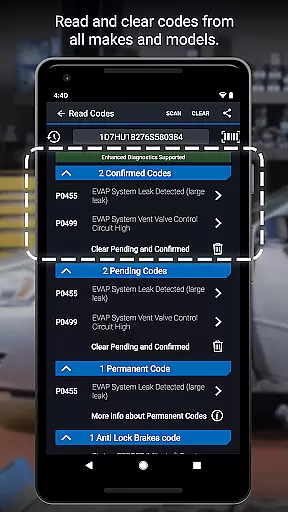
BlueDriver OBD2 Scan Tool is a professional automotive diagnostic application that transforms your smartphone or tablet into an advanced scan tool. Designed for both professional mechanics and DIY enthusiasts, the app pairs with the BlueDriver Bluetooth Sensor to provide comprehensive vehicle diagnostics. The core functionality includes reading and clearing trouble codes across multiple systems such as engine, ABS, airbag, and transmission modules.
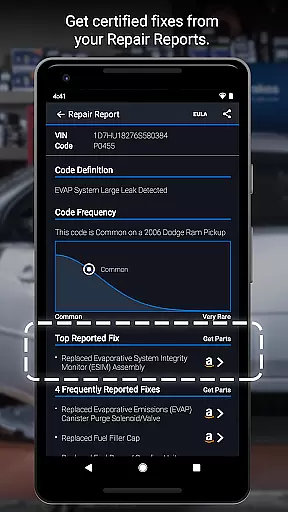
The application stands out through its enhanced diagnostic capabilities and user-friendly interface. It offers advanced features like Mode 6 testing, smog readiness checks, and live data graphing. Users can generate professional-grade Repair Reports specific to their vehicle's make, model, and year. The wireless Bluetooth connectivity ensures convenient operation without cumbersome cables, while the extensive vehicle coverage supports most major manufacturers including GM, Ford, Toyota, and European brands.
This application proves particularly valuable when addressing check engine lights or preparing for emissions tests. Mechanics and car owners can make informed repair decisions based on real-world fix data from millions of vehicles. The ability to save and share detailed diagnostic reports adds significant value for professional users who need to document their work.
BlueDriver distinguishes itself through several innovative features that enhance the diagnostic experience. The application provides comprehensive code reading capabilities across multiple vehicle systems, including engine, transmission, ABS, and airbag modules. Its unique Repair Report function generates detailed, vehicle-specific documentation that can be saved and shared with customers or insurance providers.
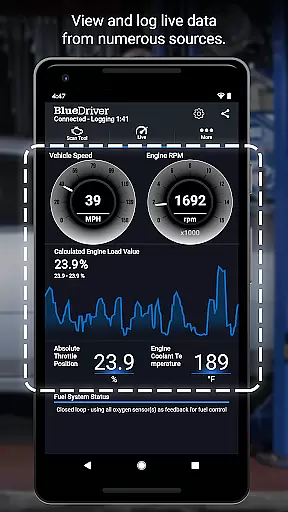
The implementation of wireless Bluetooth technology sets BlueDriver apart from traditional wired diagnostic tools. This feature enables technicians to move freely around the vehicle during testing. The live data monitoring with multi-PID graphing allows users to visualize multiple parameters simultaneously, facilitating more accurate diagnosis. Advanced users will appreciate the Mode 6 testing capabilities and the ability to switch between metric and imperial units.
What truly makes BlueDriver innovative is its database-driven approach to problem-solving. The application draws from millions of real-world repair scenarios to suggest likely fixes in plain language. The enhanced diagnostics coverage extends to newer vehicle models from major manufacturers, while the VIN-based report preview function allows users to test the system before purchasing the sensor. These features collectively create a powerful diagnostic tool that serves both professional and amateur users effectively.
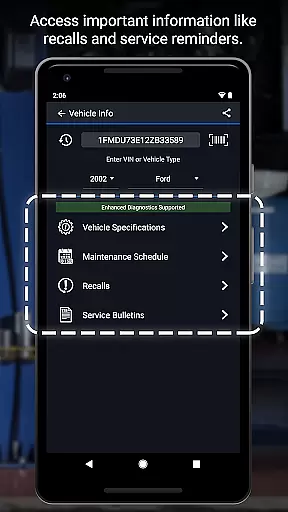
Accessing detailed vehicle information is crucial for effective diagnostics and repairs. BlueDriver OBD2 Scan Tool provides comprehensive data specific to your vehicle's make, model, and year.
The app reads and clears trouble codes from various systems including engine, ABS, airbag, and transmission. It also generates professional-grade Repair Reports tailored to your exact vehicle specifications.
Users benefit from enhanced diagnostics coverage across multiple brands like GM, Ford, Toyota, and more. The application supports advanced features such as Mode 6 test results and live data graphing.
This level of detail empowers both professional mechanics and DIY enthusiasts to make informed repair decisions with confidence.
Price transparency in automotive tools ensures users understand the costs involved before making a purchase. BlueDriver offers its diagnostic app free of charge, with optional hardware purchase.
The BlueDriver Sensor, sold separately, enables full functionality of the app through wireless Bluetooth connection. This approach allows users to preview Repair Reports by entering their VIN and trouble code without needing the sensor immediately.
Unlike subscription-based models, BlueDriver requires no ongoing fees. Users can access millions of real-world fixes and generate unlimited reports at no extra cost.
This transparent pricing model helps users budget effectively while gaining access to professional-grade diagnostic tools that were previously only available to industry professionals.
User-friendly interface
Comprehensive vehicle coverage
Wireless Bluetooth connectivity
Detailed Repair Reports
No subscription fees
Sensor sold separately
Limited older vehicle support
Bluetooth connection issues
Advanced features require expertise
Device compatibility concerns

OBD1 ECMs application. Data log or tune directly from your phone or tablet!
 4.60
4.60
Realtime Charts is a plugin for the Torque Pro App (OBD 2 & Car)
4.20
Get your personalized financing options and shop for used cars today!
4.20
Digital Car Key/Launcher, Screen Mirror, Android Dashboard, Remote Wireless Link
4.40
Get more out of your AAWireless adapter with this companion app | aawireless.io
4.80
AI Powered - Automotive Mechanic Assistant
4.30
Find Fast EV Chargers | Charge Your Vehicle at 1,100+ Fast Car Charging Stations
4.60
Marathon ARCO Rewards members earn rewards & apply the rewards for fuel savings!
4.80
PayByPhone: A quick and easy way to pay for parking.
3.80
7-Day Returns on All Cars
4.80
Listings of Tesla's with FSD - Included package
4.60
Easy connect & control your cars from afar. Remote Lock & unlock car and carplay
4.60
Autotrader is your online solution for buying and selling new and used cars.
4.40
A smarter way to park and reserve your spot ahead of time.
4.40
myAudi offers users services and Audi connect services for Audi drivers
4.10
Control maps, media and messaging, with the Google Assistant while you drive
4.10
Boost profits and hit your goals faster with GigU's amazing tools for gigworkers
4.00
Discover new and used cars in Syria easily! Browse ads and connect with sellers.
3.70
Theme for Car Launcher
4.0


User Reviews