
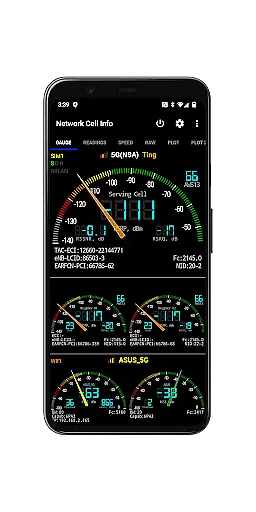
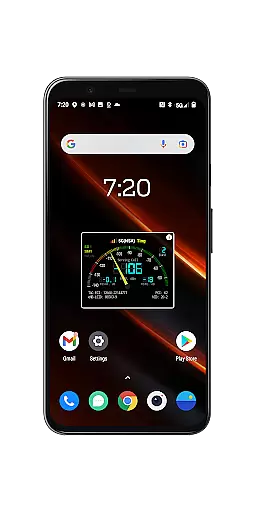
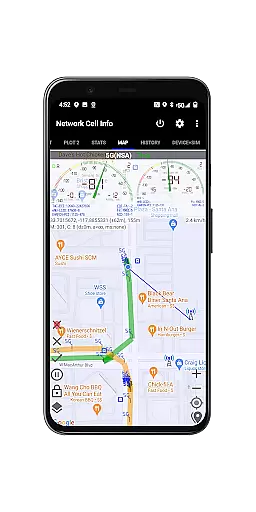
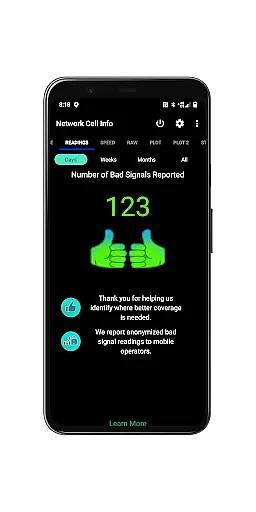
Network Cell Info & Wifi is a comprehensive mobile network and Wi-Fi monitoring tool designed for users seeking to optimize their connectivity experience. The app provides detailed diagnostic data on 5G, LTE+, LTE, CDMA, WCDMA, GSM, and Wi-Fi signals, making it an essential utility for troubleshooting reception issues and analyzing signal strength history.
A standout feature of the app is the Bad Signal Reporter, which allows users to automatically report poor signal areas to their mobile network operators. This crowdsourced data helps improve network coverage over time. Additionally, Network Cell Info offers advanced tools such as real-time signal monitoring, dual-SIM support, speed tests, and location-based signal mapping, empowering users to locate the strongest available signals in their area.
This app is particularly valuable for tech-savvy individuals, frequent travelers, or anyone experiencing persistent connectivity problems. By providing actionable insights into cellular tower connections, signal quality, and network performance, Network Cell Info ensures users can maximize their mobile and Wi-Fi experiences.
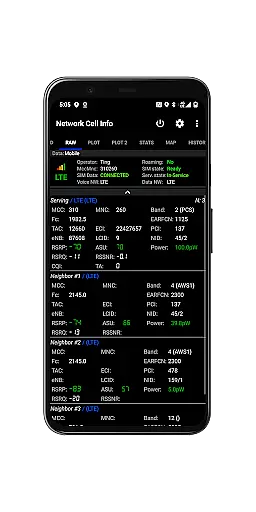
Network Cell Info & Wifi stands out with its extensive range of features tailored for network diagnostics and optimization. One of its core capabilities is the almost real-time (1-second interval) monitoring of cellular and Wi-Fi signals, presented through intuitive Gauge and Raw tabs. This functionality supports multiple network types, including 5G, LTE+, LTE, CDMA, UMTS, and GSM, ensuring compatibility across various devices and carriers.
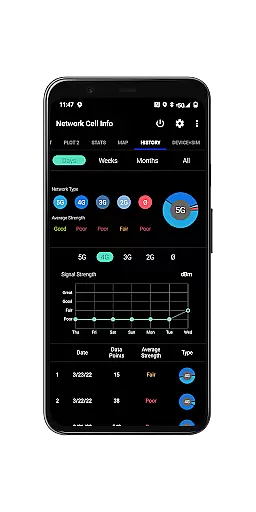
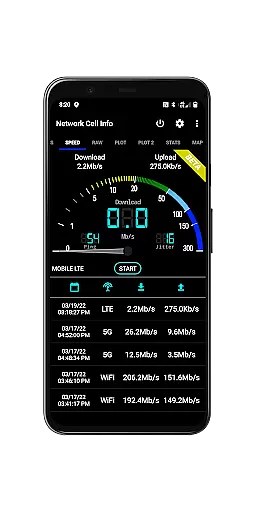
The app also includes specialized tools like one-tap speed tests for measuring download, upload, ping, and jitter performance, as well as dual-SIM support for users with multiple carriers. Its mapping feature visualizes network information and signal strength, while the Personal Best Signal Finder and Crowdsourced Best Signal Finder layers assist in identifying optimal signal locations. Furthermore, users can access historical logs, export measurement databases, and view detailed connection statistics.
These features collectively enable users to troubleshoot connectivity issues, analyze network performance, and make informed decisions about their mobile usage. Whether you're diagnosing persistent dead zones or optimizing your device's settings, Network Cell Info provides the tools necessary for a seamless experience.
Network Cell Info & Wifi delivers exceptional core functionality by providing precise monitoring and diagnostic tools for mobile networks and Wi-Fi connections. The app supports a wide range of network types including 5G, LTE+, LTE, CDMA, WCDMA, and GSM, ensuring comprehensive coverage for different user needs.
The application offers almost real-time monitoring of cellular carrier and WiFi signals through its Gauge/Raw Tabs feature. This allows users to observe signal strength with merely a one-second delay, empowering them to troubleshoot reception and connectivity issues effectively. Additionally, the inclusion of a one-tap WiFi/mobile internet performance speed test enables users to measure download, upload, ping, and jitter speeds conveniently.
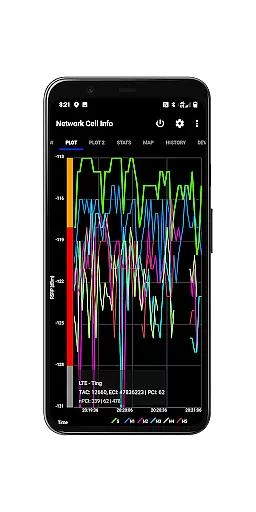
For users seeking optimal signal strength, Network Cell Info provides advanced features such as the Personal Best Signal Finder and Crowdsourced Best Signal Finder. These tools assist in identifying the strongest signals available based on location history and carrier data. With dual-SIM support and detailed signal plots for up to six cells, the app ensures that users have access to accurate and actionable network information.
Despite its technical depth, Network Cell Info & Wifi maintains an intuitive and user-friendly interface. The app's design emphasizes ease of use without compromising on the delivery of complex data, making it accessible even to those who may not be tech-savvy.
Key functionalities are easily navigable through clearly labeled tabs such as Gauge, Raw, Map, and History Logs. This logical organization helps users quickly find the information they need, whether itu2019s current signal strength or historical data about their network performance. Furthermore, the Status Bar provides at-a-glance network information, enhancing the overall user experience.
Additional features like the Bad Signal Reporter simplify the process of reporting poor signal areas to mobile network operators. By automating this feedback loop, the app reduces user effort while contributing valuable data for network improvements. Overall, Network Cell Info strikes a balance between offering robust tools and maintaining an approachable interface, ensuring users can make the most of its capabilities without a steep learning curve.
Comprehensive network diagnostics
Real-time signal monitoring
Dual-SIM support
Bad Signal Reporter
Speed test functionality
Complex for beginners
Premium version required
Heavy battery usage
Limited CDMA support
Interface not user-friendly

Quickly switch to an encrypted DNS server on Android TV
 4.50
4.50
PDF Reader - Document Viewer: Read, Manage & Organize Your Documents
3.10
Unit and currency converter with easy and simple UI.
4.80
Unlock your Essential Key. Create custom shortcuts to your favorite apps!
4.3
HD Video player and downloader for all formats, fast & smooth 4K video playback.
4.60
Safely recover deleted photos, videos, and files with a single easy tap.
3.70
An easy-to-use calculator designed to save time calculating and bending conduit
4.30
Screen Mirroring with sound for Samsung TV, LG TV, Sony TV, Smart TV and Browser
4.20
A clean app.
4.50
The ultimate tool for network analysis, wifi scanning and problem detection.
4.90
Small and simple app to Verify Root Access and BusyBox Install!
4.70
Universal TV remote control all TVs, Roku, LG, Samsung, Fire, Vizio, Sony, TCL.
4.40
Clean up large files and similar photos, fast and easy to use
4.40
Just one-tap to easy translate in any language after calls within seconds.
4.20
App that Recover your pictures, videos or files after you delete them.
4.20
Quickly & easily calculate the spacing of handrail balusters
4.20
Fun lie-detection pranks for friends and parties.
3.80
Clean the junk files on your device
3.40
A non-root local ADB shell client. READ BELOW!
3.40


User Reviews