
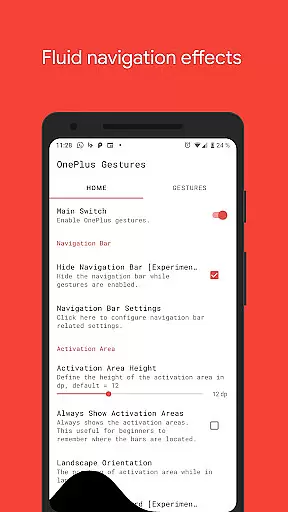
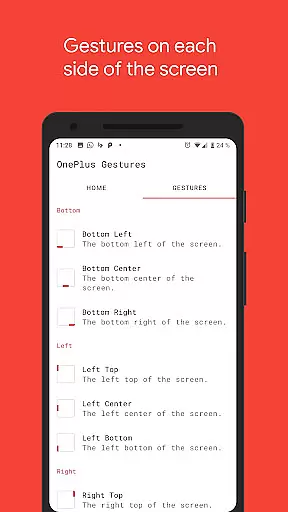
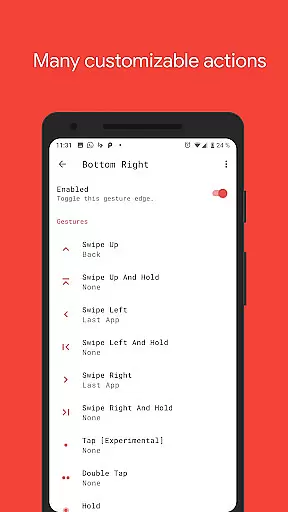
Vivid Navigation Gestures is a powerful tool that revolutionizes the way you interact with your Android device. This app allows users to control their devices through intuitive gestures instead of traditional button presses, bringing a modern and fluid user experience to any Android device regardless of its version.
The application features beautiful visual effects during gesture interactions and supports multiple gesture triggers across different areas of the screen. With options like swipe up, double tap, and hold, users can execute various actions such as launching Google Assistant, going back, returning to the home screen, or even taking screenshots. Additionally, it offers advanced functionalities including toggling split-screen mode and hiding the navigation bar for a truly immersive experience.
Whether you're looking to enhance productivity or simply want a more intuitive way to navigate your device, Vivid Navigation Gestures provides a versatile solution that caters to power users and casual users alike.
Vivid Navigation Gestures stands out with its comprehensive set of features designed to maximize convenience and efficiency. The app supports an extensive range of gesture types, including swipe up, swipe left, double tap, and more. Each gesture can be assigned specific actions such as launching apps, controlling media playback, or accessing system settings.
One of the key highlights is the ability to trigger actions from virtually any part of the screen, including bottom left, bottom center, and even right top corners. This flexibility ensures that users can customize their interaction patterns according to personal preferences. Moreover, the app integrates seamlessly with Android's accessibility services to perform actions like toggling auto-rotation or opening quick settings without requiring root access.
For advanced users, the option to hide the stock navigation bar using ADB commands adds another layer of customization. Detailed instructions are provided for setting up ADB on your PC, making it accessible even for those new to Android development tools. Overall, these features combine to create a highly adaptable and user-friendly navigation experience.
Vivid Navigation Gestures offers a highly accurate and effective gesture-based navigation system that eliminates the need for traditional button presses. The app supports multiple gesture triggers across different screen areas, ensuring precision in detecting user inputs.
With a comprehensive set of available gestures, including swipes, holds, and taps, the app provides reliable execution of various device actions. These include launching the Google Assistant, navigating back, accessing the home screen, and even controlling media playback, all without missing a beat.
The app's integration with Android's accessibility services allows for seamless execution of system-level functions such as opening notifications, recent apps, or quick settings. This ensures that users can operate their devices intuitively while maintaining complete control over essential functions.
By enabling users to hide the stock navigation bar, Vivid Navigation Gestures maximizes screen real estate and creates a more immersive experience. Although some advanced features require ADB or root access, the core functionality remains accessible to most users, delivering an efficient and modern navigation solution.
The interface of Vivid Navigation Gestures is designed with simplicity and intuitiveness in mind, allowing users to easily adapt to gesture-based navigation. Despite the complexity of its features, the app maintains a straightforward setup process that guides users through activating and customizing their gesture controls.
Visual feedback during gesture execution enhances the intuitive nature of the app. Beautiful fluid effects accompany each gesture, providing clear indications of recognized actions while maintaining a sleek and modern aesthetic that aligns with current design trends.
While offering extensive customization options, the app presents these choices in a logical manner. Users can assign specific actions to various gesture types and trigger points without feeling overwhelmed by the available selections, thanks to well-organized menus and clear labeling.
For advanced features requiring ADB commands, the app provides detailed instructions and links to installation guides. This approach maintains a simple primary interface while still making powerful tools accessible to interested users, striking a balance between ease of use and advanced functionality.
Intuitive gesture controls
Beautiful visual effects
Highly customizable
Wide range of actions
Accessibility service integration
Requires ADB for some features
Complex setup for beginners
Limited iOS compatibility
No automatic backup
Occasional performance lag

 4.50
4.50
PDF Reader - Document Viewer: Read, Manage & Organize Your Documents
3.10
FV File Manager Pro, Fast and powerful file manager for Android
4.60
Learn the vast amount of system information about device and monitor it's state
4.70
Family Locator, Share location, StayConnect with your family in real time
3.90
View detailed information about your Nissan Leaf the dealer never shows you.
4.10
Download any file easily and quickly with Downloader
4.3
Fast VPN USA for any country. Super secure VPN for calls, streaming, games, TV.
4.40
fast and easy mp3 music downloader
4.80
WiFi Signal Strength Meter help you detect WiFi Signal Strength in real time.
4.80
Extremely fast, secure, and protects your privacy
4.80
Remote Play with FSR upscaling, low latency & full controller support
4.80
Fast Video Downloader, Movie Downloader, Torrent Downloader & Adblock Browser
4.70
App to pay for FUTO Keyboard
4.60
Forza Tuning Calculator App for Forza Horizon 5, Motorsport and Earlier Titles
4.40
Effortlessly run ADB commands directly on your device without a PC.
4.20 4.10
4.10
MS-DOS in your pocket. Play old DOS games anywhere you are ;)
4.10
Create your own custom widget with endless possibilities
3.90


User Reviews