
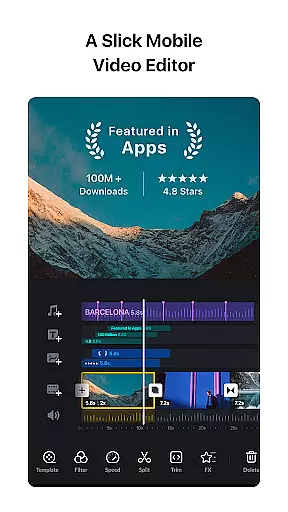

VN is a versatile video editing app that combines professional-grade features with an intuitive interface, making it accessible for both amateur and experienced editors. The app offers a complete suite of tools including multi-track editing, keyframe animations, speed adjustments, and rich cinematic filters, enabling users to create high-quality videos without watermarks.
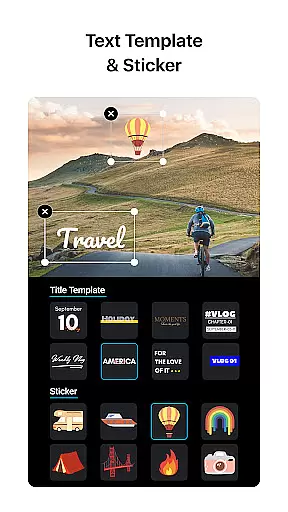
One standout feature is its advanced timeline editor, which allows precise control over video elements down to 0.05-second keyframes. Additionally, VN supports creative transitions, music synchronization, and customizable text templates, empowering users to produce engaging content tailored to their vision. Whether you're crafting social media clips or professional projects, VN ensures seamless collaboration across devices and secure asset management.
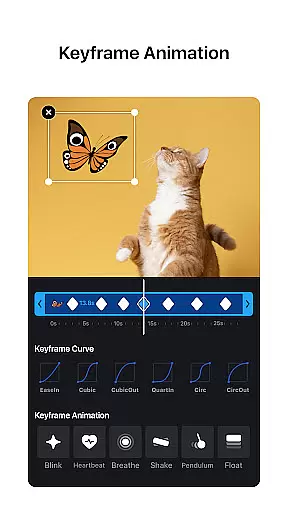
VN stands out with its comprehensive set of video editing tools designed for precision and creativity. Its multi-track timeline lets users layer videos, images, stickers, and text effortlessly, while the Keyframe Animation feature provides 19 built-in effects to enhance customization. Advanced options like Speed Curve and Time Remapping allow dynamic pacing adjustments, giving videos a polished, cinematic feel.
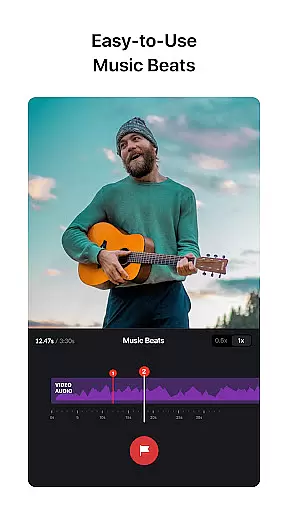
The app also excels in audiovisual integration, offering music beat markers, voice-over recording, and sound effect imports via Wi-Fi or messaging apps. With flexible material imports, non-destructive editing, and custom export settings up to 4K resolution at 60 FPS, VN caters to diverse editing needs. Furthermore, its Protection Mode secures drafts with passwords and expiration dates, ensuring your work remains private and safe.
One of VN's standout features is its extensive video format compatibility, ensuring that users can work with a wide array of file types without the need for prior conversion. This flexibility allows both amateur and professional video editors to import and export videos in their preferred formats, streamlining the editing process.
The app supports popular formats such as MP4, AVI, MOV, and many others, making it versatile for different project requirements. Whether you're creating short social media clips or longer cinematic pieces, VN accommodates various resolutions and frame rates, up to 4K at 60 FPS, providing crisp and clear output every time.
Moreover, VN enhances user experience by allowing bulk imports via ZIP files and easy transfers through platforms like Google Drive and OneDrive. This seamless integration ensures that no matter where your files are stored, incorporating them into your projects is straightforward and efficient.
By removing technical barriers related to format compatibility, VN empowers creators to focus on what truly matters u2013 producing high-quality, engaging content. The ability to customize export settings further adds to the appeal, letting users tailor each projectu2019s resolution, frame rate, and bit rate according to specific needs.
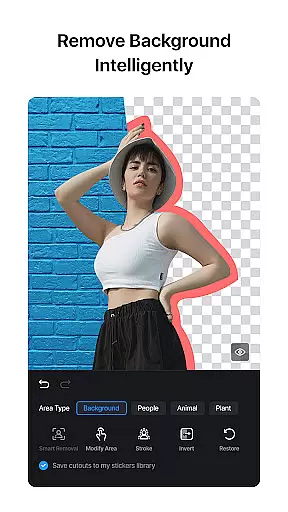
VN incorporates advanced AI-powered editing features that significantly enhance the video creation process. These intelligent tools assist users in executing complex edits effortlessly, thereby elevating the overall quality of their projects without requiring extensive technical expertise.
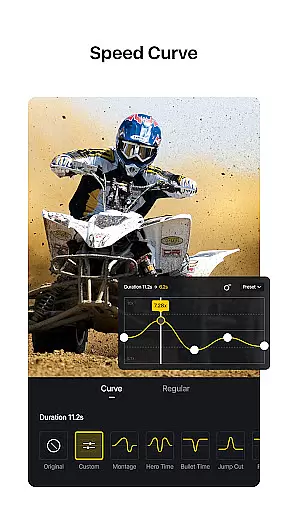
Among these features is the Speed Curve tool, which functions similarly to Time Remapping in Adobe Premiere Pro. It allows precise control over playback speed, enabling dynamic effects that can make videos more captivating. With six preset curves available, creators have ample options to experiment with pacing and rhythm within their footage.
In addition to speed adjustments, VN offers sophisticated keyframe animations and rich cinematic filters. Users can apply overlay and blur transitions along with customizable timing and speed settings, adding depth and professionalism to their work. Importing LUT (.cube) files further expands creative possibilities by simulating film stock looks and color grades used in Hollywood productions.
These AI-driven capabilities not only simplify intricate tasks but also inspire innovation and experimentation among users. By leveraging technology to automate tedious processes, VN ensures that even those new to video editing can achieve impressive results while seasoned professionals enjoy enhanced efficiency and expanded artistic freedom.
User-friendly interface
Professional editing tools
No watermark on exports
Customizable export settings
Secure project protection
Limited advanced tutorials
Occasional performance lags
Fewer third-party integrations
Preset limitations in free version
Learning curve for beginners

Your media, on your terms.
 4.10
4.10
Video Trimmer, Video to MP3 Converter. Extract music from video, Easy & Fast.
4.80
Tik & Story Saver-Download ALL social media videos, photos & reels no watermark.
4.80
Create & edit videos with AI
4.30
Download videos easily & play them all in one smart, powerful video manager.
3.40
Video Downloader, Multiple Resolution Options, Video Player
4.50
Browser for Samsung TV to stream webvideos, online movies and livestreams in HD
4.10
AI Video Editor with Music, Filter, Slideshow, Effect, Merge & Trim Video.
4.80
Fast & Private HD Video Downloader with Built-in Proxy Browser and Video Player.
4.50
HD Video player all format, HD Videos, Cast & Subtitle. No annoying ads.
4.60
Cast Videos from Web Browser, IPTV to Roku, Chromecast, DLNA, Smart TV +more
4.60
?100% FREE! Download & save videos? safely in this app. All formats supported.
4.60
Snaptubè Video Downloader app allows to download videos and music in Snaptube. .
4.60
Powerful Video Editor & Photo Editing App —— Quick Edits & Stunning Effects!
4.30
Connect 2 UVC devices for recording and broadcast video/audio stream
3.90
Explore the largest library of free GIFs, Stickers & Memes - or create your own!
3.90
Cast to Smart TV, Fire TV. Cast video, photo - Fast & Stable!
3.90
Live TV, anywhere in your home
3.80
Browser for Sony TV to stream web videos, online movies and live tv
3.20


User Reviews