
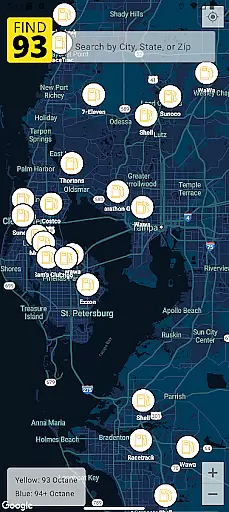
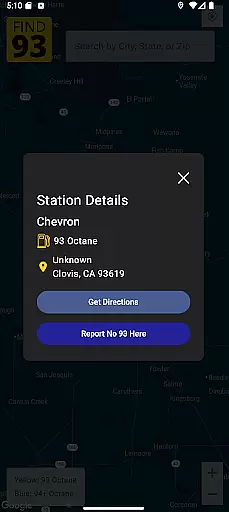
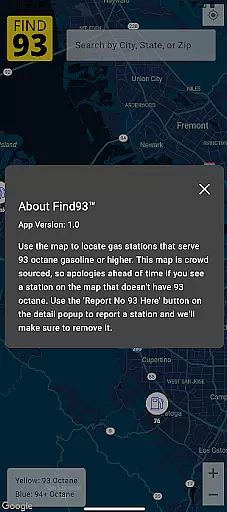

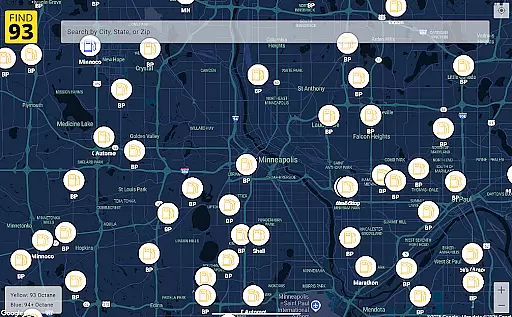
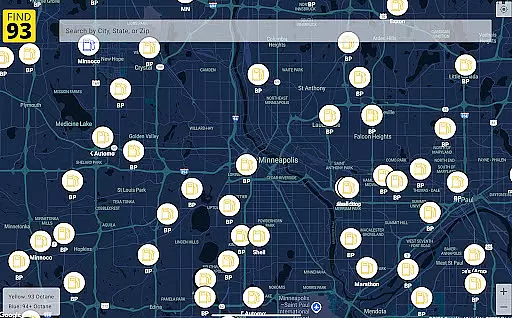
Find93 is a specialized navigation app designed to help drivers locate gas stations that offer 93 octane gasoline or higher. The app's core functionality revolves around its crowdsourced map, which provides real-time information about fuel availability. Users can easily find nearby stations, view detailed information including fuel types and addresses, and access integrated navigation features.
The app stands out with its community-driven approach, allowing users to report stations that no longer serve 93 octane fuel. This feature ensures the map remains accurate and up-to-date. Whether you're on a long road trip or need premium fuel in an unfamiliar area, Find93 offers a reliable solution for finding the right gas station when it matters most.
Find93 offers several distinctive features that enhance the user experience. The app's crowdsourced map system allows users to contribute real-time data about gas stations, creating a dynamic and constantly updated resource. Each station listing includes comprehensive details such as fuel types, precise location, and additional descriptions provided by users.
A key innovation is the multi-navigation integration system. Users can choose their preferred navigation app - whether Apple Maps, Google Maps, or Waze - directly from the station information page. The reporting functionality streamlines the process of flagging inaccurate information, while the intuitive interface makes it easy to switch between different features and access crucial information quickly.
Map accuracy is essential for any navigation app, and Find93 excels in this area by providing users with the most up-to-date information on gas stations that serve 93 octane or higher. This crowdsourced map relies on contributions from its active user base to ensure real-time updates and accuracy.
The app's community-driven approach means that every time a user reports a station that no longer serves 93 octane gasoline, the map gets updated promptly. This feature ensures that drivers can trust the data they see on their screens when searching for high-octane fuel stations nearby.
For users, this translates into reliable navigation assistance without the frustration of outdated or incorrect location data. Whether you're on a road trip or commuting through unfamiliar areas, having precise map details at your fingertips allows for efficient route planning and peace of mind.
Route planning is a critical component of the Find93 app, designed to help drivers efficiently reach gas stations serving 93 octane fuel. By integrating with popular navigation apps like Apple Maps, Google Maps, and Waze, Find93 offers multiple options for plotting your course.
Upon selecting a gas station from the detailed listings available within the app, users can choose their preferred navigation tool to get directions. This flexibility ensures that whether you prioritize scenic routes, shortest distance, or real-time traffic conditions, thereu2019s an option tailored to your needs.
This seamless integration not only simplifies travel but also enhances overall user experience by saving time and reducing stress associated with finding specific types of fueling points. With accurate mapping data combined with versatile routing choices, Find93 stands out as an indispensable aid for motorists seeking convenience and reliability in their journeys.
User-friendly interface
Real-time station updates
Multiple navigation options
Comprehensive station details
Community-driven accuracy
Limited to premium fuel
Dependent on user reports
No offline functionality
Occasional data delays
Specific use case only

Navigate with your watch and keep the phone in your pocket!
 4.60
4.60
All of NHSA's trail information at your fingertips for the 2025-2026 season
4.1
Turn your tablet or Android powered unit into a full blow Android Auto headunit.
2.30
Find radar maps, GPS coordinates, altitude, offline maps, location, travel route
4.40
NJ TRANSIT information and ticketing at your fingertips
3.70
Get route map navigation with 3D satellite view, and live earth camera streaming
3.70
ParkWhiz, an Arrive Mobility brand, part of the Arrive Network
4.30
Navigate seamlessly with Real-Time Traffic, Offline Maps, and Voice Navigation.
4.10
Track friends in real-time and explore worldwide live cameras.
4.60
Airport parking, with airport shuttle (TPS shuttle), reservations, and Spot Club
4.80
America’s largest public fast charging network, with over 500 charging stations.
4.50
CamSam PLUS - The speed and red light camera warning system!
4.40
"Balad" is a map and navigator with a Persian voice assistant and a complete city guide
4.40
Explore a light pollution map to find suitable dark sky locations for observing.
4.30
Get matched with a nearby driver — you’ll be on your way in minutes.
4.30
Find radar, speed camera, flight tracker. Use hud, location tracker, speedometer
4.20
GPS phone tracker, family locator, secure location sharing app
4.20
Easy, Moderate and difficult offroad adventures.
4.00
Discover over 800 points of interest along the canal.
3.70


User Reviews