
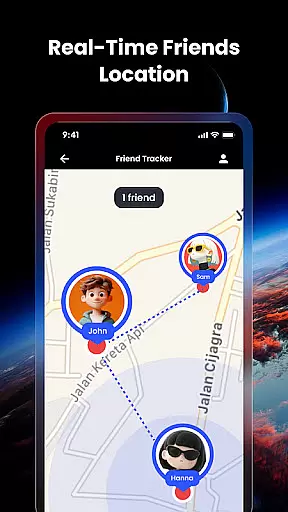
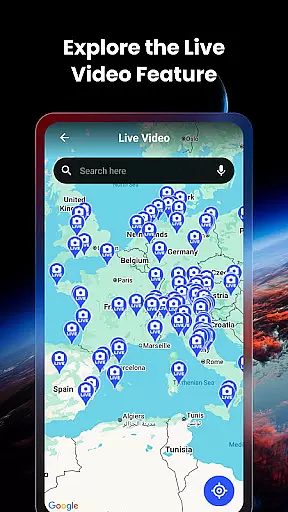

Live Earth Map & GPS Tracker is a comprehensive navigation and social connectivity app that allows users to explore the world in real-time while staying connected with friends and family. The app provides an interactive 3D map experience, live street views, and access to thousands of live cameras worldwide. Its standout feature is the real-time Friend Tracker, which lets users locate their loved ones instantly by adding a unique share code. This functionality makes it ideal for coordinating meetups, ensuring safety, or simply exploring together.
In addition to its social features, Live Earth Map & GPS Tracker offers advanced mapping tools such as GPS geotagged images, map-integrated galleries, and precise navigation capabilities. Whether you're planning a trip, navigating unfamiliar terrain, or just satisfying your curiosity about global landmarks, this app serves as an essential travel companion. By combining cutting-edge satellite technology with user-friendly features, Live Earth Map & GPS Tracker delivers both practical utility and immersive exploration.
Live Earth Map & GPS Tracker stands out with its innovative combination of navigation and social features. One of its key highlights is the Friend Tracker, which enables real-time location sharing between users. After a simple setup process where users exchange unique codes, they can view each other's locations on an interactive map alongside live camera feeds from around the world. This feature not only enhances personal safety but also fosters closer connections among friends and family.
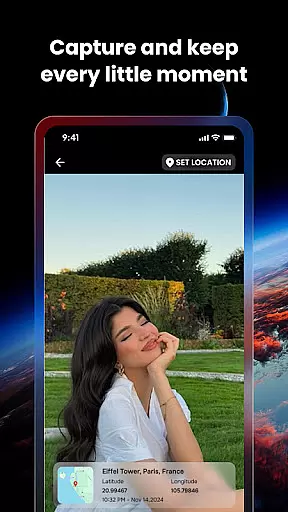
The app also excels in providing diverse mapping functionalities. Users can access live global camera feeds, explore landscapes in 3D, and utilize precise GPS navigation for seamless travel. The GPS Geotagged Camera allows users to capture images with accurate location data, while the map-integrated gallery lets them browse these photos directly on the world map. Additionally, the ability to edit images without losing geotags ensures that location information remains intact. These robust features make Live Earth Map & GPS Tracker a versatile tool for both exploration and everyday use.
Map accuracy is essential for any navigation app, and Live Earth Map & GPS Tracker excels in this area. The application provides users with real-time, high-definition satellite imagery and 3D views of landscapes, ensuring that every exploration or navigation task is based on the most precise visual data available.
The app's integration of live global camera feeds from thousands of locations further enhances its map accuracy. Users can access real-time street views, which are crucial for obtaining current information about their surroundings. This feature not only aids in navigation but also allows users to preview destinations before arrival, making travel planning more efficient and reliable.
Moreover, Live Earth Map & GPS Tracker offers an intuitive GPS system that ensures users can effortlessly navigate through busy urban centers or remote terrains. The precision of the GPS World Map guarantees that users will never miss a turn or lose track of their destination, providing peace of mind and confidence while traveling.
In summary, the map accuracy provided by Live Earth Map & GPS Tracker is unparalleled. With its combination of real-time satellite views, live cams, and street-level navigation, it delivers an all-encompassing tool that brings the world to your fingertips with exactness and clarity.
Route planning is a critical component of the Live Earth Map & GPS Tracker, designed to make your travels seamless and well-organized. By leveraging accurate GPS technology, the app offers optimal route suggestions that take into account real-time traffic conditions, ensuring you reach your destination via the fastest possible path.
Beyond basic navigation, the app's route planning feature supports coordination with friends and family. Through the Friend Tracker functionality, users can plan meetups and ensure everyone is on the same page regarding travel plans. This adds a layer of convenience and safety, particularly when exploring unfamiliar areas or coordinating group trips.
Additionally, Live Earth Map & GPS Tracker provides detailed insights into different routes, including estimated travel times and alternative paths. This empowers users to make informed decisions about their journeys, whether they're planning a leisurely trip or navigating through challenging terrains.
Ultimately, the route planning capabilities of Live Earth Map & GPS Tracker enhance both individual and social travel experiences. By combining advanced GPS navigation with innovative features like Friend Tracker, the app ensures that every journey is as smooth and enjoyable as possible.
User-friendly interface
Real-time friend tracking
Accurate GPS navigation
Interactive 3D maps
Live global camera access
Limited offline functionality
Requires constant internet
Privacy concerns with tracking
Premium features may cost extra
Occasional lag in updates

Find trails, organize your locations and navigate with offline maps.
 4.60
4.60
Navigate with your watch and keep the phone in your pocket!
4.60
America’s largest public fast charging network, with over 500 charging stations.
4.50
Find radar maps, GPS coordinates, altitude, offline maps, location, travel route
4.40
Phone Tracker and GPS Location Sharing
4.20
LIRR and Metro-North tickets and trips
4.80
Use GPS Maps and GPS Voice Navigation to find your way and get directions
4.10
Get there with the Waymo Driver — The World’s Most Experienced Driver™
4.90
Navigation, weather, offline maps & tools for smarter, safer travel planning.
4.00
Bolt is a ride-hailing app for requesting fast, safe, and affordable transport
4.80
Offline maps & GPS for hiking, travel, fieldwork & outdoor adventures
4.70
Voice GPS with driving directions, offline maps navigation GPS for safe travel
4.50
GPS navigation offers route finder, compass, translator, currency converter, etc
4.30
GPS phone tracker, family locator, secure location sharing app
4.20
Number locator, real connection map
4.10
Navigate seamlessly with Real-Time Traffic, Offline Maps, and Voice Navigation.
4.10
GPS Navigation: Get map directions and find the shortest routes to avoid delays!
4.00
Gas Station & Fuel Rewards Points
3.70
Navigate via GPS Maps of GPS Voice Navigation, driving directions to find routes
3.60


User Reviews