
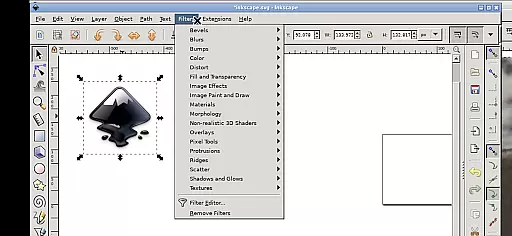
Inky is a powerful vector graphics editor that brings the full functionality of Inkscape to your mobile device. This Art & Design app allows users to create professional-grade vector images in Scalable Vector Graphics (SVG) format while maintaining the flexibility to import and export other file types. With its comprehensive feature set, Inky supports both primitive vector shapes and complex transformations.
The application enables designers to work with various design elements including rectangles, ellipses, polygons, and more, with options for color fills, gradients, and stroke adjustments. The intuitive Android-specific interface provides touch-friendly controls such as pinch-to-zoom and gesture-based navigation, making it suitable for both tablet and smartphone use. Whether you're a professional designer or hobbyist, Inky offers a complete vector editing solution on the go.
Inky stands out with its extensive range of design tools and features tailored for mobile users. The app supports all fundamental vector editing capabilities including shape creation, text manipulation, and raster image tracing. Users can apply various fill options like solid colors, patterns, and gradients, with adjustable transparency settings for both fills and strokes.
What makes Inky particularly unique is its seamless integration with Android's ecosystem. The app provides direct access to system files through useful links in the home directory, eliminating the need for cumbersome file importing/exporting. Its touch-optimized interface includes innovative gestures - one-finger taps for left-clicks, two-finger taps for right-clicks, and intuitive zoom/pan controls. Additionally, the app maintains professional-grade capabilities while being completely free and open-source under GPLv3 licensing.
Inky offers a comprehensive suite of creative tools that cater to both professional designers and hobbyists. The app provides full-featured vector graphics editing capabilities, enabling users to create intricate designs with shapes such as rectangles, ellipses, polygons, arcs, spirals, stars, and even 3D boxes.
Users can fill these shapes with solid colors, patterns, or gradients while adjusting transparency levels for unique visual effects. Inky also supports text manipulation, allowing creators to integrate typography seamlessly into their artwork.
One of the standout features is its ability to trace raster graphics, converting photos and other pixel-based images into scalable vector formats. This functionality opens up endless possibilities for graphic design on mobile devices without compromising quality or flexibility.
The canvas and format flexibility in Inky ensures that artists are not constrained by traditional design limitations. Users can manipulate their creations through various transformations including moving, rotating, scaling, and skewing objects with precision.
Inky supports multiple file formats beyond SVG, making it versatile for importing existing projects or exporting finished works for different platforms. Whether you're designing for print, web, or multimedia presentations, this adaptability streamlines your workflow.
Additionally, accessing files from across Android devices is simplified through useful links within the home directory. This means no more cumbersome importing or exporting; everything you need is readily accessible, enhancing productivity and convenience.
User-friendly interface
Comprehensive vector tools
Free and open-source
Direct file access
Cross-device compatibility
Steep learning curve
Complex for beginners
Performance intensive
Limited mobile optimization
No cloud integration

AI generated images & photos, turn your words into drawing, painting & pictures.
 4.30
4.30
Transform photos into amazing monochrome dither art with professional algorithms
4.0
Art of Combination Wear OS Watch faces (for Wear OS 5+ devices)
3.00
Easy 3D drawing design maker & creator. Model designing, Sculpting. Create&paint
4.00
Remove Background, Magic Eraser, Photo Enhancer, Story Templates, Collage Maker
4.30
Create stunning art with AI.
4.80
Turn your drawings into flipbook-style animations with simple creative tools
4.60
A luxurious gold watch face for an elegant and refined look.
4.3
Retouch photos. Create or edit images. Endless capabilities.
2.70
Novices can also easily complete diamond painting masters
4.70
Photo stitcher for automatically screenshot stitching into a long screenshot
4.70
Create color palette from Image, RGB & RYB Color wheel harmonies, Color Scheme
4.50
Painting, drawing, & sketching
4.50
Photo blender app to create overlay photos & double exposure.
4.40
Art of Combination Wear OS Watch faces (for Wear OS 5+ devices)
3.90
Paint with oils and sketch with natural tools on a realistic virtual canvas.
3.80
Sketch, trace and master AR drawing with awesome anime art!
3.30
Art of Combination Wear OS Watch Faces
3.30
Art of Combination Wear OS Watch faces
4.2


User Reviews