
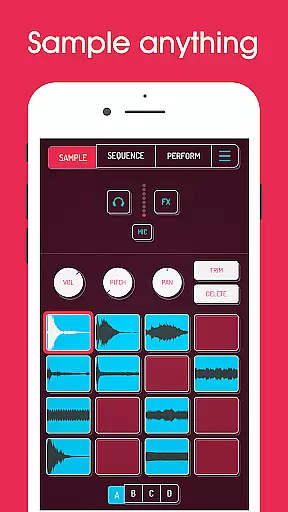
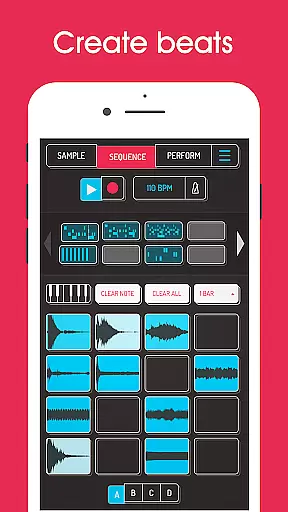
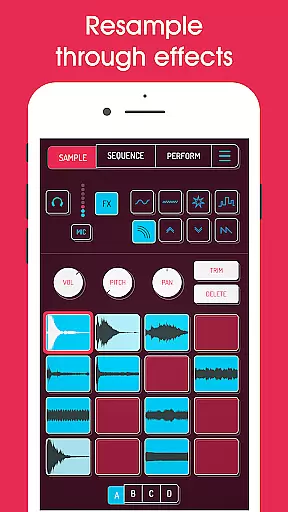
Koala Sampler is a pocket-sized music production tool designed for both amateur and professional musicians. This app allows users to record sounds through their phone's microphone or import custom samples, transforming them into beats with built-in effects. With an intuitive interface, Koala makes the music creation process seamless and enjoyable, focusing on instant track-making without getting bogged down by complex parameters.
One of the standout features of Koala Sampler is its ability to resample audio output back into the input, creating endless sonic possibilities. The app includes AI-powered sample separation, 16 high-quality effects, and MIDI compatibility, making it versatile for various music styles. Whether you're crafting beats on-the-go or producing professional-quality tracks, Koala Sampler keeps the creative flow alive while offering advanced tools like quantization, swing adjustment, and multi-mode playback.
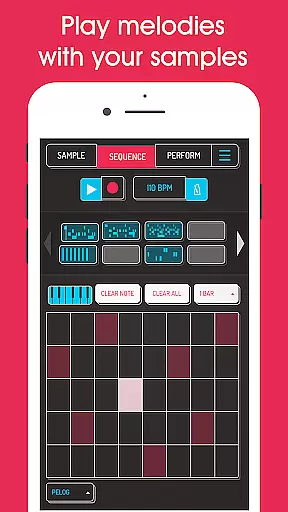
Koala Sampler offers a rich set of features that cater to diverse music production needs. Users can record up to 64 unique samples and apply one of the 16 built-in effects, ranging from reverb to synthesizer tones. The app supports advanced functionalities such as AI-driven sample separation, which splits audio into individual instruments like drums, bass, and vocals. Additionally, the high-resolution sequencer and keyboard mode provide precise control over note playback and scale adjustments.
For those seeking more customization, Koala includes professional-grade tools like time-stretching, piano roll editing, and auto-chop modes available via in-app purchase. The app also supports MIDI controllers, enabling integration with external hardware. With export options for WAV files and seamless copy-paste functionality for sequences, Koala ensures a smooth workflow while maintaining a fun and engaging user experience.
Koala Sampler offers a robust music library that allows users to record up to 64 different samples using their phone's microphone. This extensive capability ensures a vast personal music repository tailored to individual preferences.
In addition to recording, the app supports importing your own samples, thus expanding the music library with content that is personally curated and copyright-compliant. The ability to use AI for separating samples into individual instruments further enriches the library with unique creations.
With professional-quality WAV file exports, Koala Sampler not only respects copyright laws but also provides musicians and producers with the tools needed to maintain authenticity in their work. This feature is crucial for those looking to distribute or monetize their music.
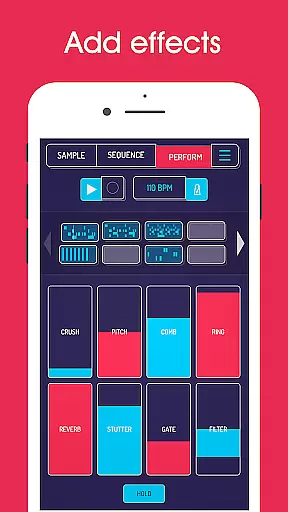
The app boasts 16 superb built-in effects that transform any sound or voice recording, ensuring top-notch audio quality. These effects range from basic enhancements like More Bass and More Treble to more sophisticated ones such as Reverb and Synthesizer.
For users seeking even greater control over their sound design, Koala Sampler includes advanced DJ Mix FX. Options like Bit-crusher, Pitch-shift, and Resonant High/Low Pass Filters allow for precise audio manipulation, catering to both amateur enthusiasts and professional DJs.
Furthermore, features included in the SAMURAI In-App Purchase, such as Pro-quality Timestretch and Piano roll editor, offer additional layers of refinement. These tools ensure that every track produced within Koala Sampler meets industry standards for audio fidelity and clarity.
Intuitive interface
Extensive sound effects
AI-powered sample separation
MIDI compatibility
Professional export options
Paid pro features
Complex for beginners
Limited free effects
Occasional bugs
High device requirements

Fun & Easy Voice Changer – Record, Edit & Add Hilarious Effects!
 4.50
4.50
Equalizer, Bass Booster and Volume Booster (Eq & Bass) improve sound quality
4.30
VB-AUDIO Software / VBAN-Receptor allows listening to any VBAN Streams
4.10
Enhance the sound quality of your devices, listen to what you want
4.50
The only true audiophile music player with Hi-Fi audio rendering and DSP engine
3.90
A sleek, no-frills player designed for true music lovers.
4.20
Travel To The Music Universe
3.40
Listen to offline music and sounds from all categories
4.70
Play your music offline without limits
4.80
Make songs with AI! Any genre, custom lyric, song generator for music creation!
4.80
Music, News & Sports Radio Tuner App. Tune in Live FM & AM Radio Stations.
4.80
Advanced 10-Band Audio Graphic Equalizer Sound Booster Pro
4.30
No wifi music app. Mp3 offline. Tuner radio, young radio music. Music downloader
4.20
The original SP-1200 experience on your iPad
4.20
Turn your Android phone into a professional audio analyser with up to 120 bands.
4.00
Offline Tunes, Unlimited Vibes
3.90
Powerful beat maker & DJ mixer to remix tracks, make music, & perform DJ mix
3.70
Control your MIDI USB or Bluetooth devices in app and avoid some trampling
3.30
Remove ads permanently from Music Visualizer
4.4


User Reviews