
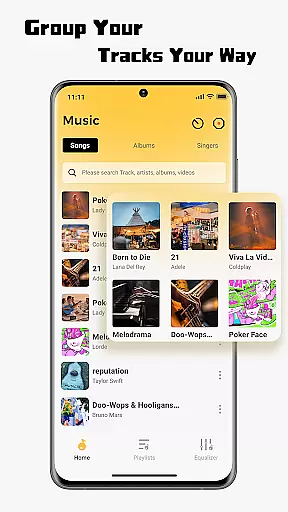
SonicNest is a premium music player application tailored for audiophiles and casual listeners alike. Designed to provide an immersive audio experience, this app combines powerful local music management with advanced playback features. Its standout functionality lies in seamless music import, enabling users to consolidate their entire music library into one accessible location.
Beyond basic playback, SonicNest offers a suite of professional-grade tools. The built-in equalizer allows users to customize sound profiles with precision, while smart organizational features ensure that your library remains tidy and easy to navigate. Whether you're looking to categorize tracks by mood, activity, or genre, SonicNest delivers a personalized and efficient solution.
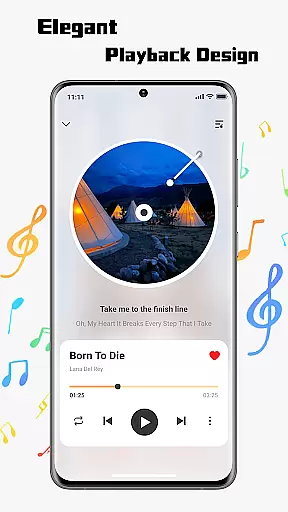
Ideal for individuals who value both aesthetics and functionality, SonicNest boasts a sleek, user-friendly interface. It caters to various listening preferences, making it suitable for workouts, relaxation, or focused work sessions. By transforming how users interact with their music collections, SonicNest ensures a richer, more engaging auditory experience.
SonicNest distinguishes itself through its robust feature set, which enhances every aspect of music playback and management. One of its core strengths is the ability to effortlessly import and organize local music files. Users can browse their device's storage, select desired tracks, and integrate them into the app's unified library system. This eliminates the hassle of juggling multiple apps and streamlines the listening process.
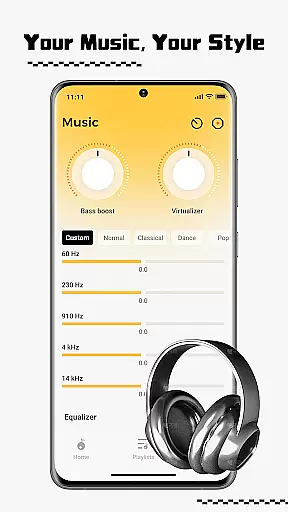
The app also includes a sophisticated equalizer that caters to discerning listeners. With customizable presets and manual adjustment options, users can fine-tune audio output to match their preferences. Whether you prefer deep bass for energetic playlists or crystal-clear treble for classical compositions, SonicNest provides the tools to achieve optimal sound quality.
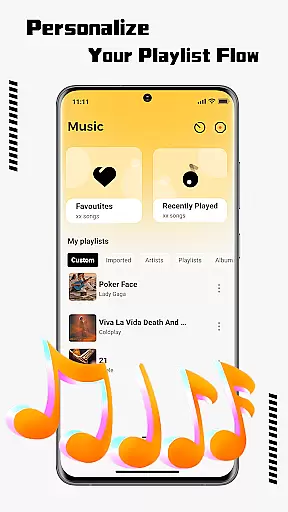
Additionally, SonicNest offers smart library management features that simplify categorization and access. Users can edit metadata, sort tracks by artist or album, and create custom playlists for specific occasions. These capabilities not only improve usability but also empower users to curate their music libraries with unprecedented flexibility and control.
When it comes to music applications, the size and authenticity of the music library are crucial factors. SonicNest offers a seamless local music import feature that allows users to effortlessly bring their personal music collections into the app. This ensures that all your tracks are centralized in one location, eliminating the need for multiple apps.
SonicNest doesn't just stop at importing music; it provides smart local music management tools. These tools help keep your library organized by allowing you to edit track details, sort by album or artist, and create custom folders. Whether you're in the mood for high-energy workout tracks or relaxing acoustic sessions, your music stays neatly categorized for quick access.
The app's commitment to copyright authenticity is evident through its support for personal music libraries. By focusing on local music management, SonicNest ensures that users can enjoy their legally acquired music without concerns about copyright infringement. This dedication to authenticity enhances user trust and satisfaction.
Audio quality is paramount for an immersive listening experience, and SonicNest excels in this area with its precision sound and built-in equalizer. The advanced equalizer allows users to fine-tune every track to perfection, ensuring that each listening session is tailored to individual preferences.
For audiophiles, SonicNest offers manual customization options that let you dial in the exact sound profile you love. Whether you want to boost the bass for workout sessions or enhance vocals for lyrical focus, the app provides the tools needed to achieve the desired audio quality. Expertly crafted presets are also available for those who prefer a more guided approach.
By prioritizing audio quality, SonicNest transforms how users experience their favorite tracks. The combination of a sleek interface and cutting-edge features like the built-in equalizer ensures that music is not only heard but felt, providing a rich and immersive auditory journey.
Intuitive user interface
Advanced equalizer settings
Efficient music import
Customizable organization
High-quality audio playback
Limited streaming options
No cloud sync feature
Heavy on storage
Few visual themes
Occasional bugs

Powerful beat maker & DJ mixer to remix tracks, make music, & perform DJ mix
 3.70
3.70
A High-Precision Audio Spectrum Analysis App
4.20
Your song collections with lyrics and chords on Android smartphones and tablets.
4.80
The ultimate media player for Android devices
3.90
Smart piano keyboard, Classical to Pop, Real-time multiplayer connection!
4.20
PowerAudio is a powerful offline music player.
4.20
Ringtone Maker is free app create ringtone from music files or your recording.
4.40
Full featured mp3 and audio player with Chromecast and Android Auto support.
4.40
Get alarms that fit your lifestyle and wake up to the sounds you love.
4.80
Make songs with AI! Any genre, custom lyric, song generator for music creation!
4.80
JBL PartyBox APP works with 110/310/710/120/320/520/Encore/Encore 2/Encore Ess 2
4.80
Responsive piano with great sounds, graphics, and songs
4.80 4.70
4.70
Most Advanced AI Song Generator and Music Creator. Rap, Pop, Rock, Gospel & more
4.70
Let your Android device with the sound effects you want
4.50
Time Guru will strengthen your internal sense of musical time via random muting.
4.30
The Music Journey in Your Hands
4.30
The official Sonos app
4.10
Music Streaming suite for Ampache, Nextcloud Music and compatible backends.
4.3


User Reviews