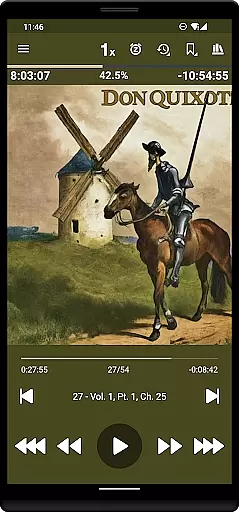
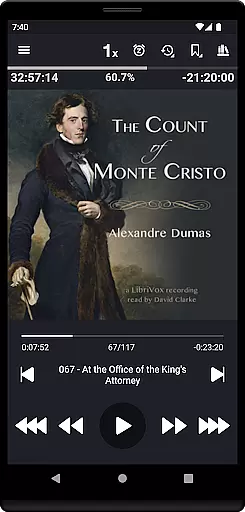
Listen Audiobook Player is a feature-rich audio player designed specifically for audiobook enthusiasts. This application allows users to play DRM-free audiobooks from various sources, including popular platforms like Librivox, Downpour, and Loyalbooks. The app supports multiple audio formats such as mp3, m4b, m4a, opus, ogg, aac, flac, and more, ensuring compatibility with a wide range of audiobooks.
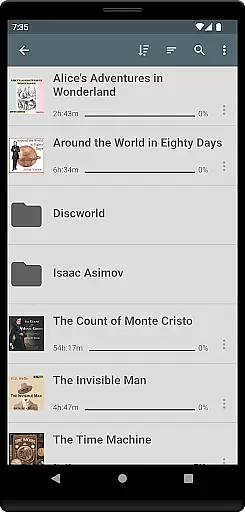
One of the standout features of Listen Audiobook Player is its folder-based library system that automatically syncs with your audiobook folder, allowing for easy organization and quick access to your entire collection. Additionally, it offers advanced playback options including variable speed playback (0.5x to 4x), pitch control, volume boost, and an equalizer. Users can also enjoy seamless integration with Android Auto, Plex, and Audiobookshelf, enhancing their listening experience across multiple devices.
The app is particularly useful for users who want a customizable and uninterrupted listening experience. With options to set bookmarks, view position history, and even convert books to Opus format for reduced file size without compromising sound quality, this app caters to both casual listeners and audiobook aficionados. Its user-friendly interface and extensive customization options make it a valuable tool for managing and enjoying a vast audiobook library.
Listen Audiobook Player boasts an array of features tailored to enhance the audiobook listening experience. One of its core functionalities is the support for numerous DRM-free audio formats, including mp3, m4b, m4a, opus, ogg, aac, flac, and more. This ensures that users can enjoy audiobooks from different sources without worrying about compatibility issues. Furthermore, the app supports embedded chapters in most audio codecs, providing a richer and more organized listening experience.
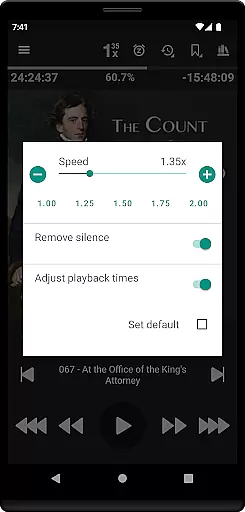
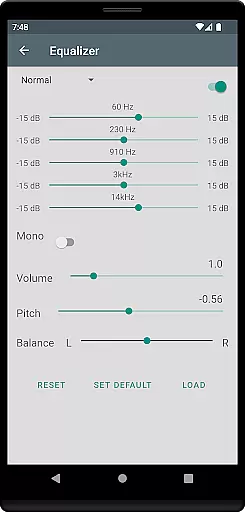
Another significant feature is the advanced playback controls. Users can adjust playback speed from 0.5x to 4x, trim silence, control pitch, boost volume, and use an equalizer to fine-tune their listening experience. These settings can be configured globally or customized on a per-book basis, offering unparalleled flexibility. Additionally, the app provides robust bookmarking capabilities, allowing users to create, view, and search bookmarks across all books, and even generate shareable audio clips from these bookmarks.
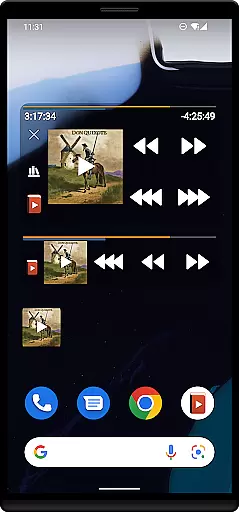
Integration with external services like Plex and Audiobookshelf further enhances the app's functionality by enabling users to download books directly from hosted servers to their local library. Other notable features include Android Auto support, Bluetooth play/pause/skip controls, sleep timers with unique options, auto-rewind based on paused time, and customizable skip times. The app also offers extensive personalization options, such as setting custom colors for progress bars, action bars, and text, making it a versatile tool for any audiobook listener.
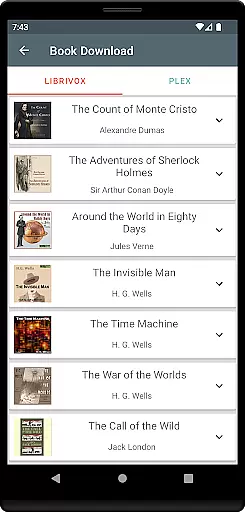
Listen Audiobook Player offers an extensive music library that includes a wide range of audiobooks from various genres. The app allows users to download curated books from Librivox, ensuring access to numerous classic titles such as 'The Count of Monte Cristo' and 'Pride and Prejudice'. This vast selection caters to diverse tastes and preferences.
The emphasis on copyright authenticity is evident as the app sources DRM-free content from reputable sites like Librivox, Downpour, and Loyal Books. By doing so, it guarantees that all audiobooks are legally obtained and free from any copyright restrictions, providing peace of mind for users who want to enjoy their favorite books without legal concerns.
Moreover, the app supports multiple audio formats including mp3, m4b, flac, and more, which ensures compatibility with a broad spectrum of audiobooks available online. This flexibility in format support enhances the user experience by allowing seamless playback without worrying about format compatibility issues.
One of the standout features of Listen Audiobook Player is its superior audio quality options. Users can enjoy variable playback speeds ranging from 0.5x to 4x, enabling them to adjust the listening pace according to their preference or comprehension level. This feature is particularly beneficial for those who wish to consume content faster or need a slower speed for better understanding.
In addition to speed control, the app provides advanced audio settings such as trim silence, pitch control, volume boost, equalizer, and balance adjustments. These options allow users to customize their listening experience precisely how they like it, whether they prefer enhanced bass or need to increase clarity through pitch adjustments.
Furthermore, the inclusion of embedded chapters for most audio codecs ensures that listeners can easily navigate through long audiobooks without losing track of their progress. Coupled with high-quality cover art sourced either from embedded files or downloaded directly within the app, these features collectively contribute to an immersive and enjoyable auditory experience.
User-friendly interface
Wide format support
Advanced playback options
Seamless integrations
Customizable experience
No cloud storage
Limited language support
Complex for beginners
Occasional bugs
Heavy on resources

Tune in to the greatest hits on UK Radio | The home of Capital, Smooth & Heart.
 4.90
4.90
Most Advanced AI Song Generator and Music Creator. Rap, Pop, Rock, Gospel & more
4.70
Listen to live FM radio stations, sports, music and news on global radios online
4.70
Bass Booster Pro takes auto-equalizing to the next level!
4.30
Bass Booster & Volume Equalizer Pro improves your music and video sound quality
4.60
Learn to play the piano using falling notes!
3.80
Offline Music Player&MP3 Player with themes, equalizer, lyrics, music play mode
4.60
The iconic iOS metronome app is now on Android.
3.70
MilkDrop for Android TV
3.00 4.70
4.70
Performance-Synthesizer & Multi-Track-Sequencer, polyphonic + multi timbral!
4.70
Formerly known as Spotistats! View your top tracks, artists, albums and more!
4.40
DJ Music Mixer - DJ Remix: remix songs, make beat music & record mix of DJ.
4.40
Ringtone Maker is free app create ringtone from music files or your recording.
4.40
The Music Journey in Your Hands
4.30
Learn and play 2M+ music tabs & chords on guitar, ukulele, bass, and more
4.30
Next generation modular control surface
4.10
Control your MIDI USB or Bluetooth devices in app and avoid some trampling
3.30
The Minimalistic Premium Music Player. Handmade with passion for music
2.20


User Reviews