

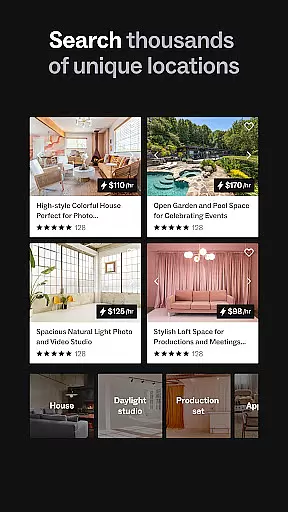
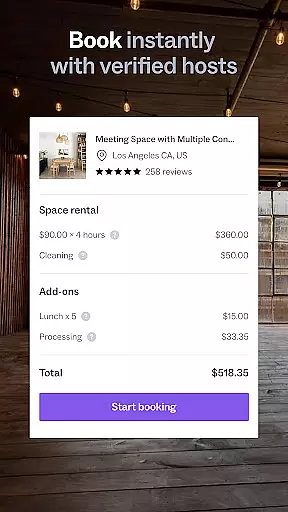
Peerspace is a leading platform for booking unique spaces by the hour, designed specifically for events, meetings, and creative projects. The app provides access to an extensive network of venues including photo studios, meeting rooms, lofts, galleries, and more, spanning cities worldwide. Whether you're planning a corporate event or a personal gathering, Peerspace connects you with local hosts who offer their spaces for rent. This flexibility allows users to host events in extraordinary locations while enabling hosts to earn extra income effortlessly.
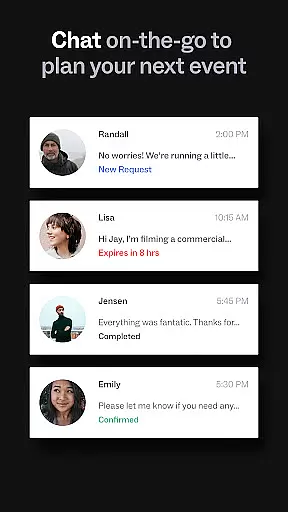
In addition to its booking capabilities, Peerspace offers tools for seamless communication and management. Users can browse spaces, connect directly with hosts, and manage bookings from their mobile devices. Hosts benefit from customizable listing options, allowing them to set pricing and availability according to their preferences. With its user-friendly interface and innovative approach to space rental, Peerspace stands out as a valuable resource for both guests and hosts seeking unconventional venues.
Peerspace distinguishes itself through several key features that enhance the user experience. First, the app's intuitive browsing system lets users filter spaces based on location, size, amenities, and purpose, ensuring they find exactly what they need. Each listing includes high-quality photos, detailed descriptions, and transparent pricing, empowering users to make informed decisions. Additionally, the app supports direct messaging between guests and hosts, streamlining communication and facilitating smooth coordination.
For hosts, Peerspace offers robust tools to manage listings effectively. They can customize rental terms, specify permitted activities, and adjust hourly rates at their discretion. Payments are processed securely through the app, with earnings deposited directly into the host's bank account. Furthermore, Peerspace's notification system keeps users updated on booking requests, messages, and other important updates. These comprehensive features ensure a reliable and efficient platform for discovering and renting unique spaces tailored to various needs.
Task creation and detail customization are essential features for event planning applications like Peerspace. This functionality allows users to tailor each booking with specific requirements, ensuring that every event is unique and meets the organizer's expectations.
Peerspace offers a streamlined process where users can browse various spaces and customize details directly through the app. Whether it's setting up meeting rooms or arranging backyard gatherings, hosts can specify amenities, capacity, and availability, while guests can request particular layouts or equipment setups.
The benefit of this feature is the ability to create personalized event experiences. Users can adjust every aspect of their booking, from hourly durations to special requests, enhancing both guest satisfaction and host flexibility. This level of customization ensures that all events, whether personal or professional, are executed seamlessly.
Ultimately, the task creation and customization capabilities of Peerspace empower users to design events that align perfectly with their needs. By providing detailed options and clear communication channels between hosts and guests, Peerspace sets a new standard in event space rental, making extraordinary events accessible to everyone.
Reminder settings play a crucial role in event management apps such as Peerspace by ensuring timely notifications and updates. This feature helps users stay organized and on schedule, preventing missed bookings or last-minute changes.
Peerspace incorporates reminder settings that automatically notify users of upcoming events, new messages, or booking requests. These reminders can be customized according to user preferences, allowing them to choose notification times and types that best suit their schedules.
For users, this means never missing an important update or event detail again. Hosts receive alerts about potential bookings and inquiries, enabling prompt responses, while guests get reminders about their reservations and any additional information needed prior to the event date.
By integrating robust reminder settings, Peerspace enhances user engagement and reliability. The automatic notifications ensure smooth coordination between hosts and guests, contributing to successful events and fostering trust within the Peerspace community.
User-friendly interface
Wide variety of spaces
Secure payment processing
Direct messaging with hosts
Customizable listing options
Limited rural availability
Service fees apply
Variable host responsiveness
No instant booking for all
Dependent on host approval

PheedLoop Go! is the mobile event app for events powered by PheedLoop.
 4.40
4.40
Community for Mods, Addons, Melsaves, Melmods for Melon Playground
4.1
Find tickets to upcoming concerts, sports events, festivals, shows, attractions
4.70
Wedding planner app with wedding venues, wedding checklist, countdown & budget.
4.60
Everything you need for the Best Thursday Ever.
4.40
The Official App
3.70
Text message invitations for birthday party, wedding, graduation, baby shower +
4.60
Birthday Greetings provides Birthday Card, Frames, Gifs & Father's day Wishes
4.80
TodayTix is the easiest way to get tickets to the best shows in your city.
4.90
Fantasy of Lights Event App
5.00
Beautiful invitation cards + easy RSVP tracking for any event. Design Invites.
4.80
Here you can choose tickets for films, performances, concerts and other events
4.60
Greeting card maker with photos best app| Birthday cards| All wishes eCards FREE
4.50
Manage all your events, leads, ticketing, payments and check-ins.
4.30
Buy and sell tickets to sports, concerts, theater, festivals, and comedy events
4.10
Microsoft Ignite is an event that showcases latest advancements in technology
4.00
Purchase line-skip passes, drinks, cover, and more at bars and clubs
3.50
RAISE-365 makes fundraising easy and fun!
3.20
TV Garden - World Live TV : Play & cast your videos seamlessly!
3.20


User Reviews