


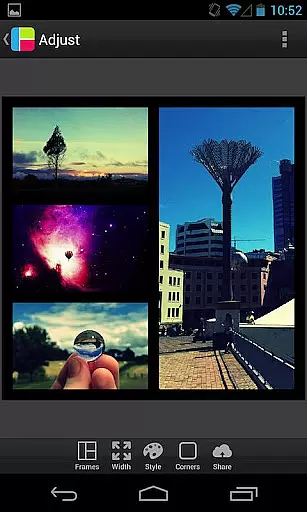
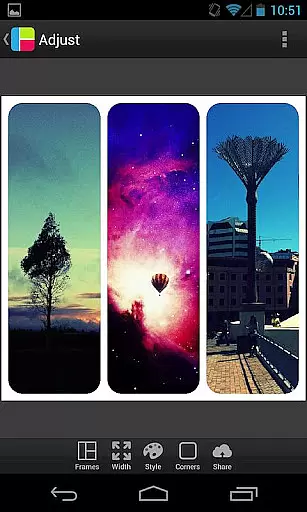

PicFrame is a versatile photography app that allows users to create stunning photo collages by combining multiple images into customizable frames. With 36 adjustable frame layouts, users can include up to five photos in a single frame, offering endless creative possibilities. The app provides advanced editing tools such as rounded corners, shape customization, and precise control over borders, colors, and patterns. Whether you're looking to enhance your social media posts or create personalized gifts, PicFrame delivers professional-quality results with ease.
The app's intuitive interface makes it accessible for both casual users and photography enthusiasts. Key features include adjustable photo effects, brightness/contrast/saturation controls, and precise zoom functionality. Users can save their creations in multiple resolutions and instantly share them across various platforms including Instagram, Facebook, and Twitter. PicFrame stands out through its attention to detail and comprehensive customization options, making it an essential tool for anyone interested in digital photography and visual storytelling.
PicFrame distinguishes itself through its extensive feature set tailored for creative photo editing. The app offers 36 fully adjustable frame templates that can be customized with remarkable precision - users can modify inner frame borders, adjust corner radius, and control border width to achieve their desired look. Advanced shape manipulation allows users to transform photos into circles, hearts, hexagons, and other unique forms, while the color picker tool provides unlimited border color options.
The application supports 52 background patterns and includes sophisticated image adjustment tools for brightness, contrast, and saturation control on a per-photo basis. Additional professional-grade features include six aspect ratio options (including popular 1:1 square format), photo rotation capability, and pinch-to-zoom functionality. These comprehensive tools enable users to create highly personalized and professional-looking photo compositions that stand out on social media platforms and in personal projects.
All created frames can be saved in multiple resolutions and easily shared across various applications, making PicFrame suitable for both casual sharing and professional use cases. The combination of these features in one application creates a powerful tool for visual content creation.
Real-time capture and preview functionality is essential for photography apps as it allows users to see exactly what the final image will look like before taking a photo.
PicFrame offers this feature by enabling users to adjust various settings such as brightness, contrast, and saturation of each photo in their frame. This ensures that every picture fits perfectly into the desired aesthetic without any guesswork.
Users can also zoom in or out using pinch gestures and drag photos around within the frame, providing precise control over composition. These real-time adjustments help create unique and visually appealing frames that stand out.
The ability to instantly see changes applied to photos enhances user experience, making photo editing intuitive and enjoyable. With these capabilities, PicFrame empowers users to produce professional-quality collages effortlessly.
AI beauty and enhancement features are becoming increasingly popular in photography apps due to their ability to enhance images naturally while maintaining authenticity.
PicFrame incorporates advanced AI algorithms that allow users to apply adjustable photo effects, shapes, and patterns to their frames. The app provides 52 background patterns and customizable borders with rounded corners, ensuring that enhancements complement the original photos rather than overshadow them.
Additionally, users can change the shape of their photos to circles, hearts, hexagons, and more, adding creative flair without compromising on natural appearance. The easy-to-use color picker further refines the border colors, enhancing overall visual harmony.
By focusing on natural enhancement, PicFrame ensures that edited photos retain their genuine essence, offering users a seamless blend of creativity and realism in their photo projects.
User-friendly interface
Extensive customization options
High-quality output resolution
Multiple social sharing options
Regular feature updates
Limited free features
Occasional performance lag
Subscription required for premium
Learning curve for beginners
Some ads in free version

A collection of tools and reference tables for DPs, ACs, DITs and Operators.
 4.70
4.70
Gallery show photo, video, slideshow, is perfect 3D effect private photo albums.
4.80
HD Photo gallery and photo manager to edit, hide private photos, videos & albums
4.0
Application for remote controlling DSLR
3.00
Photo editor: AI filters, photo enhancer, pic collage maker, AI art generator.
4.80
Add a dreamy vibe to your selfies and videos with soft style filters
4.1
Pro version: AR sun/moon tracker for any date. Tool for photographers & planners
4.90
Discover & download millions of art for The Frame TV or Hisense CanvasTV
4.60
Edit photos with the picture generator: PS2 & AI Clay filters, cartoon effects.
4.50
Amazing Photo Effects - The most fun you can have with your photos!
4.70
Enhance, upscale, and transform your images — on your device, without limits
4.70
Cut and paste photo editor & eraser to customize photos easy and swap faces fun
4.50
HD Camera Pro with HD Video shooting, Panorama, Photo editor , Beauty Camera.
4.50
Create AI photos & videos with Enhancer; restore, fix, beautify, enhance photos
4.50
AI portrait generator and polaroid AI selfie, fun AI generated AI photo creator!
4.30
Smart, light, and fast photo and video gallery
4.30
AI-powered video creator by MiniMax - Where ideas meet cinema
4.20
Catch sunlight, sunrise sunset times and sun phases with the AR sun tracker.
4.10
Photo editor: face & body editor, beauty cam, filters and quality enhancer.
4.00


User Reviews