

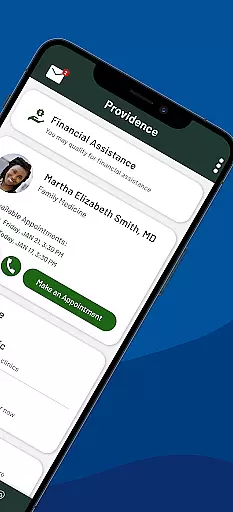
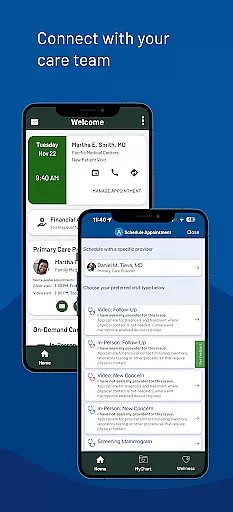
Providence is a comprehensive medical application that provides users with 24/7 access to healthcare services. The app serves as a centralized platform for managing appointments, accessing medical records, and paying bills. It also offers features like virtual visits through ExpressCare, finding urgent care clinics, and personalized health recommendations.
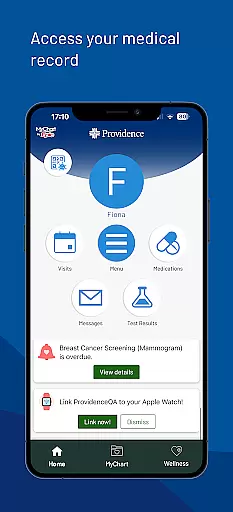
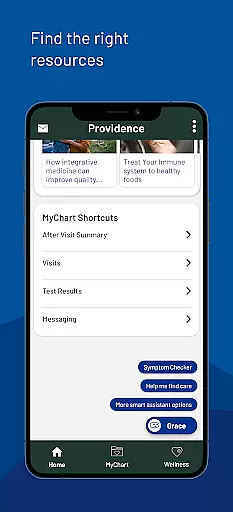
One of the standout capabilities is its integration with MyChart, allowing seamless access to personal health information. Users can communicate with their care team, view lab results, and receive tailored health reminders. Whether you need immediate care or want to stay informed about your health, Providence ensures all resources are just a tap away.
This app is particularly useful for individuals within the Providence healthcare network, spanning multiple states including Alaska, Washington, and California. By consolidating various healthcare services into one intuitive interface, Providence simplifies the management of personal and family health needs.
Providence boasts an array of features designed to enhance user experience in managing healthcare. Firstly, it allows users to connect directly with their care team by booking appointments, viewing post-visit instructions, and messaging healthcare providers. This direct line of communication ensures that users can easily clarify doubts and receive timely advice.
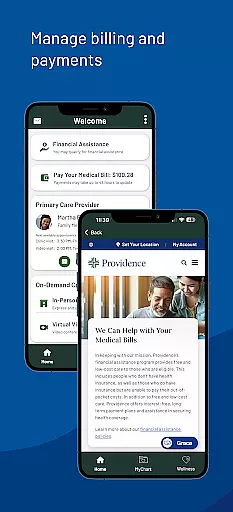
Another significant feature is the ability to access medical records online. Users can retrieve lab results, read detailed visit notes, and even share these documents with other healthcare professionals. Additionally, the app provides tools for financial management such as viewing and paying medical bills, along with checking eligibility for financial assistance programs.
The app also includes a chatbot named Grace, which helps users navigate self-service options and find relevant health resources. With individualized recommendations for health programs and educational content created by experts, Providence empowers users to take proactive steps towards better health management.
In the realm of digital health services, the credibility of medical content is paramount. The Providence app ensures that all information presented to users is thoroughly vetted by healthcare professionals and experts in their respective fields. This rigorous review process guarantees that whether you are accessing lab results, reading visit notes, or exploring new health programs, the data is both accurate and reliable.
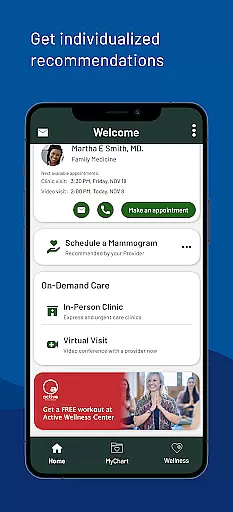
The app provides individualized recommendations for health programs and resources, curated by Providence experts. These recommendations are based on your personal health information and preferences, ensuring relevance and applicability to your unique health journey. By leveraging expert knowledge, the app delivers content that is not only informative but also tailored to support your healthcare needs.
Furthermore, the availability of relevant, health-related content created by Providence experts enhances user engagement and education. This content is designed to empower users with knowledge, enabling them to make informed decisions about their health. With trusted resources at their fingertips, users can feel confident in managing their wellbeing through the Providence app.
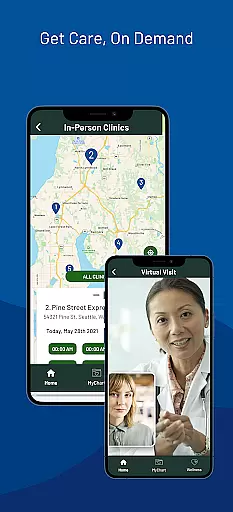
Teleconsultation has become an essential component of modern healthcare, offering convenience without compromising on quality. The Providence app excels in providing high-quality virtual visits through its ExpressCare service. Users can connect with healthcare providers from the comfort of their homes, ensuring timely medical advice and reducing the need for physical visits.
The app facilitates finding local urgent care clinics and even allows users to check wait times and queue remotely before heading out. This feature optimizes the patient experience by minimizing wait times and streamlining clinic visits. Additionally, the ability to book appointments and communicate directly with care teams enhances the overall teleconsultation process, making it more efficient and user-friendly.
By integrating these advanced teleconsultation features, the Providence app ensures that users receive comprehensive and continuous care. Whether through virtual consultations or streamlined clinic visits, the app maintains high standards of teleconsultation quality, ultimately leading to improved patient outcomes and satisfaction.
User-friendly interface
Comprehensive health management
Integrated telemedicine services
Personalized health recommendations
Secure access to medical records
Limited to Providence network
Occasional login issues
Advanced features require account
Geographical service restrictions
Potential privacy concerns

Spruce is the leading platform for HIPAA-compliant communication and care.
 4.90
4.90
Hearing aid app for Android solves your hearing problems.
4.00
Patient Health Portal
4.20
Be more confident prescribing homeopathy at home for your family.
4.80
Master AEMT with 1,400+ study items, TEIs, practice tests, and scoring.
4.10
The Better Pharmacy Experience
4.90
Zepbound & Mounjaro support & resources for savings, tracking & more
3.90
This app is simply 1 book (also large app) and 17 other apps combined into 1
4.70
Pelvic Floor Muscle Exercises
4.80
Donating blood and platelets is easier than ever with The American Red Cross.
4.80
Pelvic Floor Muscle Exercises
4.80
The NightOwl Companion app allows you to interact with the NightOwl sensor.
4.70
Remote, medical-grade heart care at your fingertips
4.70
Take your aphasia therapy to the next level with 4 evidence-based advanced apps
4.70
Download the PulsePoint app and use your CPR skills to save a life!
4.60
Perform pure-tone audiometry and a speech intelligibility test on your phone.
4.50
Voice pitch monitor for speech therapy, LSVT, Parkinson's, singing & trans
4.30
Explore human anatomy with this rich learning experience.
4.00
700 questions, 2 full exams, Predictive Scoring—your key to NREMT success!
3.90


User Reviews