
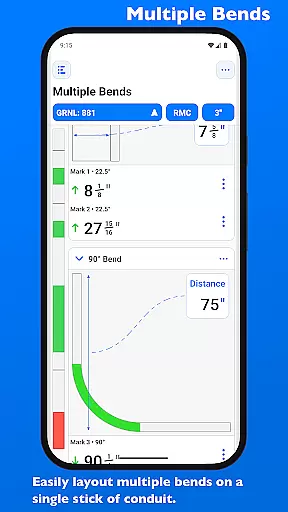
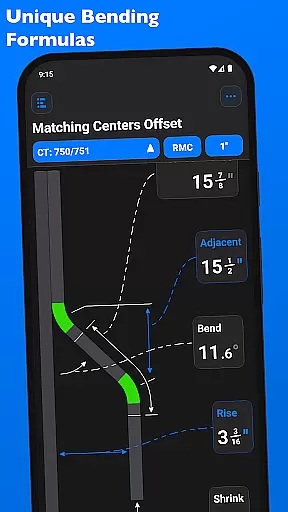
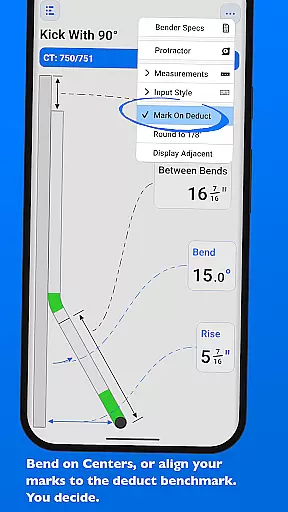
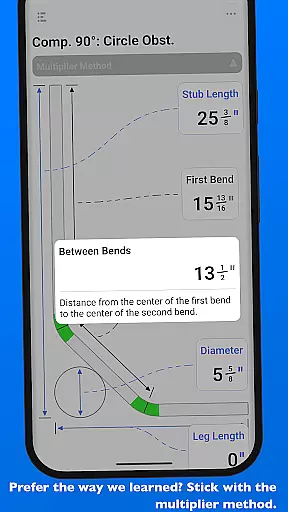
QuickBend is a cutting-edge conduit bending calculator app designed for precision and ease of use. It stands out by offering the most accurate measurements, accounting for shoe and bender radius, conduit type, and size diameter. The app employs a centerline radius algorithm to ensure rigorous and field-tested calculations, making it an indispensable tool for electricians and DIY enthusiasts alike.
Beyond its core functionality, QuickBend provides comprehensive information and documentation for individual bends. Its intuitive interface allows users to toggle between inches and centimeters, switch input styles, and preview bend feasibility through color-coded feedback. With support for various bends and the ability to layout multiple marks on a single conduit, this app streamlines complex tasks while saving time and reducing errors.
Whether you're a seasoned professional or a novice, QuickBend's visually appealing design and innovative features cater to all skill levels. By integrating tools like QuickCheck and allowing detailed customization of bender specifications, it ensures maximum productivity and convenience in every project.
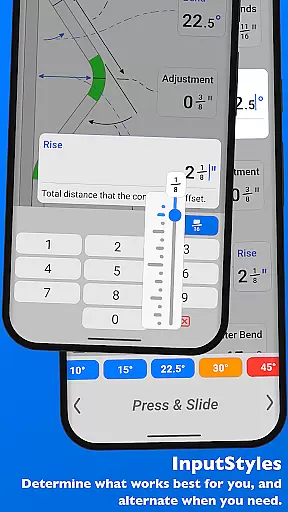
QuickBend distinguishes itself with advanced features tailored for efficiency and accuracy. One standout aspect is its dual-input method: users can choose between a number pad for direct entry or a slider bar (Press & Slide) for dynamic adjustments. This flexibility caters to different working styles, ensuring seamless interaction regardless of user preference.
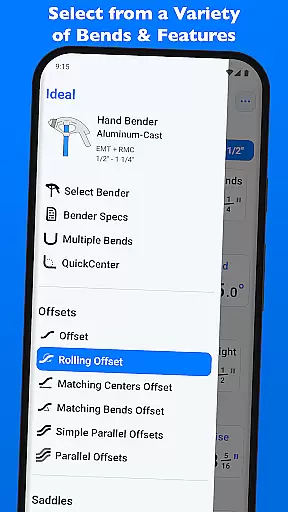
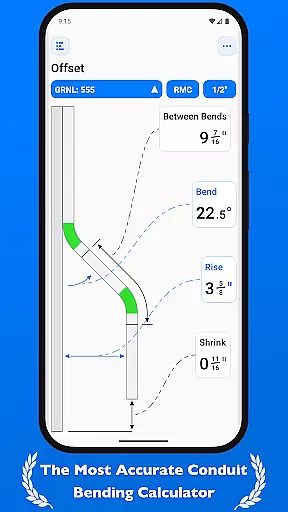
The app supports an extensive range of bends, including Offset, Rolling Offset, Three-Point Saddle, and more. Each calculation considers critical factors such as shoe radius, bender type, and conduit dimensions, delivering reliable results every time. Additionally, QuickBend incorporates visual indicators—like red text for impossible bends and orange for unlikely ones—providing immediate feedback during data entry.
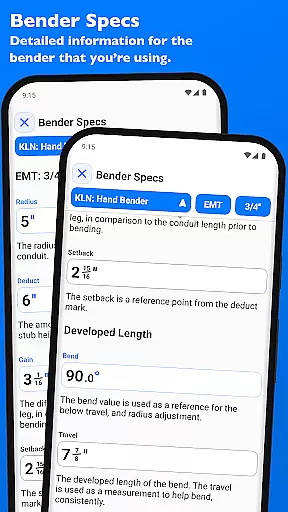
Another key feature is the ability to manage multiple benders within the same interface. Users can pin frequently used benders, edit detailed specs, and visualize adjustments for any degree up to 90°. These capabilities not only enhance usability but also empower professionals to optimize their workflow without unnecessary navigation or complexity.
QuickBend revolutionizes task management for electricians and professionals working with conduits by offering precise calculations and comprehensive documentation. This app is designed to streamline the bending process, ensuring that every measurement accounts for the radius of the shoe and bender, conduit type, and size diameter.
The app's centerline radius algorithm ensures maximum accuracy, rigorously tested for reliability in the field. Whether you're dealing with Offset, Rolling Offset, or complex Compound 90u00b0 bends, QuickBend provides detailed information on each, allowing users to execute their tasks with confidence and precision.
With features like QuickCheck, users receive instant feedback on bend feasibility, indicated through intuitive color changes. This functionality not only prevents costly mistakes but also significantly enhances productivity by enabling users to verify bend possibilities before finalizing any calculations.
While QuickBend focuses primarily on providing accurate bending calculations, its utility extends to reliable cross-device functionality, ensuring that your data is accessible wherever you need it. The app supports various input methods, including a number pad and slider bar, catering to different user preferences and enhancing synchronization across devices.
QuickBend allows seamless toggling between measurements in inches and centimeters, accommodating global users' needs. This flexibility ensures that whether you're working on a project site or planning in the office, your data remains consistent and reliable across all platforms.
Additionally, QuickBend offers the ability to pin frequently used benders, making it easy to switch between them without excessive navigation. This feature, combined with detailed 'Bender Specs' visualization, ensures that your work remains uninterrupted, regardless of the device you're using, thus maintaining high levels of productivity and efficiency.
Highly accurate calculations
User-friendly interface
Comprehensive bend support
Real-time error detection
Customizable bender settings
Premium version required
Steep learning curve
Limited free features
No offline mode
Occasional bugs

Auto-shutoff Alarm with Sunrise, Sunset & Fixed Options.
 3.50
3.50
A simple, portable logger for POTA, SOTA, Field Day, and more
4.5
Mind Map and brainstorm, note taking and idea collection
4.80
Easiest event planning, volunteer signups & parent teacher conference scheduling
2.20
PDF scanner & converter for files, photos, lottery, QR codes. One swipe away!
4.50
Activate Two Factor Authentication (2FA or Multi OTP), Password manager and more
4.10
A simple Whisper AI keyboard for reliable speech transcription and rewording
4.60
To do list widget with a notebook organizer, checklist, simple shopping list
4.60
Understand anything with a personalized AI research assistant
4.80
Secure, fast, open-source, VNC and SSH Remote Desktop for Windows, Linux and Mac
4.70
Direct Chat without saving contacts & Dual WA Account on Single Device
4.70
App lock - lock apps with fingerprint, password, pin or pattern, protect privacy
4.70
Calendar 2023 widget for Android. Appointment scheduler, planner, and reminder
4.60
Fill, sign & send docs, forms, agreements & contracts via electronic signature.
4.50
CalenGoo is a very flexible and feature-rich calendar app
4.40
A Pixel Art watchface inspired by other iconic 90s designs for Wear OS devices!
4.40
Secure your apps with lock screens, use custom themes and different features.
4.40
The ultimate file manager for rooted devices. The original and still the best.
4.00
Code on-the-go with VScode for Android. Edit,debug and collaborate from mobile!!
3.10


User Reviews