
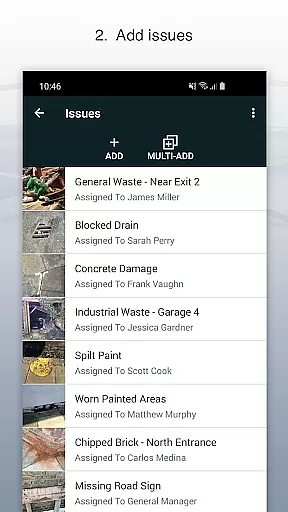
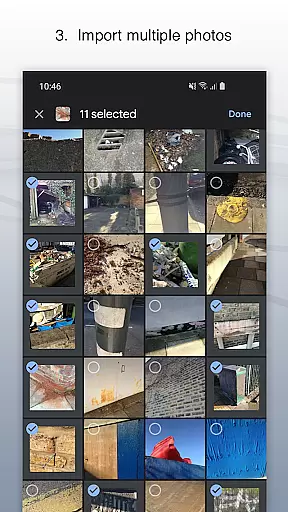
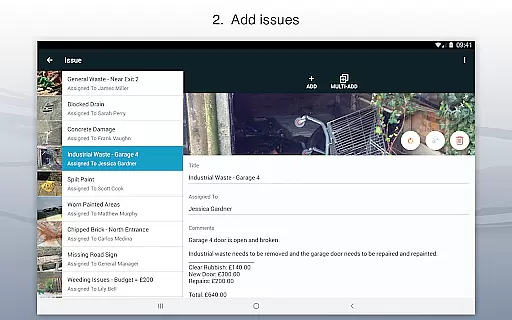
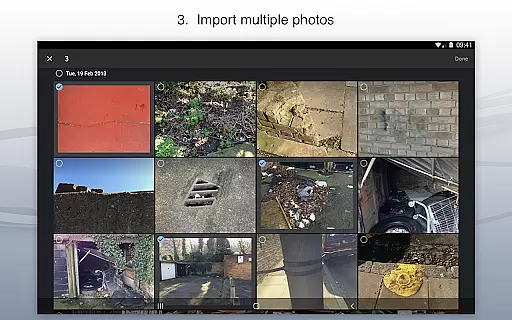
Site Audit Pro is a powerful productivity tool designed to simplify the auditing process for businesses across various industries. This mobile application allows users to efficiently record issues by capturing photos, adding relevant titles, assigning tasks to specific individuals, and including detailed comments. The app's intuitive interface enables users to annotate images, highlighting critical information directly on the photos.
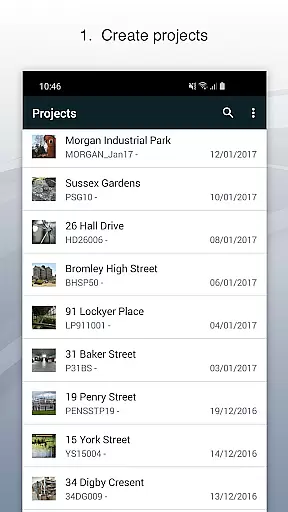
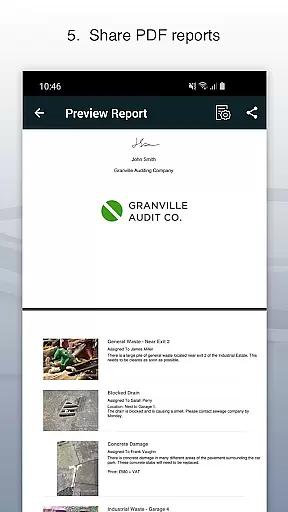
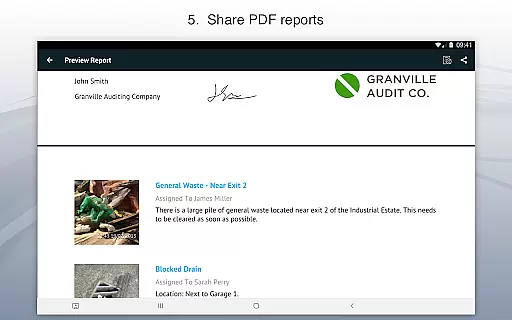
The application supports comprehensive project organization, letting users categorize identified issues into distinct projects while incorporating specific site and client details. One of Site Audit Pro's standout features is its ability to instantly generate and share professional audit reports in PDF format via email or cloud services like Dropbox. This functionality eliminates the need to return to the office for report creation, significantly enhancing operational efficiency.
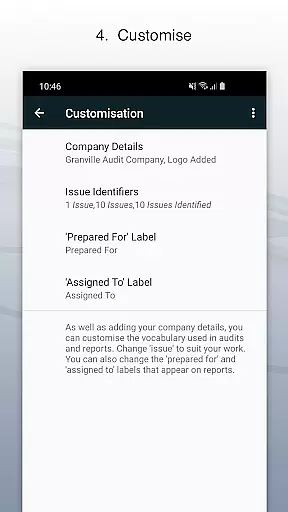
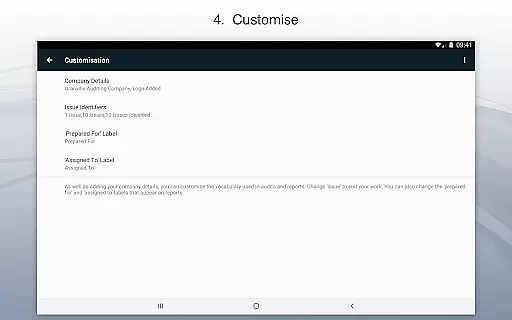
Designed for versatility, Site Audit Pro serves multiple purposes beyond traditional audits, including safety inspections, snagging lists, punch lists, and quotation preparation. Its customizable nature allows businesses to tailor reports with company logos, auditor signatures, and industry-specific terminology, making it an invaluable tool for improving productivity and streamlining reporting processes.
Site Audit Pro distinguishes itself through its robust feature set tailored for professional auditing needs. The app's core functionality revolves around its comprehensive issue recording system, which combines photo documentation with detailed annotations. Users can draw directly on images to emphasize crucial findings, ensuring that no important detail is overlooked during the auditing process.
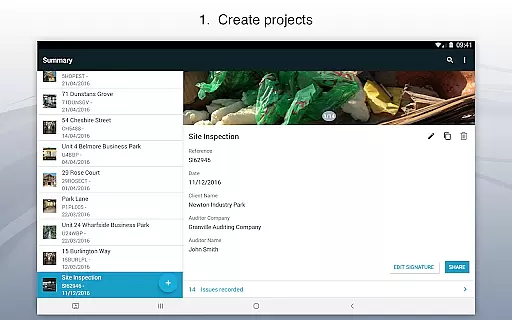
A key differentiator is the app's sophisticated project management capabilities. Site Audit Pro enables users to create structured projects, each with its own set of parameters including site specifications and client information. The application's reporting engine stands out with its eight customizable professional templates, allowing businesses to maintain consistent branding while adapting content to their specific industry requirements.
The app's sharing functionality represents another significant advantage, offering seamless integration with popular document-sharing platforms. Users can distribute polished reports immediately after completing their audits, maintaining professional standards while saving valuable time. Additionally, the app's adaptability across various use cases - from safety inspections to snagging lists - demonstrates its versatility in addressing diverse business needs.
Site Audit Pro excels in core task management by providing a comprehensive suite of tools designed to streamline the auditing process. The app allows users to record issues efficiently, attach relevant photos, and assign tasks to specific team members. This ensures that every identified issue is accounted for and directed to the appropriate personnel for resolution.
The application's ability to organize issues into distinct projects enhances its task management capabilities. Users can input site and client details pertinent to each project, ensuring that all data remains contextually relevant and easily accessible. This structured approach not only simplifies task organization but also significantly reduces the time required to manage complex audits.
Furthermore, Site Audit Pro offers features such as photo annotation, which allows users to highlight critical information directly on images. This functionality aids in delivering precise instructions and clarifications, thereby improving communication and reducing the likelihood of errors during the audit process.
Ultimately, the app's robust task management system empowers businesses to conduct audits and inspections more swiftly and manage them with greater ease. By integrating these advanced task management features, Site Audit Pro helps over 40,000 businesses worldwide enhance their productivity and operational efficiency.
Cross-device synchronization is a pivotal feature of Site Audit Pro, ensuring that all data captured during audits and inspections is reliably synced across multiple devices. This functionality allows teams to access the most up-to-date information regardless of their location, fostering collaboration and coherence among team members who may be working remotely or in different areas of a site.
The app supports instant sharing of professional audit reports without the need to return to the office. This seamless synchronization capability means that reports generated on one device are immediately available on others, streamlining workflows and expediting decision-making processes. Whether sharing via email or cloud services like Dropbox, users can distribute PDF reports quickly and efficiently.
Moreover, Site Audit Pro's synchronization extends to its customization options, enabling users to maintain consistent branding and report formats across all devices. Personalized details such as company names, logos, and auditor signatures are uniformly applied, ensuring that every shared document reflects the organization's professional standards.
By prioritizing reliable cross-device synchronization, Site Audit Pro facilitates a cohesive and organized auditing experience. Teams benefit from real-time updates and unified access to essential data, making audits and inspections not only faster but also more accurate and manageable.
User-friendly interface
Customizable reporting
Offline functionality
Cloud integration
Professional templates
Limited free version
Subscription required
Learning curve
Occasional bugs
Premium pricing

Experience Reading - Night Mode for Documents
 4.40
4.40
Unlock AutoNotification
4.00
Professional calendar app for Google Calendar, MS Outlook & Exchange
4.20
A simple, portable logger for POTA, SOTA, Field Day, and more
4.1
Simple and reliable communication between inmates, friends and family
3.20
All document reader, all in one file viewer read PDF, DOCX, XLS, PPT, TXT files.
4.60
Translate text/voice/photos in 150+ languages. Offline & fast translator app.
4.50
Subscribe to Webcal & .ics calendars and keep them up-to-date!
4.50
Set up, print, and get support—in one place
4.20
QuickBooks Workforce lets teams view pay info and track time in one place.
4.70
App Lock with fingerprint, password: Lock apps & hide photos with lock screens
4.60
To do list widget with a notebook organizer, checklist, simple shopping list
4.60
Tally and goal counter for Wear OS & mobile
4.50
Secure your apps with lock screens, use custom themes and different features.
4.40
Automates browsing any website and notifies you of important changes or events
4.30
Activate Two Factor Authentication (2FA or Multi OTP), Password manager and more
4.10
Make your handwriting beautiful, even more than pen on paper.
3.60
ID.me Authenticator is a simple and free Two Factor Authentication solution
3.50
IP Camera Viewer - Android TV : RTSP Surveillance camera viewer for Android TV
4.1


User Reviews