
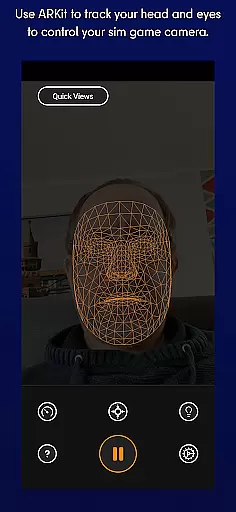
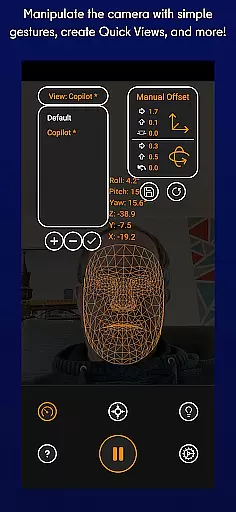
SmoothTrack is an innovative tool that revolutionizes the way you interact with simulation games by providing precise 3D head tracking. This app leverages the AR capabilities of your device to intuitively control the in-game camera, offering a near-magical experience where slight head movements translate into immediate changes in perspective. Compatible with any game supporting TrackIR, FreeTrack, or similar protocols, it opens up new dimensions in popular titles like Microsoft Flight Simulator, Elite: Dangerous, and Euro Truck Simulator 2.
The application's unique selling point is its ability to deliver this enhanced gaming experience without requiring additional equipment such as headsets. By simply setting up your device to capture your face, SmoothTrack allows for seamless interaction through natural head motions. Whether you're leaning forward to inspect your cockpit closely or shifting your gaze slightly to check the overhead panel, the app ensures that your virtual environment reacts instantly and accurately.
Designed with user convenience in mind, SmoothTrack also features adjustable modes to suit different lighting conditions, including a dark mode that conserves battery life and protects OLED screens, alongside a bright mode for optimal visibility in dimly lit spaces. With dedicated support channels available via Discord and email, users can easily resolve issues or suggest enhancements, making SmoothTrack not just a tool but a comprehensive solution for immersive gaming experiences.
SmoothTrack stands out due to its sophisticated feature set tailored specifically for enhancing simulation gaming experiences. At its core, the app employs advanced AR technology to track even the subtlest head movements, translating them into corresponding in-game camera adjustments. This functionality supports an extensive range of games, from flight simulators like Microsoft FSX to space exploration titles such as Elite: Dangerous, ensuring broad compatibility across various genres.
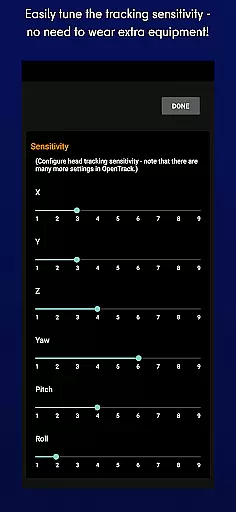
A key aspect of SmoothTrack's appeal lies in its simplicity and accessibility. There's no need for cumbersome additional hardware; instead, users can rely solely on their existing devices equipped with Google AR Services. The app intelligently magnifies real-world head motions, allowing gamers to achieve wide-ranging views within their virtual environments using minimal physical effort. For instance, looking slightly left could reveal critical information before executing a sharp turn in Euro Truck Simulator 2.
Moreover, SmoothTrack offers practical customization options designed to enhance usability. Users can switch between dark and bright display modes depending on ambient light levels, optimizing both visual comfort and energy efficiency. These thoughtful additions underscore the app's commitment to delivering a polished, user-centric experience while maintaining robust performance standards expected by avid gamers worldwide.
SmoothTrack's core functionality lies in its ability to provide precise 3D head tracking for controlling simulation game cameras. This is achieved through the AR capabilities of your device, ensuring that even the slightest head movements are accurately captured and translated into in-game camera perspectives.
The app supports any game compatible with TrackIR, FreeTrack, or similar protocols, making it versatile for flight simulators like Microsoft Flight Simulator, combat games such as Elite: Dangerous, and even trucking simulations like Euro Truck Simulator 2. The slight exaggeration of head movements allows users to peek out of cockpit windows or view overhead panels without needing exaggerated physical motions.
By simply using your deviceu2019s camera, SmoothTrack eliminates the need for additional hardware, offering an intuitive and seamless experience. This makes it not only cost-effective but also highly convenient for gamers who want to enhance their simulation experience without cluttering their setup with extra equipment.
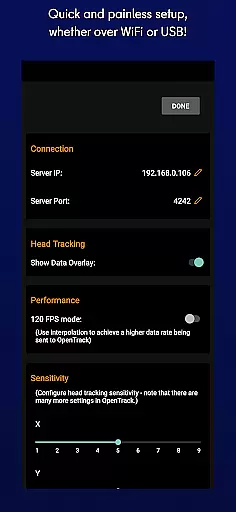
SmoothTrack excels in delivering a user-friendly interface that requires minimal setup. Once installed, users can quickly configure their devices to recognize facial movements, allowing them to jump straight into their favorite simulation games with little hassle.
The app includes thoughtful features like dark mode to conserve battery life and protect OLED screens, as well as a bright mode for optimal visibility in darker environments. These options ensure that users can tailor the app to their specific needs and preferences, enhancing both usability and comfort during extended gaming sessions.
With dedicated support available via Discord and email, SmoothTrack ensures that any issues or questions are promptly addressed. This commitment to customer service adds another layer of reliability, making the overall user experience smooth, enjoyable, and frustration-free.
Intuitive controls
No extra hardware
Broad game support
Energy-efficient modes
Responsive customer support
Limited to AR-enabled devices
Requires stable internet
Potential learning curve
Dependent on device camera quality
Subscription fees may apply

Quickly switch to an encrypted DNS server on Android TV
 4.50
4.50
Transfer Files, APK from Phone to Watch & Install.
4.0
Unit and currency converter with easy and simple UI.
4.80
Canon PRINT is a companion app for your Canon printer.
4.60
eXtended Permission Manager - a small app to manage permissions and AppOps
4.50
Quickly check the frequency of the Earth
4.30
Powerful collection of electronics tools and reference.A must for any enthusiast
4.90
The Ultimate Flex Drivers Utility App - Convenient Tapping & Block Filters
4.70
Enjoy a smooth mobile reading experience!
3.60
Connect wirelessly to your computer to watch movies, browse the web, play games
5.00
The ultimate tool for network analysis, wifi scanning and problem detection.
4.90
HD Camera captures every special moment.
4.60
FV File Manager Pro, Fast and powerful file manager for Android
4.60
Play your X-Box games remotely in 1080p with any controller and zero latency
4.60
With videos, electrical calculators, and built-in ebook, Ugly’s has your answer.
4.50
Just swipe the edge to do something!
4.40
View detailed information about your Nissan Leaf the dealer never shows you.
4.10
Safely recover deleted photos, videos, and files with a single easy tap.
3.70
Save any video in HD - paste the link, download fast and watch offline.
4.2


User Reviews