
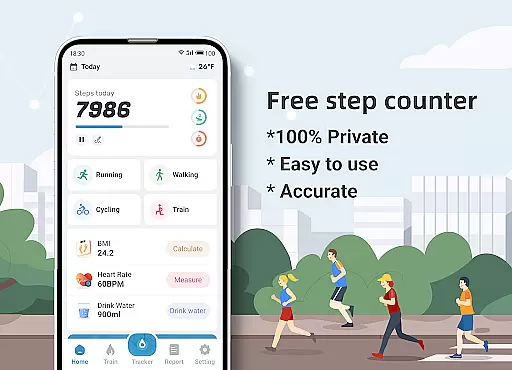
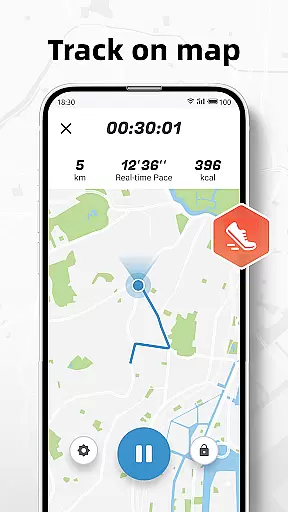
Step Counter - Pedometer & BMI is a comprehensive health and fitness application designed to track your daily steps, monitor your BMI, and provide detailed activity reports. The app offers accurate step counting through your mobile device, eliminating the need for additional pedometer hardware. It also features advanced tracking capabilities that map your walking or running routes, giving you insights into your movement patterns.
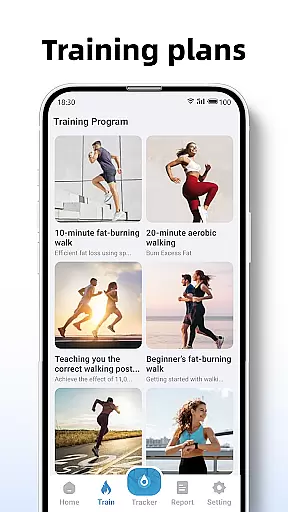
In addition to basic step counting, the app provides users with training plans tailored for different fitness levels, helping them achieve their exercise goals systematically. Whether you're a beginner looking to start jogging or an experienced walker aiming to increase daily mileage, Step Counter has customizable options for everyone. The inclusion of BMI tracking adds another layer of health monitoring, allowing users to maintain optimal body weight and overall wellness.
This app is particularly useful for individuals who want to improve their physical activity levels while keeping tabs on important health metrics like BMI. By offering private and precise tracking solutions, Step Counter ensures that your personal data remains confidential while delivering valuable insights to enhance your fitness journey.
Step Counter - Pedometer & BMI stands out with its robust feature set tailored for health-conscious individuals. One of its primary functions is the ability to track steps accurately using only your smartphone, which simplifies the process of monitoring daily physical activity without needing extra devices. Additionally, the app maps your walking or running routes in real-time, providing visual feedback on your progress and encouraging more consistent exercise habits.
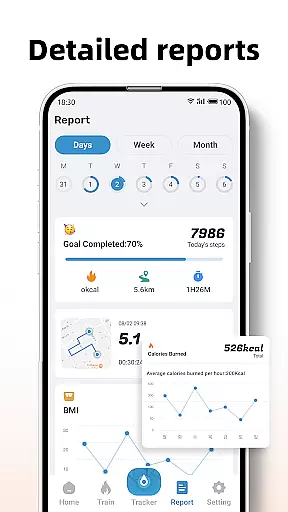
The app's detailed reporting system is another key feature, offering users comprehensive insights through daily, weekly, and monthly activity graphs. These reports help identify trends in physical activity and motivate continued improvement. Moreover, Step Counter includes structured training plans such as 10-minute jogging sessions, which guide users through their fitness routines by recording active time, distance covered, and calories burned during each session.
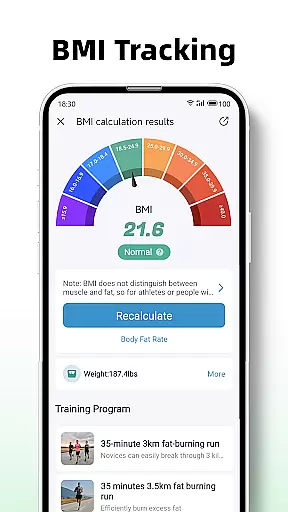
BMI tracking further enhances the app's utility by calculating and monitoring body mass index, empowering users to manage their weight effectively. With a strong emphasis on privacy, all user data is kept secure and never shared with third parties. This commitment to confidentiality, combined with adjustable sensitivity settings for precision tracking, makes Step Counter a reliable tool for anyone serious about maintaining an active lifestyle.
Personalized planning in fitness applications refers to the ability to tailor workout routines and health goals according to individual user needs. Step Counter - Pedometer & BMI excels in this area by offering training plans that cater to different fitness levels and objectives.
The app provides structured training programs, such as a 10-minute jogging plan, which users can follow to improve their physical health systematically. These plans are designed not only to count steps but also to record active time, distance, and calories burned during each session, ensuring a comprehensive approach to personal fitness.
By integrating BMI tracking, the application further refines personalized planning. Users can calculate and monitor their Body Mass Index, allowing them to adjust their fitness goals based on reliable health data. This feature supports those aiming to maintain or achieve a healthy weight.
Ultimately, the personalized planning offered by Step Counter empowers users to take control of their health journey. With customized training plans and BMI insights, individuals can create a fitness strategy that aligns with their unique physical conditions and aspirations, leading to more effective and sustainable health outcomes.
Progress visualization is a critical component of any fitness app, providing users with tangible evidence of their achievements and motivating continued effort. Step Counter - Pedometer & BMI offers detailed reports and graphs that display daily, weekly, and monthly activity data, giving users a clear picture of their progress over time.
The app's reporting tools are thoughtfully designed to present complex data in an accessible format. Through visual charts and summaries, users can easily interpret their step counts, active minutes, and other key metrics. This clarity helps individuals understand their current fitness levels and recognize patterns or trends in their behavior.
Moreover, the ability to visualize progress serves as a powerful motivator. Seeing improvements in activity levels or consistency can encourage users to set higher goals and maintain their exercise routines. The appu2019s tracking capabilities extend beyond mere numbers, fostering a deeper connection between users and their health objectives.
In summary, Step Counter's robust progress visualization features enable users to track their fitness journey effectively. By presenting comprehensive and visually engaging reports, the app not only informs but also inspires users to pursue their health goals with renewed vigor and commitment.
User-friendly interface
Accurate step tracking
Comprehensive activity reports
Customizable training plans
Private data handling
Limited device compatibility
No social sharing options
Occasional accuracy issues
Basic UI design
Requires manual input for settings

SportWerks - Workout Tracker for Wear OS Watches
 3.90
3.90
The simplest way to track your 21 Day Program containers, exercises, and water.
4.50
Home workouts for fitness & fast bodybuilding at home - no equipment needed.
4.90
Pack of 66 calming lullabies for smooth fall asleep and relaxation
4.10
A brain game that moves you
4.70
Walk. Earn: Get rewarded for every step! Walk, move, and earn real rewards.
4.70
Pilates, Calisthenics, Yoga
4.50
The most accurate heart rate app to monitor and track your heart rate & pulse.
4.40
Point, scan, and unlock truth in every bite.
4.50
sobriety counter app to help and motivate people to stop drinking alcohol.
4.90
Easy reconstitution calc for mixing peptides and creating protocols
4.70
Memory, mind & logic exercises. Puzzle games, IQ & brain test for kids & adults
4.50
Your Health Assistant
3.90
Understand your body’s most meaningful messages and transform your health.
3.90
Pupillary distance PD with camera quick and easy, checking glasses frames on you
3.70
Measure real-time wrist & ambient temperature with your Galaxy Watch (Wear OS)
3.20
Use your watch as a bike computer, heart rate monitor and cycling power meter
2.50
The Wear OS BeechBand app is designed to alleviate anxiety and other conditions
4.4
Using Recognise™ has been shown to reduce pain and improve performance
4.4


User Reviews