
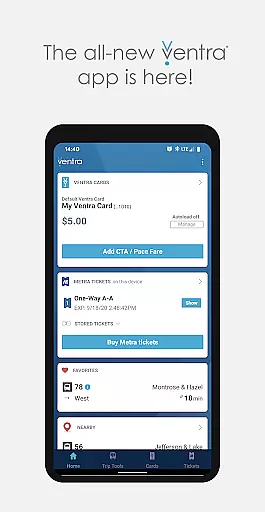
Ventra is a comprehensive transit management app designed specifically for the Chicago metropolitan area. This innovative application allows users to effortlessly manage and pay their fares across CTA, Metra, and Pace buses and trains. With its user-friendly interface, Ventra provides all the essential features found on the Ventra website plus additional functionalities like mobile ticketing for Metra trains.
The app's core strength lies in its ability to provide real-time account notifications, ensuring users are always aware of their balance status and when it's time to reload fare or purchase more tickets. Whether you're commuting to work or exploring the city, Ventra makes your journey seamless by offering instant access to transit value and passes directly through your smartphone.
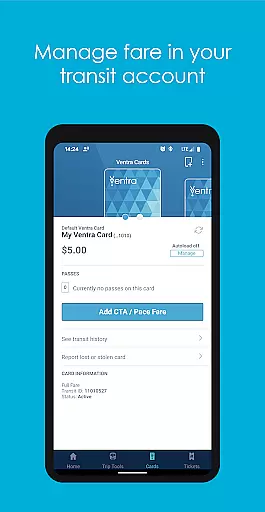
Ventra stands out with its robust feature set tailored for Chicago commuters. The app enables users to check their balance and available passes in their Ventra Card's transit account with just a few taps. It also supports instant loading of value or passes to the Ventra Card, providing unparalleled convenience.
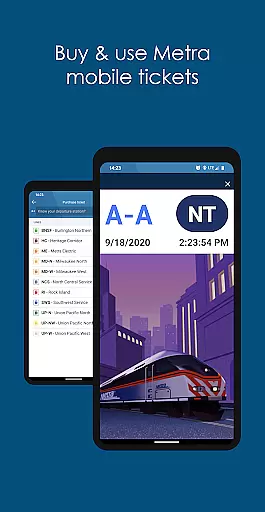
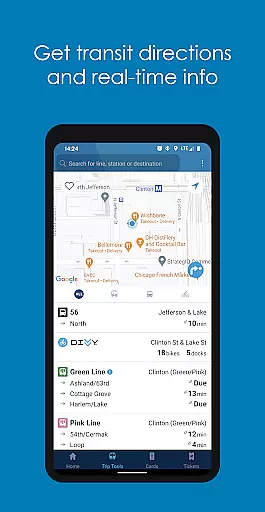
One of the standout features is the ability to buy and use Metra mobile tickets directly within the app, eliminating the need for physical tickets. Additionally, users can switch autoload for transit value or passes on and off according to their preferences. Real-time arrival and departure information from CTA, Metra, and Pace are integrated into one platform, making trip planning efficient and straightforward.
These features collectively ensure that Ventra users have a reliable and streamlined transit experience, enhancing both daily commutes and occasional travel throughout the Chicago area.
Map accuracy is crucial for any navigation app, and Ventra excels in this area by providing precise location data for transit users in Chicago. The app integrates real-time information from CTA, Metra, and Pace, ensuring that users have access to the most up-to-date transit routes and stops.
Ventra's map functionality allows users to view arrival and departure times for buses and trains directly on the map interface. This feature not only shows the geographical position of transit options but also overlays essential details like service alerts and alternative routes when there are disruptions.
For commuters, this level of accuracy means they can plan their journeys with confidence, knowing exactly where each station or stop is located and how far they need to travel. Whether you're a daily commuter or a visitor exploring the city, having reliable mapping tools at your disposal enhances your overall transit experience.
Effective route planning is a cornerstone of the Ventra app, designed to simplify the process of navigating Chicago's extensive public transportation network. By aggregating data from CTA, Metra, and Pace, Ventra offers users multiple route options based on current traffic conditions and scheduled services.
The app provides detailed guidance for each suggested route, including estimated travel times, transfer points, and walking directions to the nearest transit stations. Users can customize their preferences, such as prioritizing faster routes or those with fewer transfers, ensuring a personalized journey every time they use the app.
This comprehensive approach to route planning empowers users to make informed decisions about their commutes, ultimately saving time and reducing stress. With real-time updates and intuitive controls, Ventra ensures that even complex trips across different transit systems become manageable and efficient.
User-friendly interface
Real-time notifications
Instant fare loading
Comprehensive transit info
Mobile ticketing option
Limited to Chicago area
Occasional bugs reported
Requires stable internet
No offline functionality
Initial setup complexity

Offline maps for phone and smart watch: topographic maps, satellite images...
 3.30
3.30
The fastest and most convenient way to pay for parking on our lots.
4.40
Navigate with your watch and keep the phone in your pocket!
4.60
Find radar maps, GPS coordinates, altitude, offline maps, location, travel route
4.40
GPS Speedometer & Odometer: Track car, bike, truck speed & distance in real-time
4.70
Drive safe with real-time speed camera radar, police, and traffic alerts
3.80
Gas Station & Fuel Rewards Points
3.70
Navigate seamlessly with Real-Time Traffic, Offline Maps, and Voice Navigation.
4.10
Park in Chicago, NYC, Boston, SF, Houston & more!
4.70
Ride or drive at YOUR price
4.70
Offline maps & GPS for hiking, travel, fieldwork & outdoor adventures
4.70
Complete offline 1:50k South Island topo map including DOC Hunting Permit Areas
4.60
Navigate MTA, NJ Transit, MBTA, SEPTA, BART, MARTA, CTA & 900+ cities
4.60
Rideshare, taxi cabs, and more for your airport travels and everyday trips.
4.50
CamSam PLUS - The speed and red light camera warning system!
4.40
Instant diesel discounts - save big with each fill up!
4.40
Simple & easy to use a compass app. Get accurate directions.
4.20
Explore offline maps with radar, satellite view, and real-time alerts.
3.60
Explore the world with Live Satellite View, 3D Maps, GPS Navigation & Earth Map.
2.90


User Reviews