
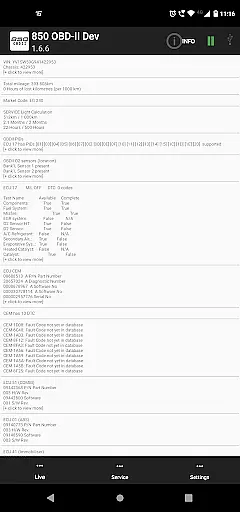
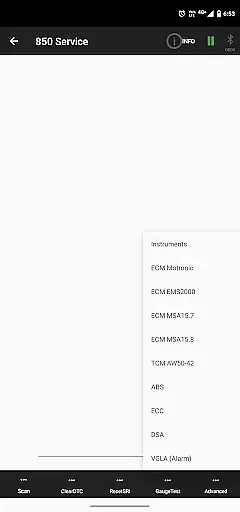
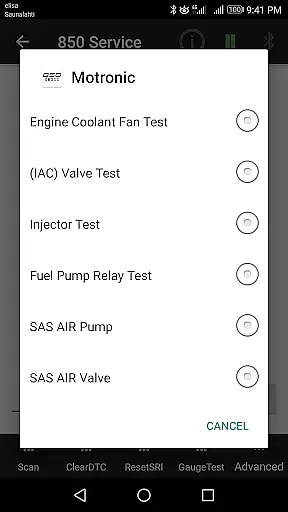
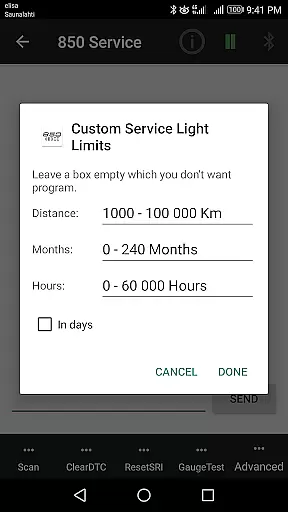
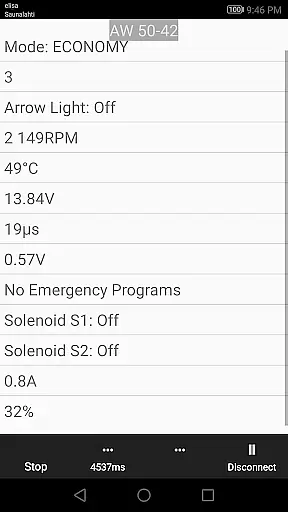
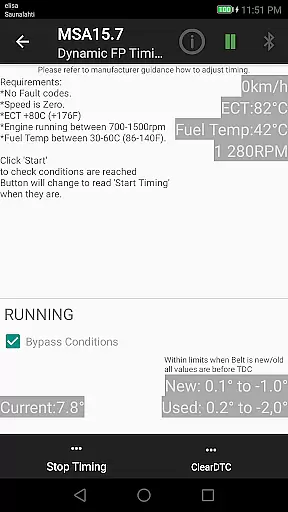
850 OBD-II is a specialized diagnostic and programming application designed for Volvo vehicles from 1996-2000, with extended support for other models. The app works in conjunction with ELM327 Bluetooth/Wi-Fi/USB dongles to provide advanced vehicle diagnostics beyond standard OBD-II capabilities. It allows users to directly read individual modules, aiding in accurate problem diagnosis.
This tool is particularly beneficial for car owners and mechanics who need detailed insights into their vehicle's systems. By supporting functions like Service Light reset, Fault Code reading, live sensor data monitoring, and advanced commands such as Injector Testing, the app offers comprehensive control over vehicle maintenance and repair tasks.
The 850 OBD-II app boasts an array of powerful features tailored for Volvo diagnostics. It supports essential functions like resetting service lights, reading and clearing fault codes, and retrieving real-time sensor data. Additionally, it provides detailed information about vehicle systems, including part numbers and configurations of ECUs.
Advanced functionalities include specific commands for systems like Motronic M4.4, TDi Fuel Pump Dynamic Timing, and VGLA Remote Programming. The app also facilitates reading Volvo-specific DTCs across various modules such as ABS, SRS, Instrument Panel, and more. Its capability to act as a terminal for ELM327 adds another layer of versatility, allowing custom command inputs.
Accessing detailed vehicle information is crucial for effective diagnostics and maintenance. The 850 OBD-II app excels in this area by providing comprehensive data about individual modules within supported Volvo models. Through the ELM327 interface, users can directly read specific systems such as ABS, TCM, ECM, and more.
This application goes beyond standard OBD-II capabilities by offering access to Volvo-specific parameters and fault codes. For example, users can retrieve part numbers of ECUs and system configurations, which are essential for accurate troubleshooting. The app supports multiple platforms including P80, S40/V40, and P2 series vehicles.
The value to users is significant - technicians and DIY mechanics can now pinpoint issues with unprecedented precision. Whether it's reading airbag system codes or monitoring real-time sensor data from various modules, this app provides the detailed information needed for thorough vehicle analysis. This level of detail helps in making informed decisions about necessary repairs or adjustments.
While primarily a diagnostic tool, the 850 OBD-II app offers excellent value through its transparent pricing model. Unlike many automotive diagnostic tools that require expensive subscriptions or hardware, this app works with widely-available ELM327 adapters. Users can choose from various compatible Bluetooth/WiFi/USB dongles within their budget.
The app clearly states its hardware requirements - specifically the need for ELM327 version 1.4b or greater. This transparency helps users avoid common compatibility issues and ensures they purchase the correct equipment. Additionally, the app provides notifications when firmware issues are detected, preventing wasted time on troubleshooting.
Users benefit from having all necessary information upfront, allowing them to make cost-effective decisions about their diagnostic setup. The app's website offers further details about supported features and potential limitations, ensuring customers know exactly what they're getting before committing to the solution.
User-friendly interface
Comprehensive diagnostic tools
Supports multiple Volvo models
Real-time data monitoring
Advanced programming options
Requires ELM327 device
Limited to compatible vehicles
Some features model-specific
Occasional bugs reported
No warranty provided

ODB2 based monitoring application for the Chevy Bolt (2017-2021)
 4.00
4.00
Launcher for use in the car
4.40
Buy and sell your boat
4.70
Autolist - The Largest Selection of Local Used Cars and Trucks
4.50
Instant diesel savings. No credit checks or fees. Nationwide growing network.
4.40
Automotive Electrical Wiring Diagrams
4.40
DMV practice test 2025: Driver License permit test & written test for all states
4.70
Find Fast EV Chargers | Charge Your Vehicle at 1,100+ Fast Car Charging Stations
4.60
Get price alerts, vehicle history details and more for cars near you!
4.50
7-Day Returns on All Cars
4.80
Practice the drills within MotoJitsu Master Riding Program Volume 1 & 2!
4.80
View your car’s service records and find out when maintenance is due.
4.70
Trip computer+car diagnostic tool with widest variety of features and dashboard!
4.70
Easy connect & control your cars from afar. Remote Lock & unlock car and carplay
4.60
Autotrader is your online solution for buying and selling new and used cars.
4.40
A smarter way to park and reserve your spot ahead of time.
4.40
Blink Charging Mobile app makes finding an EV charger an intuitive experience.
3.80
Mobile Phone Parking - So easy to park
3.70
Better fuel to help keep you on the road
3.20


User Reviews