
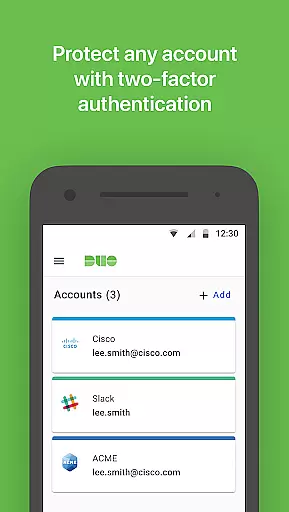
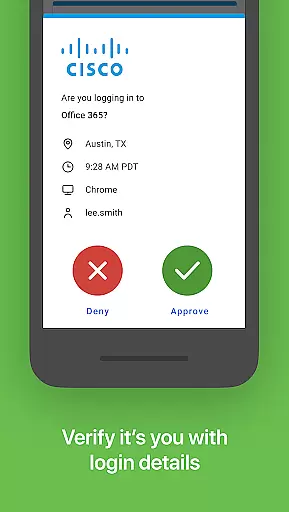
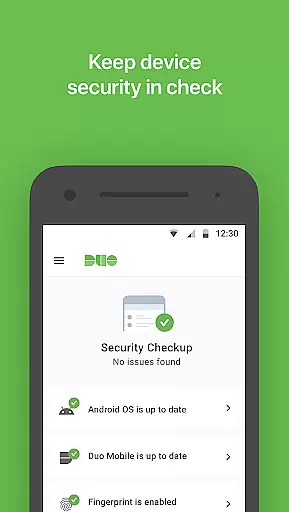
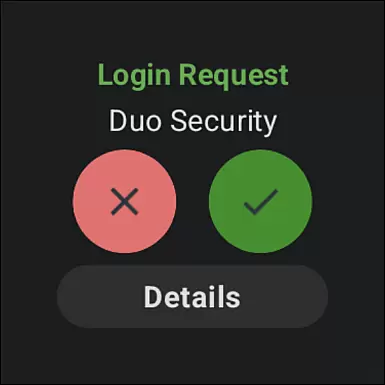
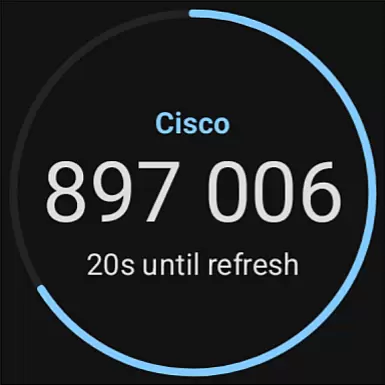
Duo Mobile is a security application designed to enhance login protection through two-factor authentication. The app generates passcodes and provides push notifications for easy, one-tap authentication on Android Wear devices.
With Duo Mobile, users can manage two-factor authentication not only for Duo Security accounts but also for other applications and web services that utilize passcodes. This makes it an essential tool for maintaining robust security across multiple platforms.
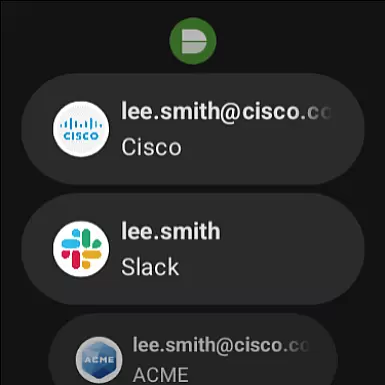
The app's integration with Wear OS through Duo Wear ensures secure authentication is more convenient, even on smartwatches. Activation requires linking to your Duo account via an activation link received during enrollment, making your accounts safer without compromising convenience.
Duo Mobile offers several key features that make it stand out in the realm of two-factor authentication. Firstly, it generates time-based passcodes for secure logins, ensuring that even if passwords are compromised, accounts remain protected.
Secondly, the app supports push notifications for one-tap authentication, streamlining the login process while maintaining high-security standards. This feature is particularly useful for users who need quick access to their accounts without sacrificing security.
Additionally, Duo Mobile extends its capabilities to third-party applications and web services, allowing users to manage all their two-factor authentications from a single platform. Its compatibility with Wear OS through Duo Wear further enhances accessibility, providing seamless authentication options directly from your smartwatch.
Companion app integration is a crucial feature for applications that extend their functionality to wearable devices. Duo Mobile excels in this area by offering seamless synchronization with its Wear OS companion app, Duo Wear.
The integration process begins when users link their Duo Mobile account with the smartwatch app. Once connected, Duo Wear allows users to receive authentication requests directly on their wrist, providing an additional layer of convenience and security. This ensures that users can authenticate quickly, even when their phone isn't immediately accessible.
Duo Mobile's companion app support demonstrates the application's commitment to multi-device usability. By extending two-factor authentication capabilities to smartwatches, the app effectively addresses modern users' need for both security and accessibility across their digital ecosystem.
This integration also showcases how Duo Mobile maintains its core security features while adapting to different form factors. The ability to approve login requests from a smartwatch without compromising security standards represents a significant advancement in user-friendly authentication methods.
Device compatibility is essential for applications targeting the Android Wear platform. Duo Mobile demonstrates exceptional compatibility with various Wear OS devices, ensuring broad accessibility for users who rely on smartwatches for authentication purposes.
The application has been optimized to function across different Wear OS devices, maintaining consistent performance regardless of screen size or hardware specifications. This universal approach to compatibility means that users can expect reliable functionality whether they're using a newer model or an older smartwatch.
Duo Mobile's developers have paid special attention to system integration, ensuring that the app works harmoniously with Wear OS's native features. This includes proper notification handling, battery optimization, and interface scaling, all of which contribute to a smooth user experience.
Furthermore, the app's compatibility extends beyond just physical devices. It supports various Android versions and maintains functionality through system updates, demonstrating a commitment to long-term support and adaptability in the rapidly evolving wearable technology market.
Enhanced Security
User-Friendly Interface
Multi-Platform Support
Push Notifications
Wear OS Integration
Requires Activation
QR Code Dependency
Limited Offline Use
No Biometric Login
Third-Party Account Limit

A customizable Christmas watch face for Wear OS with a countdown.
 4.20
4.20
Embrace the holiday spirit with this magical animated watch face!
4.40
an Analog Watch Face for winter season with freeze winter background for Wear OS
4.3
Fitness interactive virtual pet super fighter boy watch face
4.3
sleep, alarm, snoring, stress, healing, focus, sound therapy, circadian rhythm
4.10
Nutrition, Macro tracker: Food, fitness & healthy diet tracking for weight loss
4.60
Gym & home workout plans with strength training, exercise tracking, HIIT & more.
4.60
Simple, helpful messaging by Google
4.60
Start and succeed with PAP
4.10
Real-time weather radar with temperatures, warnings, hurricanes, and widgets
4.80
Stylish, Energizing and Modern Watch Face crafted by Dominus Mathias.
4.50
Beautiful artistic animated digital watch face, with a customizable layout!
4.40
A white realistic classic analog watch face with many customization options.
4.40
Animated video-game inspired “secret agent” simulation, right on your wrist!
4.20
Structured watch face with seven complications and modular UI elements
3.90
Get helpful reminders, take progress photos and find answers to your questions.
3.90
Watch face designed for Thanksgiving Day. 7 Background Styles included.
3.20
Wear Os Watch Face - Animated Snow - Sesonal for Christmas & Winter
4.1
Sleek, highly customizable watch face inspired by Galaxy Watch Circle Dashboard.
4.3


User Reviews