
My Invisalign is a comprehensive application designed specifically for individuals undergoing orthodontic treatment with Invisalign clear aligners. This innovative app serves as a one-stop solution for both prospective and current Invisalign patients, offering a suite of features to support and enhance the treatment journey.
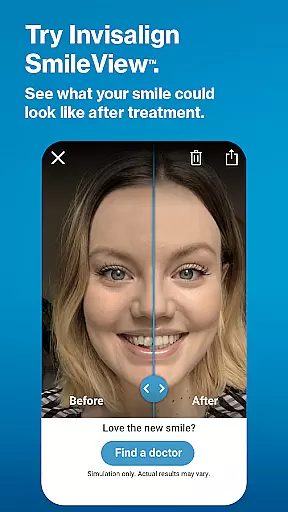
For those considering Invisalign treatment, the app provides detailed information about the aligners and their benefits. Users can simulate their future smiles using the SmileView™ tool and easily locate nearby certified doctors to schedule consultations. Current Invisalign patients can actively manage their treatment through various tracking and monitoring tools. The app enables users to maintain precise records of their aligner wear time, set up timely reminders for aligner changes, and even participate in virtual care sessions with their doctors.
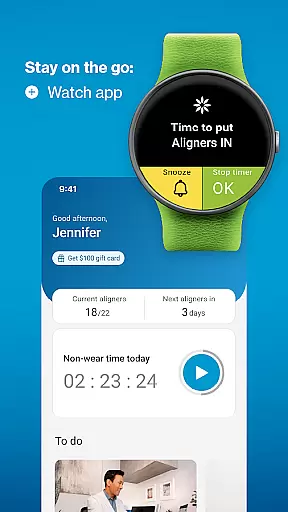
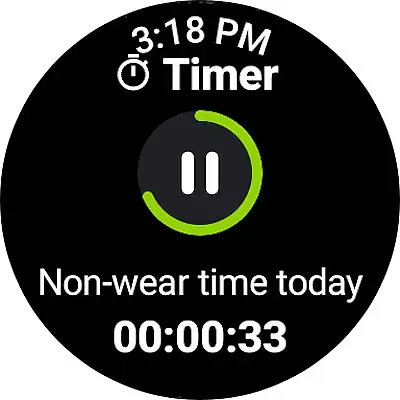
This Android Wear compatible app extends its functionality to smartwatches, allowing users to conveniently track their aligner usage directly from their wrists. By integrating advanced treatment management features with user-friendly interfaces, My Invisalign helps patients stay committed to their treatment plans while providing valuable support throughout their smile transformation journey.
The My Invisalign app distinguishes itself through a collection of specialized features tailored to the needs of clear aligner patients. One of its most notable capabilities is the SmileView™ simulation tool, which allows users to preview their potential new smile and share these visualizations with others. This feature not only helps in making informed decisions about treatment but also serves as a motivational tool during the alignment process.
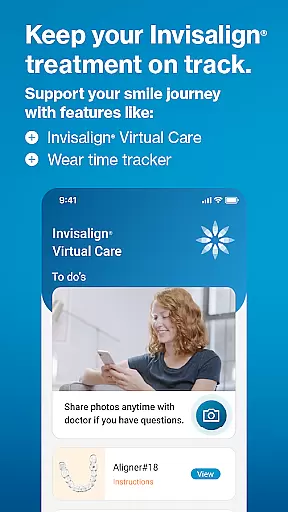
For patients already undergoing treatment, the app offers sophisticated tracking mechanisms. Users can monitor their aligner wear time through customizable timers and visual calendars that display progress on weekly, monthly, and yearly scales. The integration with Invisalign®Virtual Care represents another significant advancement, enabling remote communication between patients and their doctors through photo sharing and feedback exchanges.
Additional features include personalized treatment calendars for managing appointments, automatic reminders for aligner changes, and tools for documenting treatment progress through videos and photographs. The app's compatibility with Wear OS devices further enhances its utility by providing wearable access to essential tracking functions. These comprehensive features collectively create a robust support system that empowers users to maintain optimal treatment compliance while staying connected with their dental care providers.
Companion app integration is essential for users who want a seamless experience between their mobile devices and wearables. The My Invisalign app excels in this area by ensuring that all your treatment data is synchronized across devices.
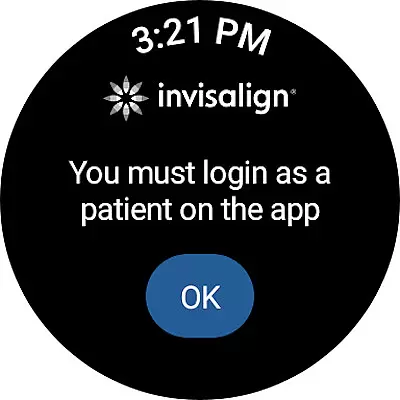
By connecting your Wear OS device to the My Invisalign app, you can access the custom aligner tracker directly from your watch. This feature allows you to monitor your wear-time progress without needing to reach for your phone, making it more convenient to stay on top of your treatment plan.
The synchronization between the phone and watch ensures that whether you're at home or on the go, your treatment calendar, reminders, and progress tracking are always up-to-date. This connectivity provides peace of mind, knowing that you won't miss important updates or notifications related to your Invisalign journey.
Ultimately, the companion app integration enhances user engagement by providing timely and accessible information, which helps patients maintain consistency in their treatment regimen and achieve their desired smile transformation efficiently.
Device compatibility is crucial for ensuring that users can fully utilize the features of an application on their wearable devices. The My Invisalign app supports Wear OS, allowing patients to integrate their treatment tracking seamlessly into their daily routines.
With the My Invisalign watch app, users can access a custom aligner tracker that provides quick insights into their wear-time progress. This compatibility ensures that whether you're working out, commuting, or simply busy with daily tasks, you can easily check your aligner usage right from your wrist.
The app's compatibility extends beyond just tracking; it also includes receiving notifications when it's time to change aligners. This functionality ensures that patients never miss a step in their treatment process, enhancing overall compliance and effectiveness.
By focusing on robust Wear OS/device compatibility, the My Invisalign app not only broadens its accessibility but also empowers users to manage their orthodontic treatment with greater flexibility and convenience, leading to better outcomes and satisfaction.
User-friendly interface
Comprehensive tracking tools
Virtual care integration
Smile simulation feature
Wear OS compatibility
Limited to Invisalign patients
Some features doctor-restricted
Premium feature costs
Occasional sync issues
Battery consumption

A customizable Christmas watch face for Wear OS with a countdown.
 4.20
4.20
Christmas - Festive - Christmas Village - Winter - Christmas lights
5.00
Easy Voice Recorder is your everyday companion to record important moments.
4.70
Digital, flexibly customizable watch face. For Wear OS 5.0, API 34+ and later.
5.00
Ideal for surviving in the wasteland left after nuclear fallout
4.50
Hyperlocal rain alerts by MyRadar using patent-pending technology, radar & more
4.80
Premium hybrid watch face with many customizations for Wear OS devices.
4.40
A white realistic classic analog watch face with many customization options.
4.40
Your local weather forecast, storm tracker, radar maps & live weather news
3.40
Rose gold watch face with festive lights & customizable features.
4.60
A realistic hybrid watch face with many customization options.
4.60
Simple, helpful messaging by Google
4.60
Deck out your Wear OS Watch face with a beautifully decorated pine wreath!
4.50
Embrace the holiday spirit with this magical animated watch face!
4.40
Animated Watch Face and Customizable with 24 Backgrounds. Perfect for Christmas!
3.90
Want to take charge of your health? Let Google Fit help you reach your goals.
3.50
Watch face designed for Thanksgiving Day. 7 Background Styles included.
3.20
A Wintery Snow Globe on Your Wrist; now celebrating Christmas!
4.2
Contemporary digital watch face with five complications
4.4


User Reviews