
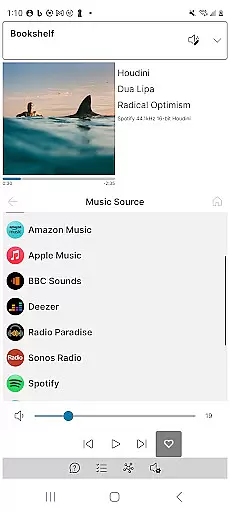
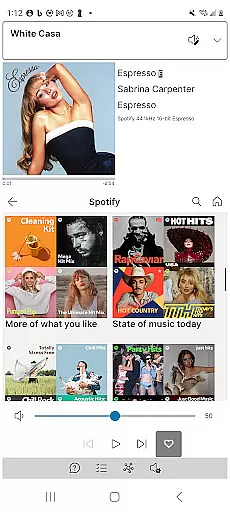
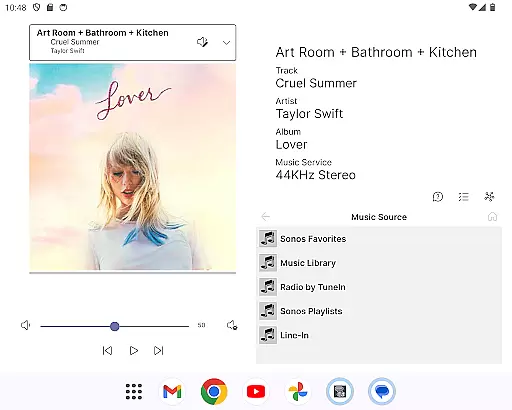
Phonos Ultimate is a comprehensive control solution for your Sonos music system, designed to provide seamless management of your whole-home audio experience. The app offers reliable performance with an emphasis on speed and stability, ensuring you can effortlessly manage all aspects of your Sonos devices.
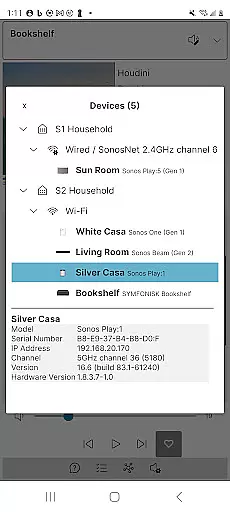
This application supports over a hundred music services and integrates seamlessly with local libraries, custom station URLs, and line-in options. It provides essential controls such as play, pause, skip, shuffle, repeat, and volume adjustments for both individual devices and groups. Additionally, Phonos Ultimate includes unique features like the Devices View, which shows how your devices are connected, and detailed streaming data for tracks.
Whether you're adjusting EQ settings, managing playlists, or exploring podcast controls, Phonos Ultimate caters to both expected and advanced user needs. Its support for S1, S2, and multiple systems simultaneously makes it a versatile tool for any Sonos user looking to enhance their audio setup.
Phonos Ultimate stands out with its extensive feature set tailored for Sonos users. The app allows you to see all your devices, rooms, groups, and music sources in one place, providing a centralized hub for your audio management needs. With support for over a hundred music services and integration with local libraries, this app ensures that your music playback options are virtually limitless.
One of the key highlights is the unique Devices View, which gives you a clear picture of how your Sonos devices are interconnected. This feature is complemented by detailed track streaming data, including sample rate and bit depth, available for users on the S2 system. Unlike other apps, Phonos Ultimate does not rely on the Sonos cloud API, enhancing its speed and reliability.
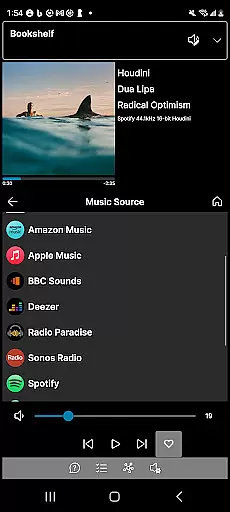
Additional functionalities include easy group editing, queue management, and the ability to add direct streaming URLs as custom radio stations. The app also supports various display modes, including portrait, landscape, and dark mode, ensuring a comfortable user experience in any environment. These features collectively make Phonos Ultimate a powerful tool for managing your Sonos ecosystem efficiently.
Phonos Ultimate offers an extensive music library that supports over a hundred music services, similar to what Sonos provides. This vast selection ensures users have access to a wide range of music genres and artists.
In addition to streaming services, the app allows for the integration of local libraries, line-in connections, and custom station URLs. This feature not only broadens the music sources but also guarantees that all content is legally accessible and free from copyright infringement.
The ability to save queues as Sonos Playlists and manage these playlists directly within the app enhances user experience by providing personalized music curation options.
Furthermore, Phonos Ultimate respects copyright laws by enabling users to add and delete tracks from Sonos Playlists without unauthorized modifications, ensuring a responsible approach to music management.
One of the standout features of Phonos Ultimate is its commitment to audio quality. The app displays track streaming data, including sample rate and bit depth, which is crucial for audiophiles who demand high-fidelity sound reproduction.
By avoiding the use of the Sonos cloud API, Phonos Ultimate ensures speed and reliability in audio delivery. This direct approach minimizes latency and potential quality loss, offering a superior listening experience.
Users can adjust EQ settings within the app, allowing for customized audio output tailored to individual preferences or room acoustics. This level of control empowers users to fine-tune their audio experience.
Additionally, support for various Sonos devices, except Ace headphones, means consistent audio quality across different playback systems, reinforcing Phonos Ultimate's dedication to delivering pristine sound.
User-friendly interface
Extensive music service support
Unique Devices View
No Sonos cloud dependency
Multiple system compatibility
No system setup capabilities
Limited to Sonos devices
Not officially endorsed by Sonos
Requires S2 for full features
Initial learning curve

Your HD audio recorder on the go for music, meetings, ambience, animal sounds…
 4.30
4.30
Offline and always ad-free - stream in the highest quality available.
4.10
10-Band Audio Equalizer, Sound / Bass Booster for Spotify Users & Music Players
4.40
VB-AUDIO Software / VBAN-Receptor allows listening to any VBAN Streams
4.10
The ultimate media player for Android devices
3.90
The alternative folder based music player.
4.20
No wifi music app. Mp3 offline. Tuner radio, young radio music. Music downloader
4.20
Help you quickly get started with Shokz headphones
4.40
MilkDrop for Android TV
3.00
Walkout Song DJ is the most intuitive app to manage your sports music.
4.70
Over 100 million tracks available for high quality streaming and download
4.60
Super Sound Editor, Song Maker & Mixer, Vocal Remover, Voice Recorder & Changer!
4.60
Full featured mp3 and audio player with Chromecast and Android Auto support.
4.40
Bass Booster Pro takes auto-equalizing to the next level!
4.30
A High-Precision Audio Spectrum Analysis App
4.20
PowerAudio is a powerful offline music player.
4.20
Next generation modular control surface
4.10
Sing, record, and create music together — enhanced by smart voice tools.
4.00
Make music anywhere. Turn your device into an instrument.
4.2


User Reviews