






Shazam is a powerful music recognition app designed specifically for Android Wear devices, allowing users to instantly identify songs playing around them. With over 2 billion installs and 300 million users worldwide, this app has become an essential tool for music lovers. Shazam not only identifies tracks but also provides additional features such as time-synced lyrics, artist information, and concert updates.
One of the standout capabilities of Shazam is its ability to work offline, ensuring that users can identify songs even without an active internet connection. The app integrates seamlessly with popular music streaming services like Apple Music, Spotify, and YouTube Music, making it easy to save and listen to discovered tracks. Whether you're commuting, attending a live event, or simply enjoying music at home, Shazam enhances your experience by delivering accurate song identification and related content in real-time.
Shazam offers a comprehensive set of features tailored for Android Wear users. Its core functionality lies in its ability to quickly recognize songs using the device's microphone, even when headphones are connected. The app goes beyond basic identification by providing time-synced lyrics, enabling users to follow along with their favorite tracks. Additionally, Shazam allows users to explore music videos directly through Apple Music or YouTube, creating a richer multimedia experience.
Another key feature is Auto Shazam, which continuously listens for and identifies multiple songs without requiring constant user interaction. This is particularly useful during events like concerts or parties. The app also includes a Shazam Widget for quick access from the Home Screen and supports offline mode for uninterrupted use. Users can browse personalized recommendations, view local music charts, and discover upcoming concerts based on their location, making Shazam an indispensable tool for staying connected to the music world.
Companion app integration is essential for wearable devices, ensuring seamless interaction between the main application and its wearable counterpart. Shazam offers a robust Wear OS app that works in harmony with its mobile version.
The Shazam Wear OS app allows users to identify songs directly from their smartwatch, providing instant music recognition without needing to reach for their phone. This integration ensures that core functionalities such as song identification and notifications are preserved and optimized for the smaller screen.
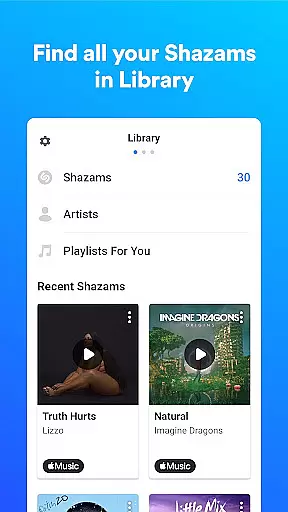
Users benefit from real-time synchronization of song history and preferences between devices. Whether you're tracking previously identified songs or exploring new ones, the experience remains consistent across platforms.
This companion app setup enhances user convenience by enabling music discovery anytime, anywhere, even when the smartphone isn't accessible. The ability to Shazam directly from your wrist exemplifies how thoughtful integration can significantly improve accessibility and user engagement.
Device compatibility is crucial for apps targeting multiple platforms, especially wearables. Shazam excels in this area by offering comprehensive support for Wear OS devices, ensuring broad accessibility and optimal performance.
The app is designed to function smoothly on various Wear OS smartwatches, adapting its interface to different screen sizes and resolutions. This adaptability guarantees that users receive a consistent and high-quality experience regardless of their specific device model.
Shazam's compatibility extends beyond just basic functionality; it maintains advanced features like offline mode and Auto Shazam on supported devices. These capabilities ensure that users can continue identifying songs even without their phones nearby or under poor network conditions.
By prioritizing Wear OS compatibility, Shazam demonstrates its commitment to embracing diverse technology ecosystems while maintaining feature parity and reliability across devices. This approach not only expands its user base but also reinforces its reputation as a versatile and indispensable music discovery tool.
Instant song recognition
Offline functionality
Seamless streaming integration
Time-synced lyrics
Auto Shazam feature
Limited offline features
Requires microphone access
Location permissions needed
Ads in free version
Regional restrictions

Christmas watch face. For Wear OS devices.
 4.30
4.30
A Wintery Snow Globe on Your Wrist; now celebrating Christmas!
4.1
The most customizable minimal watch face. For Wear OS 5.0, API 34+ and later
4.70
Digital watch face. For Wear OS devices.
4.40
Structured watch face with seven complications and modular UI elements
3.90
Period, ovulation & pregnancy tracker. Fertility insights & menstrual calendar.
4.90
Hyper-Realistic Airplane Dashboard Watch Face With 10 Skins and Custom AOD
4.00
Fast and smart typing with Emojis, GIFs, and more
4.50
Track airplanes and follow flights with our real-time flight tracker
4.50
Digital, flexibly customizable watch face. For Wear OS 5.0, API 34+ and later.
5.00
Walking app for weight loss: walk & step tracker, pedometer, indoor treadmill
4.60
Premium hybrid watch face with many customizations for Wear OS devices.
4.40
Get helpful reminders, take progress photos and find answers to your questions.
3.90
Your local weather forecast, storm tracker, radar maps & live weather news
3.40
Watch face designed for Thanksgiving Day. 7 Background Styles included.
3.20
an Analog Watch Face for winter season with freeze winter background for Wear OS
4.2
Sleek, highly customizable watch face inspired by Galaxy Watch Circle Dashboard.
4.2
Fitness interactive virtual pet super fighter boy watch face
4.3
Minimalistic design modern digital watch face.
4.5


User Reviews