

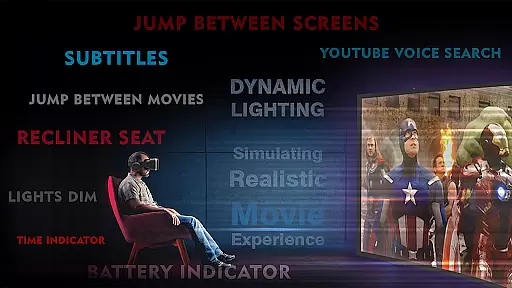
VR Player Plus - Movie Theatre is a premium virtual reality movie player that brings the Imax screen experience to your VR headset. Designed for immersive entertainment, this app allows users to watch videos, movies, and shows with Spatial Surround sound technology, delivering a theater-like atmosphere in the comfort of their home. The app supports multiple video formats including 4K and 2K resolution, ensuring high-quality playback without lag.
One standout feature is the SEAT SELECTION option, which lets users customize their viewing angles and screen sizes, mimicking the experience of sitting in different parts of a cinema. Compatible with various VR headsets like Google Cardboard, Irusu VR, VR Box, and Shinecon VR, this app caters to a wide range of devices. Whether you're watching WhatsApp videos or professional VR content, VR Player Plus offers an unparalleled level of control and immersion.
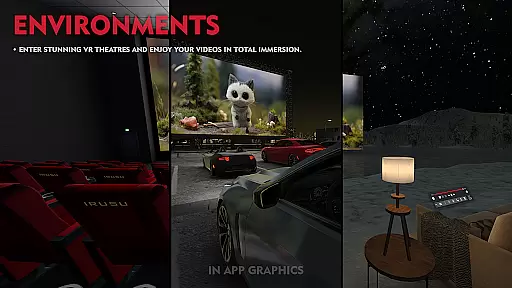
VR Player Plus boasts an array of advanced features designed to enhance the virtual reality movie-watching experience. Users can choose from multiple theater environments, ranging from a serene lakeside view to a classic cinema setting, allowing for personalized ambiance during playback. The app supports various VR video formats, including regular, side-by-side, and top-bottom configurations, making it versatile for different types of content.
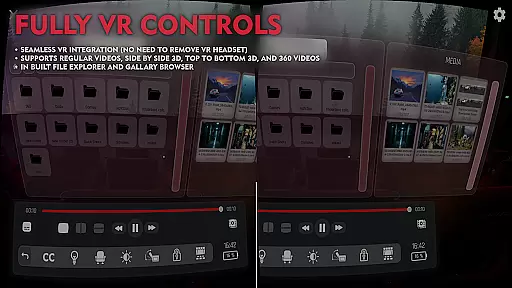
The inclusion of 3D surround sound with Spatial audio technology ensures a captivating auditory experience. Combined with the SEAT SELECTION feature, which enables angle and screen size adjustments, users can replicate the feeling of sitting in different sections of a theater. Additional functionalities include a video seek bar for easy navigation, an in-built file browser for seamless media management, and a seat recliner feature for added comfort. These innovations make VR Player Plus a top choice for immersive home entertainment.
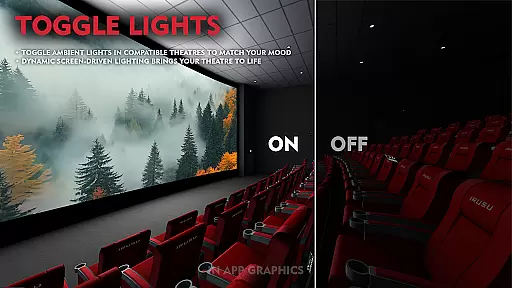
VR Player Plus - Movie Theatre offers an extensive range of content variety that caters to diverse entertainment preferences. The app allows users to select from different virtual environments, ranging from a serene lake view to a classic cinema theatre setting. This feature ensures that users can customize their viewing atmosphere according to their mood or preference, providing a fresh experience every time.
The application supports various video formats including regular, side by side, and top-bottom VR videos, making it versatile for different types of content consumption. With compatibility across multiple VR headsets like Google Cardboard, Irusu VR, VR box, and Shinecon VR, the app delivers a seamless movie-watching experience on virtually any mobile-based VR headset available in the market.
Moreover, the VR Player Plus is optimized for high-quality video playback, supporting 4K and 2K videos with automatic aspect ratio adjustment. Its advanced video rendering algorithms ensure smooth playback without lag, provided the user's smartphone has adequate processing power. This positions VR Player Plus as a go-to entertainment hub for immersive cinematic experiences at home.
User engagement is a critical factor for any entertainment platform, and VR Player Plus - Movie Theatre excels in this area through its innovative features designed to retain users. One such feature is the seat selection option, which allows viewers to choose their preferred seating arrangement and angle within the virtual theatre. This not only enhances comfort but also encourages longer viewing sessions by offering a personalized and engaging experience.
In addition to customizable seating, the app provides a 3D surround sound experience using spatial audio technology. When users strap on their headphones, they are fully immersed in a breathtaking auditory environment that complements the visual feast on the virtual big screen. Such an encompassing sensory experience is likely to keep users engaged for extended periods.
Furthermore, the inclusion of practical functionalities like a video seek bar for easy navigation and a seat recliner feature for better viewing angles adds to the overall convenience and enjoyment. These thoughtful additions contribute significantly to user retention by ensuring that viewers have control over their experience and can adjust settings to suit their preferences, thus encouraging them to return to the app repeatedly.
Immersive VR experience
Supports 4K video
Customizable environments
Advanced audio tech
User-friendly interface
Limited free features
High device requirements
Occasional bugs
Premium cost
Learning curve

Create, chat & bond with AI souls who truly listen.
 4.50
4.50
Heroclix search units with multi filter , team builder, collection manager.
4.40
With the credits you earn play more games
2.90
Your choice of 350+ networks plus movies and full TV series on-demand.
3.70
NFL, NBA, NHL, MLB, local sports coverage, shows, movies & news!
3.20
Unleash Your AI Imagination
4.60
Raise Christmas Magic with daily missions, magical scanners, and kindness.
4.3
With the Steam Mobile App, you can take Steam with you anywhere.
3.00
Scary prank camera & on face app: Shoot videos, selfies with spiders & scorpions
4.60
SpiritWave is paranormal ITC application.
5.00
Stream Live TV, News & Documentaries. Watch Full Seasons with PBS Passport.
4.80
Original short dramas with diverse genres for a rich viewing experience!
4.80
Hand-drawn, cartoon OC creator - original character creator
4.70
Stream Movies & TV Series: Original Shows, Family Movies & New Releases Weekly
4.60
Series,Películas y Telenovelas
4.50
Best of icon for christmas
4.30
Fire effects for your Philips Hue lights
4.20
Official KennysGifs Stickers
4.20
Music visualizer and party effects for Hue
3.90


User Reviews