
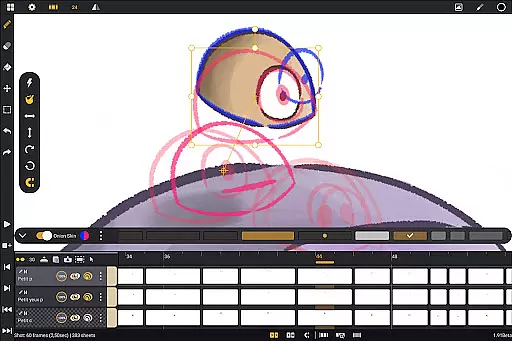
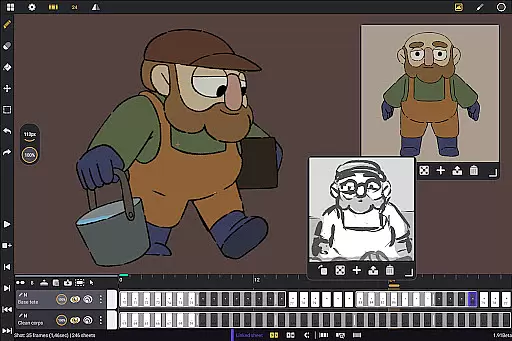
Callipeg is a professional-grade 2D hand-drawn animation application tailored for both seasoned animators and beginners. The app provides an entire suite of tools akin to a full-fledged animation studio, all accessible on Android devices. With support for frame-by-frame and keyframe animation, storyboarding, and shot production, Callipeg empowers creators to produce high-quality animations.
The platform offers advanced features such as studio-like organization with drag-and-drop functionality, adjustable frame rates up to 60 frames per second, and canvas sizes reaching 4K resolution. It also includes unlimited layer support, comprehensive drawing tools, onion skinning, and customizable workspace settings. These capabilities ensure that users can work efficiently and effectively, bringing their creative visions to life.
Designed specifically for Android tablets with stylus compatibility, Callipeg eliminates subscription models, providing all updates and features through a one-time purchase. This makes it an ideal choice for artists seeking flexibility and power in a mobile animation studio environment.
Callipeg stands out with its rich feature set designed to cater to the needs of professional animators. One of its core strengths is the studio-like organization, allowing users to manage shots, scenes, and folders seamlessly. The integrated search function and color tagging system further enhance asset management, making it easy to locate specific elements within complex projects.
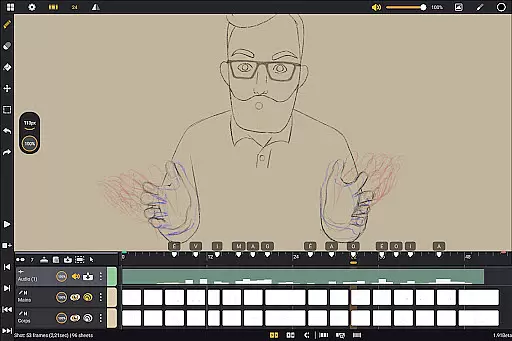
The app supports adjustable frame rates and large canvas sizes, accommodating industry-standard requirements. Users can work with up to 4K resolution and choose from multiple frame rates including 12, 24, 25, 30, or 60 frames per second. Additionally, Callipeg offers unlimited layer support, enabling the import of images, video clips, and audio files for techniques like rotoscopy and lip-syncing.
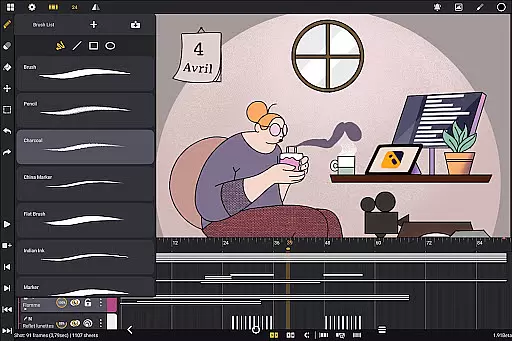
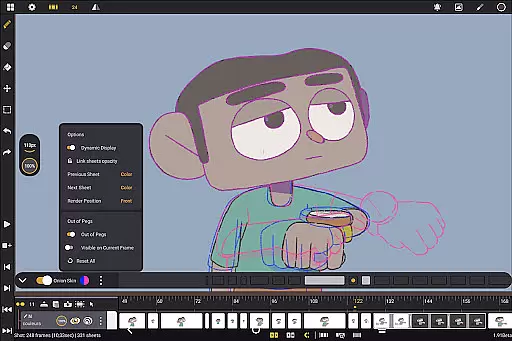
Comprehensive drawing tools provide versatility, featuring customizable brushes such as pencil, charcoal, and ink. The inclusion of onion skinning with adjustable opacity and color settings streamlines the animation process, while flexible import and export options allow for seamless integration with other industry-standard software. These robust features collectively contribute to a powerful and efficient animation workflow.
In the realm of digital art and animation, having a comprehensive suite of creative tools is essential for bringing ideas to life. Callipeg stands out by offering an extensive array of features that cater to both professional animators and beginners alike. The app provides users with a versatile brush set including pencil, charcoal, ink, and more, each customizable in terms of smoothing, tip shape, and texture.
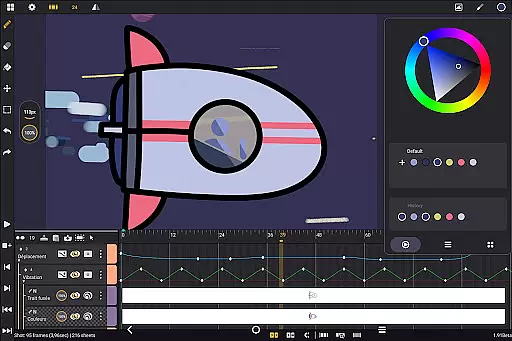
Furthermore, Callipeg supports unlimited layers of various types such as drawing, video, transformation, audio, or group layers. This allows artists to import images, video clips, and audio files for advanced techniques like rotoscopy or lip-syncing. With support for adjustable frame rates up to 60 frames per second and canvas sizes reaching 4K resolution, creators can work within professional standards while enjoying the flexibility that this all-in-one 2D animation app offers.
The inclusion of studio-like organization features means users can efficiently manage their projects through color tags, filters, and an integrated search function. Such capabilities ensure that whether you're developing storyboards or producing complete shots, your workflow remains uninterrupted by clutter or disorganization.
Flexibility in canvas size and format compatibility is crucial for accommodating diverse artistic visions and industry requirements. Callipeg addresses this need by enabling animators to work on canvases with resolutions up to 4K, thus supporting high-quality outputs suitable for professional use. The ability to adjust frame ratesu2014including options for 12, 24, 25, 30, or 60 frames per secondu2014further enhances the creative possibilities available within the app.
Callipeg also excels in its flexible import and export options. Users can bring their creations to life by exporting animations in multiple formats such as .mp4, .gif, .png, .tga, .psd, and .peg. Additionally, project files can be imported and exported in .json, .xdts, and .oca formats, ensuring seamless integration with other industry-standard software while maintaining timing and layer structure across platforms.
This level of format flexibility empowers artists to create without constraints, knowing they can adapt their work for different mediums and share it effortlessly with collaborators or clients around the globe.
User-friendly interface
Unlimited layer support
Customizable workspace
Professional-grade tools
No subscription model
Limited to Android
Stylus required
Learning curve
Fewer tutorials
Export limitations

Meet the magic aı 3d photo generator and smart AI video generator app.
 3.20
3.20
Nano Banana AI Image Generator, Anime Filter, AI Portrait, AI Photo Generator
4.30
Design unique, funny and adorable cat stickers that reflect your own style!
3.80
Art of Combination Wear OS Watch faces (for Wear OS 5+ devices)
3.90
Bring One UI 8.5 Icons to life -elegant dark icons with a modern, premium touch.
4.30
Create Logos, Tattoos, AI Art & more with our AI Photo Generator & Design Editor
4.20
Draw, fidget, and spin glow art! Relax and express your creativity with a finger
4.60
Create amazing pictures and unleash your creative genius with AR Drawing Sketch
4.40
All-in-One art, logo & collage maker. Design photos and edit video backgrounds
4.80
See Color, Paint Color
4.90
Passport size photo maker, create ID photo and visa photo in seconds
4.80
The ultimate tool for creating animations
4.60
Draw glowing spinners, relax, and spin your creative art
4.60
Customizable Outlined Fonts. Watch Face Format. Battery friendly Digital Clock.
4.20
OneUI 8.5 icons ✨ Smooth, modern & based on the latest Play Store design ??
4.10
Create trending AI photos & videos with powerful effects and 3D styles.
3.20
Draw anime easily with AR guidance, sketch templates & trace tools!
3.10
Retouch photos. Create or edit images. Endless capabilities.
2.70
Your Essential Color Theory Guide: Red, Yellow, Blue (RYB)
4.2


User Reviews