

Hush is an innovative solution designed to address audio-related issues encountered with Android Auto. The app plays a silent audio track on repeat, allowing users to safely adjust their vehicle's volume without interruptions from other audio apps. This prevents unexpected audio switches, such as going from a soft podcast on YouTube to loud music on Spotify, which can be distracting while driving.
Specifically developed for vehicles with Android Auto limitations, Hush ensures that non-Android Auto audio apps can be enjoyed without interference. By acting as the currently active audio app, it provides a seamless and safe audio experience, making it ideal for drivers who want to enjoy uninterrupted audio content during their journey.
Hush offers several key features that enhance the Android Auto audio experience. First, it resolves known issues related to audio switching by playing a silent track, ensuring that your preferred audio source remains uninterrupted. This feature is particularly beneficial when using apps like YouTube that do not natively support Android Auto.
In addition, Hush acts as a background audio manager, preventing apps such as Spotify or YouTube from resuming playback unexpectedly. This functionality allows users to maintain control over their audio environment, providing peace of mind and reducing distractions while driving. With its simple yet effective design, Hush delivers a reliable solution for Android Auto users seeking uninterrupted audio enjoyment.
Detailed vehicle information is crucial for drivers who want to understand their car's compatibility with apps like Android Auto. Hush addresses a specific issue found in certain vehicles, such as some Toyota Camry models, where the system resumes the last used Android Auto audio app when adjusting the volume. This can be distracting and even dangerous while driving.
The app plays a silent audio track continuously, effectively preventing unwanted audio interruptions from services like Spotify or YouTube. By acting as the active audio app, Hush ensures that your preferred non-Android Auto audio source remains uninterrupted. This solution provides peace of mind, especially for those familiar with the frustration of sudden audio changes.
For users experiencing this problem, Hush offers a simple yet effective fix. It allows you to maintain control over your in-car audio experience without unexpected surprises. With Hush, you can confidently adjust your vehicle's volume knowing that your audio settings will remain consistent throughout your journey.
Price transparency is an essential factor when considering app purchases. For Hush, the value lies not just in its price tag but in the convenience and safety it provides to drivers. Although the app is free, understanding what you're getting in return for your download is important.
Hush solves a niche yet significant problem that has troubled many Android Auto users, particularly those with incompatible vehicle systems. The developer created this app out of personal necessity after years of dealing with audio switching issues in a Toyota Camry. Despite regular updates from the dealer, no official solution was provided.
By offering Hush at no cost, the developer empowers users to take control of their driving experience without worrying about subscription fees or hidden charges. This approach not only enhances user satisfaction but also builds trust within the community of Android Auto users seeking reliable solutions for their vehicles.
Prevents audio interruptions
Enhances driving safety
Compatible with non-AA apps
Easy to use interface
Improves user experience
Limited to Android Auto
No iOS version available
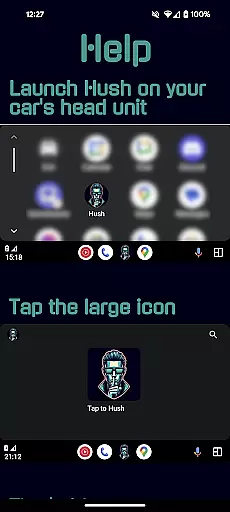
Requires manual launch
Consumes minimal resources
Single-function utility

Ultimate OBD2 Car Scanner: Diagnostics, Service and Modification Tool
 4.30
4.30
Monitor specific TOYOTA parameters by adding this plugin to Torque Pro.
2.00
Theme for Car Launcher
4.4
A full featured, real-time transit locator system
4.30
Autolist - The Largest Selection of Local Used Cars and Trucks
4.50
Blink Charging Mobile app makes finding an EV charger an intuitive experience.
3.80
Instant diesel savings. No credit checks or fees. Nationwide growing network.
4.40
Available in select states.
4.00
MySubaru: Download. Connect. Love.
4.70
Practice the drills within MotoJitsu Master Riding Program Volume 1 & 2!
4.80
Instantly redesign your car with AI. From sporty to futuristic, try it all.
4.50
Your Path to Driving Licensing Success Begins Here! Develop your driving skills.
4.40
Taximeter; the professional's choice
4.30
AI Powered - Automotive Mechanic Assistant
4.30
Realtime Charts is a plugin for the Torque Pro App (OBD 2 & Car)
4.20
Boost profits and hit your goals faster with GigU's amazing tools for gigworkers
4.00
Simplify your drive
3.90
Mobile Phone Parking - So easy to park
3.70
Theme for Car Launcher
4.4


User Reviews