
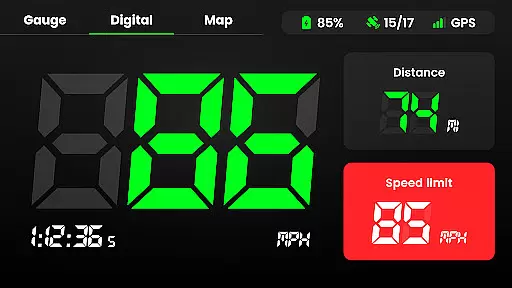
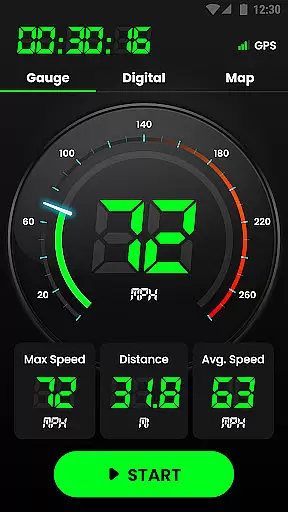
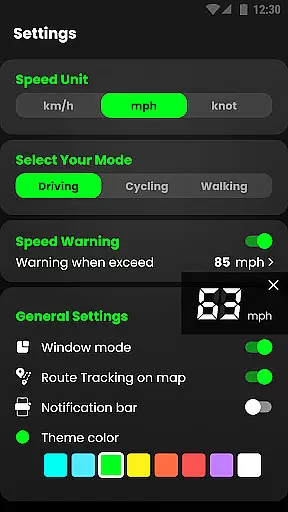
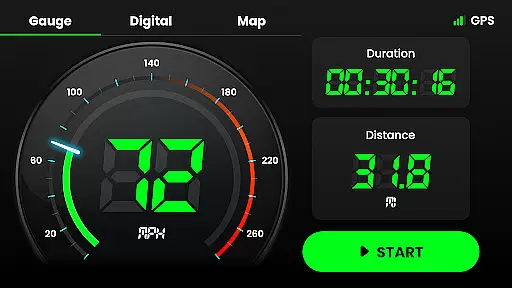
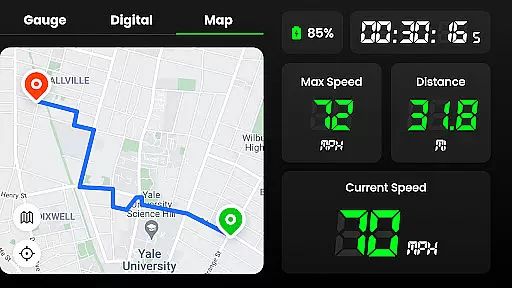
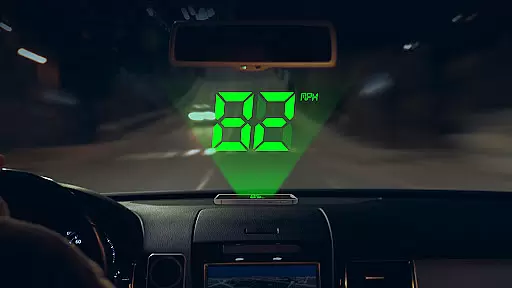
Speedometer is a highly accurate GPS-based speed tracking application designed to measure the velocity of various modes of transportation. The app provides users with real-time speed monitoring, distance tracking, and speed limit alerts through notifications when exceeding set thresholds. Available in both digital and analog display modes, it caters to different user preferences and supports multiple units including km/h, mph, and knots.
Beyond basic speed tracking, Speedometer offers advanced features such as offline functionality, HUD mode for windshield projection, and detailed journey tracking. Whether you're driving, cycling, or jogging, this app ensures precise measurements while providing additional data like average speed, maximum speed, and total mileage. Its intuitive interface and customizable options make it an essential tool for anyone needing reliable speed and location tracking.
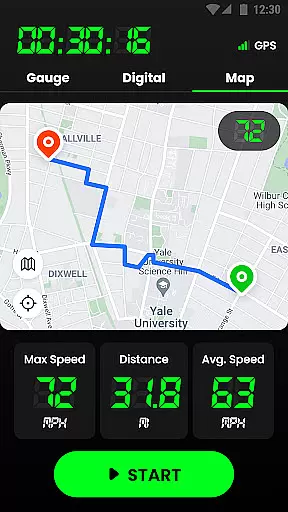
The app's offline capability and small size ensure minimal battery consumption while delivering consistent performance. Users can track their routes on an interactive map, switch between portrait and landscape modes, and even overlay the speedometer on other navigation apps. With its comprehensive feature set, Speedometer is suitable for daily commuters, fitness enthusiasts, and professional drivers who need accurate speed and distance metrics without requiring constant internet connectivity.
Speedometer stands out with its robust feature set tailored for diverse use cases. One of its key highlights is the dual-mode display, offering both digital and analog interfaces that mimic real car speedometers. This flexibility allows users to choose their preferred visualization method while tracking their speed in real time. Additionally, the app supports multiple speed units (km/h, mph, knots), catering to a global audience and making it versatile for different types of vehicles, from cars to boats.
Another standout feature is the offline functionality, ensuring that users can rely on the app even in areas with poor or no internet connectivity. The built-in GPS navigation not only tracks speed but also records trip details such as distance, average speed, and starting/ending points. Users can enable speed limit alerts with custom thresholds, receiving vibration and voice notifications when exceeding safe speeds. The Head-Up Display (HUD) mode further enhances safety by projecting speed readings onto the windshield, allowing drivers to keep their eyes on the road.
Additional functionalities include detailed journey history, customizable themes, and widget support for quick access. The app’s lightweight design ensures minimal battery drain, while its ability to overlay on other apps makes it compatible with popular navigation tools. These features collectively provide a seamless and reliable experience for users seeking accurate speed and location tracking across various scenarios.
Map accuracy is a crucial feature for any navigation app, and Speedometer excels in this area. The application uses advanced GPS technology to provide real-time location tracking with impressive precision. Whether you're walking, cycling, or driving, the app ensures that your position is accurately displayed on the map.
The speedometer function relies heavily on precise mapping data to deliver reliable speed measurements. With its ability to work offline, Speedometer guarantees that even in areas with poor internet connectivity, users can trust the accuracy of their speed and location data. This makes it an invaluable tool for those who frequently travel through tunnels or remote areas where network coverage may be limited.
Speedometer's commitment to accuracy extends beyond just location services. It also provides detailed information about your journey, including starting and ending points, total distance covered, and average speed. These features are made possible by the app's sophisticated mapping algorithms, which ensure that every route is recorded with meticulous attention to detail.
Route planning is another standout feature of the Speedometer app, offering users multiple options for navigating from one point to another. By leveraging comprehensive map data, the app allows drivers to choose between different routes based on factors such as distance, estimated travel time, and current traffic conditions. This flexibility ensures that users can always find the most efficient path to their destination.
In addition to providing alternative routes, Speedometer keeps users informed about real-time traffic updates. This means that if there's unexpected congestion or road closures along the planned route, the app will promptly suggest detours to help maintain smooth progress towards the final stop. Such dynamic rerouting capabilities significantly enhance the overall driving experience by reducing delays and stress associated with unforeseen circumstances.
Furthermore, Speedometer includes intuitive controls that make setting up and managing routes straightforward. Users can easily input destinations using voice commands or manual entry, and the app will automatically calculate optimal paths while considering various parameters like highway preferences and avoidance of toll roads. Overall, these thoughtful design elements contribute to making each trip not only faster but also more enjoyable.
User-friendly interface
Accurate GPS tracking
Offline functionality
Customizable speed alerts
Lightweight and battery-efficient
Limited free features
Occasional GPS inaccuracies
No advanced analytics
Ads in free version
Premium subscription required

Offline maps & GPS for hiking, travel, fieldwork & outdoor adventures
 4.70
4.70
Navigate with your watch and keep the phone in your pocket!
4.60
Drive safe with real-time speed camera radar, police, and traffic alerts
3.80
Explore with GPS Navigation with GPS offline, voice GPS, speed camera radar
4.60
Navigate seamlessly with Real-Time Traffic, Offline Maps, and Voice Navigation.
4.10
Route Planner is travel map to get turn by turn navigation & driving directions
3.90
Use GPS Maps and GPS Voice Navigation to find your way and get directions
4.10
Navigation, weather, offline maps & tools for smarter, safer travel planning.
4.00
Rideshare, taxi cabs, and more for your airport travels and everyday trips.
4.50
Get there with the Waymo Driver — The World’s Most Experienced Driver™
4.90
GPX Viewer PRO shows tracks, routes and waypoints from gpx and kml files.
4.60
Navigate MTA, NJ Transit, MBTA, SEPTA, BART, MARTA, CTA & 900+ cities
4.60
Affordable rides and food delivery with incredible discounts in just one app.
4.50
Turn your Android device into a real off-road GPS using off-line topo maps!
4.40
Play in the outdoors with Android as your Handheld GPS and offline topo maps!
3.50
Your guide to the recreational opportunities of the Bureau of Land Management!
3.40
Offline maps for phone and smart watch: topographic maps, satellite images...
3.30
Ride CTA, Metra & Pace: Manage your fares, buy Metra tickets, get arrivals.
3.00
Fully offline 1:50k New Zealand topographical map North Island
4.2


User Reviews