
SqueezePlayer is a powerful music streaming application that transforms your Android device into a Logitech Squeezebox, enabling you to stream all your Squeezebox content directly. Whether you're at home, in the car, or anywhere else, this app allows you to access your music library via WiFi or mobile connection. It supports various formats like FLAC, MP3, WAV, and PCM natively, ensuring high-quality playback.
With SqueezePlayer, you can enjoy internet radio stations or songs from popular music services such as Last.FM, Deezer, or WiMP. While certain platforms like Rhapsody, Napster, and Pandora are currently not supported due to licensing issues, Spotify can be accessed with the help of triode's plugin installed on a Squeezebox-Server. The app requires a Logitech Media Server (formerly Squeezebox Server) to function optimally, which can be downloaded for free.
SqueezePlayer offers an impressive range of features designed to enhance your music streaming experience. One standout feature is its ability to stream music in various formats, including FLAC, MP3, WAV, and PCM, directly to your Android device. This ensures that you receive high-quality audio without any loss in fidelity. Additionally, the app supports on-the-fly transcoding of other file types like Ogg and mp4 to FLAC or mp3 through the Squeezebox Server.
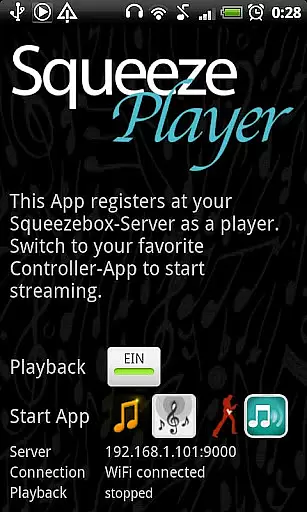
Another notable feature is its seamless integration with other control apps such as OrangeSqueeze, SqueezeCommander, and Squeezer. These apps allow you to manage your Squeezebox players effortlessly. From the main screen of SqueezePlayer, you can jump directly to these control apps, where your mobile device will appear among all other players as long as SqueezePlayer is activated. Furthermore, OrangeSqueeze offers highly integrated functionality by automatically starting SqueezePlayer from the players list.
When it comes to streaming music, the size and authenticity of the library are crucial factors. SqueezePlayer offers an extensive music library that includes local music files, internet radio stations, and songs from various apps like Last.FM, Deezer, or WiMP. This vast selection ensures users have access to a wide range of music genres and artists.
The app supports popular music formats such as FLAC, MP3, WAV, and PCM natively, meaning these files are decoded directly on your Android device. Additionally, the Logitech Media Server can transcode other file types like Ogg and mp4 to FLAC or MP3 on the fly, expanding the range of playable formats. This flexibility allows users to enjoy their entire music collection without worrying about format compatibility issues.
Copyright authenticity is another key aspect of SqueezePlayer's offering. By integrating with the Logitech Media Server, which manages and streams content legally, users can be confident that they are accessing music in compliance with copyright laws. This setup not only enhances user trust but also ensures a seamless and legal music streaming experience.
Overall, SqueezePlayer's robust music library and commitment to copyright authenticity make it a reliable choice for audiophiles who demand both variety and legality in their music streaming service.
Audio quality is paramount for any music enthusiast, and SqueezePlayer excels in providing superior audio experiences. The app supports high-fidelity audio formats such as FLAC and WAV, ensuring that users can enjoy their music in the highest possible quality. These formats preserve the original sound quality, delivering an immersive listening experience that is often lost in compressed formats.
In addition to supporting lossless formats, SqueezePlayer allows users to stream music via WiFi or mobile connections. This feature is particularly beneficial for those who want to enjoy high-quality audio while on the go. Whether you're at home, in the car, or outdoors, SqueezePlayer ensures that your music sounds clear and vibrant, regardless of your location.
For users who require even more control over their audio settings, SqueezePlayer integrates seamlessly with the Logitech Media Server. This server can transcode unsupported file types into high-quality formats like FLAC or MP3, further enhancing the audio experience. Users can customize their settings under the Advanced section of the server's interface, ensuring optimal playback performance.
Ultimately, SqueezePlayer's dedication to audio quality options sets it apart from other music streaming apps. By prioritizing high-fidelity formats and flexible streaming capabilities, it caters to discerning listeners who refuse to compromise on sound quality.
User-friendly interface
High-quality audio streaming
Wide format compatibility
Seamless app integration
Free to download and use
Requires separate server setup
Limited format support on Touch
No standalone player controls
Some services not supported
Complex network configuration

Gorgeous UI, Powerful music Search and Equalizer, the great choice for you!
 4.70
4.70
Ultimate Sonos Controller
4.70
Learn to play the piano using falling notes!
3.80
Music, News & Sports Radio Tuner App. Tune in Live FM & AM Radio Stations.
4.80
Make songs with AI! Any genre, custom lyric, song generator for music creation!
4.80
Smart piano keyboard, Classical to Pop, Real-time multiplayer connection!
4.20
Listen to offline music and sounds from all categories
4.70
Play your music offline without limits
4.80
Melody Beat: Great for travel, workouts, offline vibes, play your tunes anytime.
4.10
Full-featured, High-Quality Groovebox Workstation, perfect for Live Performance!
4.80 4.70
4.70
Simple & Intuitive Metronome
4.70
Pay Once, no monthly payment
4.60
Time Guru will strengthen your internal sense of musical time via random muting.
4.30
Advanced 10-Band Audio Graphic Equalizer Sound Booster Pro
4.30
Bass Booster Pro takes auto-equalizing to the next level!
4.30
The original SP-1200 experience on your iPad
4.20
Sheet music reader, piano & music note player. Play music score & learn to read.
3.90
Background pads for your band
3.80


User Reviews