


X PhotoKit is an advanced photography app designed to elevate your photo editing experience. This comprehensive tool offers a wide array of features including AI-powered face swapping, diverse photo editing options, creative collage layouts, and professionally-designed templates. Whether you're looking to enhance your personal photos or create stunning visuals for commercial use, X PhotoKit provides all the necessary tools.
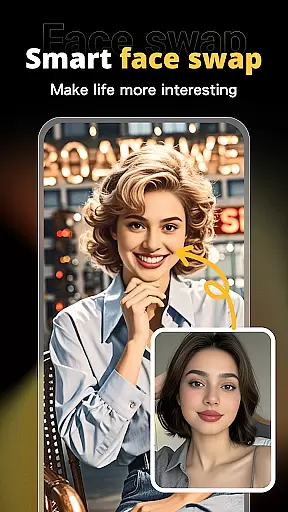
The app's standout feature is its intelligent AI face swap technology, which allows users to seamlessly replace faces in photos while maintaining a natural look. With intuitive controls and powerful editing capabilities, users can effortlessly beautify images, adjust filters, and experiment with various effects. The built-in templates cater to different occasions, making it easy to create professional-quality designs for social media, travel memories, or holiday greetings.
Designed for both amateur photographers and design professionals, X PhotoKit enables users to create panoramic images through its image stitching feature and produce visually striking collages. Its user-friendly interface ensures that anyone can achieve impressive results without requiring specialized skills. Available on mobile platforms, this app empowers users to express their creativity anytime, anywhere.
X PhotoKit distinguishes itself through its rich feature set tailored for modern photography enthusiasts. The app's AI face swapping functionality utilizes sophisticated algorithms to ensure realistic results when replacing faces in photos. Users can simply upload a selfie and let the intelligent system handle the rest, creating fun and engaging content perfect for social sharing.
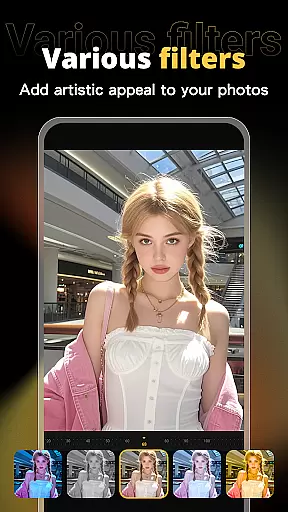
Beyond face swapping, the app provides a complete suite of photo editing tools. These include various filters, adjustment sliders, and special effects that help enhance the overall quality of images. The built-in templates cover multiple themes and occasions, allowing users to quickly generate professional-looking designs such as posters, covers, and greeting cards.
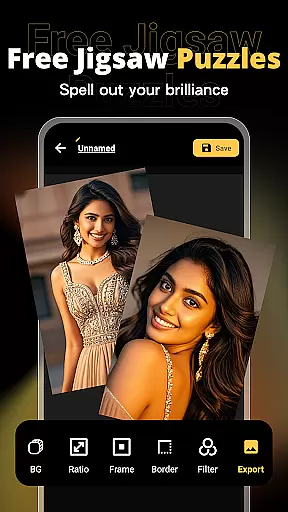
For those who enjoy combining multiple images, X PhotoKit offers flexible collage creation options with customizable layouts. The image stitching feature enables users to merge several photos into panoramic views, capturing more details in their compositions. All these features are packaged in an intuitive interface that makes photo editing accessible to users of all skill levels, whether they're creating personal memories or professional projects.
Real-time capture and preview functionality is essential for ensuring that every photo taken meets the user's expectations without the need for post-processing adjustments. X PhotoKit offers a seamless experience by providing instant feedback on images as they are captured.
The app utilizes advanced algorithms to enhance the clarity and color accuracy during the capture process, allowing users to see precisely how their final image will look. This feature is particularly beneficial for those who want to save time and effort in editing.
Users can benefit from this real-time functionality by making immediate adjustments to settings such as exposure, contrast, and saturation before taking the shot. This ensures that the captured moment is preserved exactly as intended, with vibrant colors and sharp details.
With X PhotoKit's real-time capture and preview, photographers of all skill levels can achieve professional-quality results effortlessly, enhancing their creative workflow and allowing them to focus more on the art of photography rather than technical adjustments.
AI beauty and enhancement features have become a staple in modern photo editing, offering users the ability to refine and beautify their images with natural-looking results. X PhotoKit stands out by providing sophisticated AI-driven tools that ensure enhancements are subtle and true to life.
The application employs intelligent algorithms that analyze facial features and skin tones to apply enhancements that preserve the authenticity of the original photo. This approach avoids the over-processed look that can detract from an image's appeal, instead promoting a more genuine aesthetic.
Users will appreciate the precision with which X PhotoKit applies touch-ups, smoothing skin textures and enhancing facial features without losing the unique characteristics that define their subjects. The result is a polished yet realistic appearance that enhances natural beauty.
By leveraging X PhotoKit's AI beauty and enhancement capabilities, users can achieve stunningly natural edits that elevate their photos while maintaining the integrity of the original image, thus supporting both casual sharing and professional presentations.
User-friendly interface
Powerful AI capabilities
Versatile editing tools
Wide template selection
Creative collage options
Limited advanced controls
Occasional processing delays
Watermark on free version
In-app purchases required
Learning curve for beginners

Pet Camera
 3.70
3.70
Photo editor: AI filters, photo enhancer, pic collage maker, AI art generator.
4.80
Be your best in every shot! Fix, edit and retouch your face in selfies & photos.
3.70
Create Business Headshots, Polaroid Filter, Retake Photos,Profile Pics,AI Photos
4.50
Superimpose one photo on top of another using the original Superimpose app!
3.20
A must-have app for landscape photographers
4.60
AI photo enhancer with Sora 2! Enhance, descratch, and colorize your old photos.
4.50
Use AI Video Generator to turn your words to ai generated videos.
4.50
The original Rarevision VHS look seen everywhere!
4.70
Automatically backup your photos and videos to computer, NAS and Cloud services
4.60
Cut and paste photo editor & eraser to customize photos easy and swap faces fun
4.50
AI photo editor with hair editor, retouch tools, hair color changer & filters!
4.50
Create AI photos & videos with Enhancer; restore, fix, beautify, enhance photos
4.50
Trendy TikTok time warp scan funny filter app brings you unique photos & videos.
4.40
RAW video capture with advanced controls
4.40
All-in-One Editor & AI Photo Enhancer, Collage, Cartoonify, Funny Stickers & BGS
4.10
Remote control of the phone camera from your Wear OS smartwatch
3.70
Remote control the phone camera shutter from your smartwatch and take a picture
1.60
Add a dreamy vibe to your selfies and videos with soft style filters
4.4


User Reviews