
Light Meter is a comprehensive photography tool that combines both spot and incident light metering in one app. Designed for photographers of all levels, it provides accurate exposure readings using the device's camera and light sensor. The app has been rigorously tested against industry-standard Gossen and Sekonic meters, ensuring reliable performance across most devices.
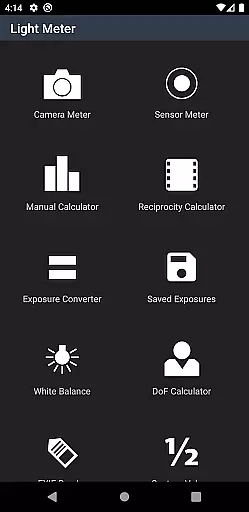
In addition to its core light metering capabilities, the app offers a suite of advanced features including Color Temperature measurement, Reciprocity Failure calculation, Exposure Conversion, Depth of Field calculation, and EXIF data reading. Whether you're shooting with a film SLR, pinhole camera, or working in cinematography, this versatile app adapts to various photography styles and equipment types.
The real value of Light Meter lies in its ability to provide professional-grade tools in a portable format. Photographers can now carry a complete set of essential metering instruments in their pocket, making it an indispensable companion for both studio work and location shoots.
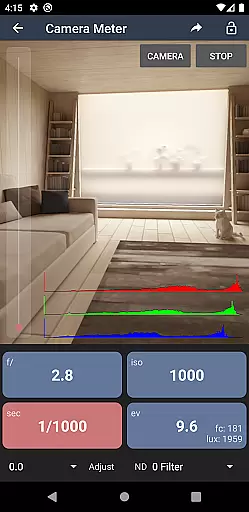
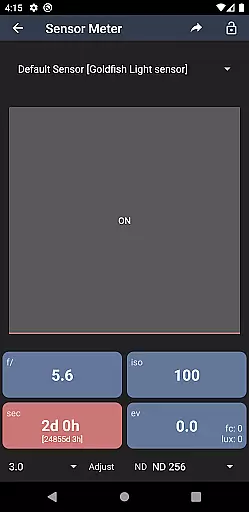
Light Meter distinguishes itself through its dual metering system and extensive feature set. The spot metering function utilizes the device's camera to measure reflected light, while the incident meter employs the built-in light sensor for ambient light readings. This combination provides photographers with maximum flexibility in different shooting conditions.
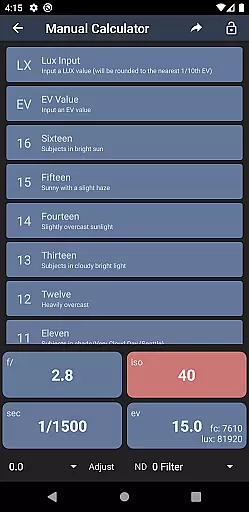
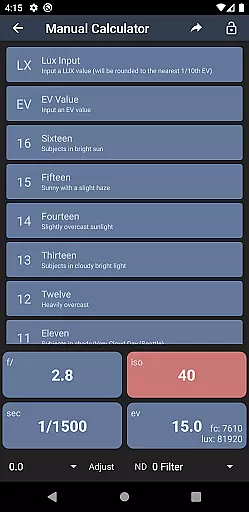
Beyond basic metering, the app includes specialized tools such as a White Balance meter for color temperature measurement, a Reciprocity Failure calculator for long exposures, and a Sunny Sixteen manual calculator for situations where traditional metering isn't possible. The Depth of Field calculator helps determine focus range, while the EXIF Reader allows users to analyze image metadata from their photographs.
All these features are presented through an intuitive interface that maintains professional accuracy without compromising usability. The app's design ensures quick access to essential functions while providing detailed information when needed, making it suitable for both quick checks and in-depth technical analysis.
Real-time capture and preview functionality is essential for photographers who need to assess lighting conditions instantly. Light Meter offers this feature by integrating both the device's camera and light sensor, ensuring accurate readings every time.
This application provides users with precise spot metering through the camera, while the incident light meter uses the device's sensor to measure ambient light. This dual approach allows photographers to capture scenes with confidence, knowing their exposure settings are based on reliable data.
By offering real-time feedback, the app enables users to make immediate adjustments to their camera settings. Whether shooting with a film SLR or a pinhole camera, the ability to preview lighting conditions ensures optimal image quality and creative control.
While primarily a tool for measuring light, Light Meter also includes features that enhance the photographic process. Although it doesn't apply AI beauty enhancements directly to images, its suite of tools indirectly supports natural-looking photographs by providing accurate exposure data.
The app includes a Color Temperature meter, Reciprocity Calculator, and other utilities that help achieve proper white balance and exposure. These features ensure that images have a natural appearance without requiring post-processing adjustments that can detract from authenticity.
Photographers benefit from these comprehensive tools as they facilitate capturing scenes accurately under various lighting conditions. The result is consistently high-quality photos that maintain their natural essence, free from artificial enhancements.
Highly accurate measurements
Comprehensive feature set
User-friendly interface
Portable solution
Versatile compatibility
Premium price point
Device-specific accuracy
Learning curve present
Limited offline support
Requires calibration

Photo editor: face & body editor, beauty cam, filters and quality enhancer.
 4.00
4.00
[3DSteroid Pro] is a stereoscopic application for Android.
4.30
Transform photos into videos! Create realistic or anime-style images easily!
4.50
Amazing Photo Effects - The most fun you can have with your photos!
4.70
AI Photo Editor with 100+ Filters, Effects! Remove BG, Retouch & Photo Enhancer.
4.80
Turn photos into cartoons & avatars! - Photo Editor, Cartoon Face!
3.90
Remote control the phone camera shutter from your smartwatch and take a picture
1.60
Solocator stamps photos you take with GPS location, Compass Direction, Date/Time
3.80
Your Family Calendar + Photos. Manage your Skylight Calendar and Skylight Frame.
4.40
Perfect body tune & face app - photo retouch, makeup, slim body & beautify face.
4.80
A collection of tools and reference tables for DPs, ACs, DITs and Operators.
4.70
See your baby AI baby face generator AI baby maker Face generator babymaker fun!
4.70
Create collages easily! Nice pic collage maker & background eraser for Instagram
4.50
Easily stitch panoramas from multiple photos or video.
4.40
AI portrait generator and polaroid AI selfie, fun AI generated AI photo creator!
4.30
Professional photography on your mobile phone
4.20
Create & Edit with AI: AI Remove, Enhance, Retouch, Filter
4.10
GCamera allows all GCam features on all phone models! Better photos with GCamera
3.30
Professional video recording application with manual controls for filmmakers!
2.80


User Reviews