







Photo Collage Maker - FunPic is a versatile photography app designed to help users create stunning photo collages and video stories. With over 300 layouts, it allows you to combine photos into eye-catching arrangements while offering unique shapes and grid options for more creative freedom.
The app provides rich editing features including filters, text, stickers, brushes, templates, and backgrounds, all updated weekly. Its AI-powered tools enable users to remove unwanted objects, change backgrounds, and even create cartoon avatars. Additionally, the Video Collage Maker lets you merge videos and photos with music, making it perfect for crafting engaging social media content.
Whether you're looking to design an Instagram feed or relive memories through video collages, this app offers everything needed to express your creativity and share your story effortlessly.
One of the standout features of Photo Collage Maker - FunPic is its extensive library of materials. Users can access 1,000+ stickers, backgrounds, and themed templates tailored for various occasions like birthdays, festivals, and love stories. The app also supports adding text, applying artistic filters, doodling, and adjusting aspect ratios to fit platforms such as Instagram and WhatsApp.
For those interested in video creation, the Video Collage Maker combines photos and videos seamlessly. You can add music from built-in tracks or personal files, decorate with stickers, and use voice recordings to enhance storytelling. Advanced AI tools further elevate the experience by allowing automatic background removal, object cleanup, and precise edge refinements.
Other notable functionalities include slideshow creation with trendy music and smooth transitions, freestyle collage modes for custom designs, and comprehensive photo editing tools like blur effects, cropping, and rotation. These features ensure that every user can achieve professional-quality results regardless of skill level.
Real-time capture and preview functionality is essential for any photography app, allowing users to see exactly what their final output will look like before they commit to taking a photo. Photo Collage Maker - FunPic offers this feature by providing live previews of collages as users arrange and edit their photos.
The app's real-time capabilities extend beyond static images, enabling users to combine videos and photos into captivating stories with live adjustments. This ensures that every addition or modificationu2014be it stickers, text, or musicu2014is instantly visible, giving creators precise control over the outcome.
With access to 300+ layouts and 1000+ stickers and backgrounds, users can experiment with different styles and arrangements in real time. The ability to adjust ratios and apply artistic filters on the fly enhances the creative process, making it both intuitive and efficient.
This immediate feedback loop not only saves time but also significantly improves the quality of the user's creations. By seeing changes as they happen, users can make informed decisions about composition, color, and design, ensuring their final collage perfectly captures their intended story or mood.
AI beauty and enhancement features are increasingly important in photography apps, offering tools that improve image quality while maintaining a natural look. Photo Collage Maker - FunPic incorporates advanced AI technology to provide users with seamless enhancements that preserve authenticity.
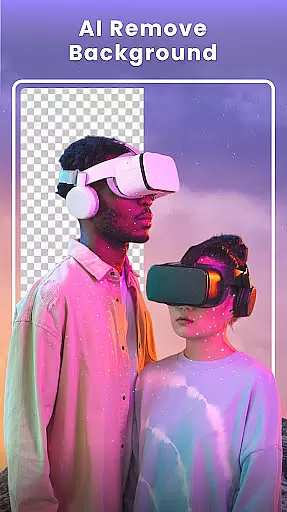
One standout feature is the AI background eraser, which allows users to remove and replace backgrounds with precision. This tool utilizes sophisticated algorithms to ensure edges are refined and objects are cleanly separated, resulting in professional-quality edits without an artificial appearance.
In addition to background editing, the app offers a suite of photo editing tools including artistic filters, stickers, and unique blur effects. These features enhance images by adding creative touches that complement the original photo rather than overshadowing it, keeping the focus on the subject matter.
By prioritizing naturalness in its AI-driven enhancements, Photo Collage Maker - FunPic empowers users to elevate their photos with confidence. Whether removing unwanted objects or applying aesthetic adjustments, the app ensures that every edit contributes to a polished yet genuine final product.
User-friendly interface
Extensive layout options
AI-powered editing tools
Versatile video creation
Weekly content updates
Premium features locked
Ads may interrupt workflow
Occasional bugs reported
Learning curve for beginners
Limited free templates

Long exposure camera with computational photography
 2.60
2.60
Application for remote controlling DSLR
3.00
Viewfinder, Light meter, Reciprocity failure time, DOF & Bellows Extension
4.60
Virtual makeup, hair filters & body tuner—edit from face to full body!
4.20
Take videos and pictures with the popular TikTok TIME WARP SCAN filter.
4.60
A reflected light meter with spot metering and incident light metering.
4.40
Hair color changer, AI haircut app, fun hair editor and buzz cut filter for all!
3.80
Your Family Calendar + Photos. Manage your Skylight Calendar and Skylight Frame.
4.40
Edit photos with the picture generator: PS2 & AI Clay filters, cartoon effects.
4.50
Photo prints, cards, & gifts at Walgreens. Easy ordering & fast local pickup !
4.80
Enhance, upscale, and transform your images — on your device, without limits
4.70
Discover & download millions of art for The Frame TV or Hisense CanvasTV
4.60
Add Watermark - Sign your pictures with a text or logo. Effective, quick, easy!
4.50
Professional photography on your mobile phone
4.20
Photobooth mini FULL app will allow you to add more fun to your parties
4.00
live datamoshing
4.00
Be your best in every shot! Fix, edit and retouch your face in selfies & photos.
3.70
GCamera allows all GCam features on all phone models! Better photos with GCamera
3.30
Snap photos remotely using your Garmin watch as the camera trigger
4.2


User Reviews