



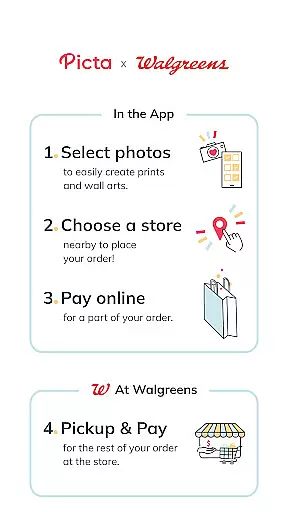
Picta is a photo printing app that allows users to print photos at Walgreens with ease. The app offers various print sizes, including 4x6, 5x7, and square prints, as well as the option to create custom magnets, cards, or photobooks. Users can select their nearest Walgreens store for 1-hour pickup, making it a convenient solution for turning digital memories into physical keepsakes.
With professional-quality photo printing services on Kodak paper, Picta provides multiple options such as 4x4 or 8x8 square prints perfect for Instagram photos. Additionally, users can create photo collages in different layouts and personalized gifts like posters, canvas, and greeting cards. The app also features a gallery that organizes photos by date taken and offers fast photo transfer capabilities.
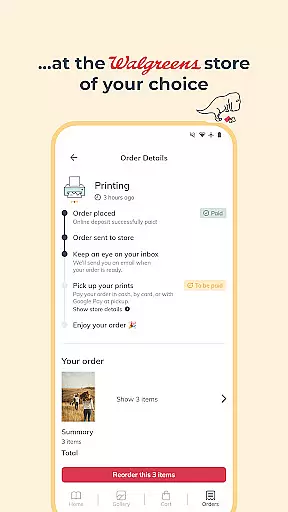
Picta stands out with its comprehensive set of features designed to enhance the photo printing experience. One key feature is the ability to crop and zoom each picture easily within the app, ensuring that users can customize their prints precisely. Another notable aspect is the real-time order status tracking, which allows users to follow their orders and pick them up in less than an hour at their chosen Walgreens store.
The app also includes exclusive deals and coupons for users, adding extra value to the service. Furthermore, Picta integrates with Walgreens' Savings & Rewards program, enabling users to clip coupons and save instantly at checkout. With functionalities like finding the nearest Walgreens using Store Locator and shopping products on the go, Picta ensures a seamless user experience from selection to pickup.
Real-time capture and preview functionality is essential for ensuring that users can accurately select and edit their photos before printing. The Picta app offers a seamless experience by allowing users to choose photos directly from their mobile devices with instant previews.
This feature provides users the ability to crop and zoom each picture easily within the app, ensuring that the final print matches their expectations. By offering real-time previews of different print sizes such as 4x6, 5x7, and square formats, users can visualize how their photos will look once printed.
The importance of this feature lies in its ability to save time and enhance user satisfaction. With real-time previews, users can make necessary adjustments before sending their photos to print, reducing the likelihood of dissatisfaction with the final product.
Overall, the real-time capture and preview feature in Picta empowers users to create professional-quality prints with confidence, knowing exactly what they will receive when they pick up their order at a Walgreens store.
AI beauty and enhancement features are increasingly popular in photography apps, providing users with tools to improve their photos' aesthetics while maintaining a natural look. Picta incorporates advanced AI algorithms to enhance photo quality without compromising authenticity.
Users can benefit from automatic adjustments that optimize brightness, contrast, and color balance, ensuring that every photo looks its best. These enhancements are applied subtly, preserving the original essence of the image and avoiding the over-processed appearance often associated with digital filters.
The value of AI beauty and enhancement lies in its ability to elevate ordinary photos into stunning prints. Whether creating personalized gifts like magnets, posters, or photobooks, users can trust that their memories will be preserved in the highest quality.
By integrating these sophisticated AI capabilities, Picta ensures that every print reflects the true beauty of the moment captured, offering users a superior photo printing experience that stands out among competitors.
User-friendly interface
Fast 1-hour photo pickup
Wide range of print sizes
Exclusive discounts available
Real-time order tracking
Limited to Walgreens stores
No direct payment through app
Occasional technical glitches
Requires internet connection
Quality depends on original photo

How old age camera Gender Swap App Face Shape Hairstyle App Hair Styler App fun!
 4.00
4.00
Natural Beauty, Selfie Retouch
4.30
Take videos and pictures with the popular TikTok TIME WARP SCAN filter.
4.60
Turn your phone into a professional camera - full DSLR manual photography
4.30
Light-weight Media Gallery app for Android made with Jetpack Compose
4.60
The #1 app for B&W film developing featuring an advanced darkroom timer.
4.10
Snap photos remotely using your Garmin watch as the camera trigger
4.4
Welcome to ProShot, the most powerful camera app on Android.
4.20
Solocator stamps photos you take with GPS location, Compass Direction, Date/Time
3.80
A collection of tools and reference tables for DPs, ACs, DITs and Operators.
4.70
Amazing Photo Effects - The most fun you can have with your photos!
4.70
1M influencer's special filter
4.60
Easily create custom gifts, cards, photo books & more on the Shutterfly app!
4.60
Cut and paste photo editor & eraser to customize photos easy and swap faces fun
4.50
HD Camera Pro with HD Video shooting, Panorama, Photo editor , Beauty Camera.
4.50
AI portrait generator and polaroid AI selfie, fun AI generated AI photo creator!
4.30
Be your best in every shot! Fix, edit and retouch your face in selfies & photos.
3.70
Application for remote controlling DSLR
3.00
Add a dreamy vibe to your selfies and videos with soft style filters
4.1


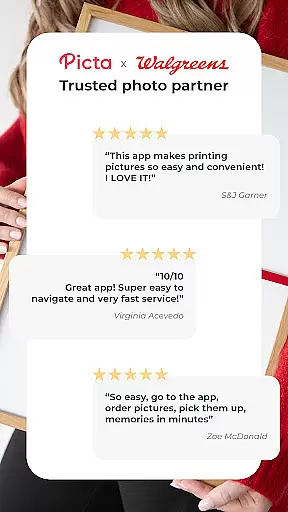
User Reviews